

Client Support
How goes Harmony Hub implementations?


Re: How goes Harmony Hub implementations?
2 years 5 months agoEnsure you are on the latest SmartRemote template and that is is actually being used.I experienced a similar issue of the blank activities panel etc.
I followed the update instruction provided - moved the hub to the Unknown room, updated both myServer and Harmony driver. Do the Select Device->Hub
and then click Activities - blank
I rebooted the Rpi4 running myServer. Tried again and it worked! click Activites showed all my stored activities on the hub.
I used the remote to move around and select things.
So far, so good.
Today though, the Smart Remote doesn't seem to be communicating with myServer. I click on the Harmony Icon, brings me to the screen with Activities and Devices. Select Activities - shows the list - but when I select an actvity it's doesn't go to the next screen. Cursor keys etc don't do anything.
The log shows activity so I know SmartRemote is talking to myServer.
When I do the same command using Harmony Command Testing - the command work fine...
Select the user / room then the icon to ensure those variables are all set.
How are you doing the testing if the SmartRemote isn't "online"?
Please Log in or Create an account to join the conversation.
Re: How goes Harmony Hub implementations?
2 years 5 months ago
First test everything from the driver's command tester.
The errors reported sound a lot like cached files being out of sync. When you are in Dashboard right-click on the Dashboard and select inspect.
Look at inspect's network tab. Make sure "Disable Cache" is checked.
Then press ctrl-R to reload the page.
Does this make the Harmony command testing work like in the documentation?
If yes then cycle through your activities and devices testing each of them.
If this does not work then I need to remote in and look at your system.
If this does work then from the smartremote-sample folder copy the three harmony files harmony.html, harmony-activities.html and harmony-devices.html into your smartremote project folder overwriting any harmony files that were previously there.
Open the Designer and select one on the files in your SmartRemote folder and then click on the "Update Project" button so that it will bring in the latest support files.
After that is finished go to your SmartRemote and close the apk and relaunch it. (Normally not needed but we're brut forcing things here)
Find your hub on the home page and click it. Does it work like in the documentation?
Yes? happy days.
No? Time for me to remote into your system.
NONE of the old activate-source macros from the old driver are needed. They can all be deleted. You should now only have one activate-source macro for each of your hubs.
The errors reported sound a lot like cached files being out of sync. When you are in Dashboard right-click on the Dashboard and select inspect.
Look at inspect's network tab. Make sure "Disable Cache" is checked.
Then press ctrl-R to reload the page.
Does this make the Harmony command testing work like in the documentation?
If yes then cycle through your activities and devices testing each of them.
If this does not work then I need to remote in and look at your system.
If this does work then from the smartremote-sample folder copy the three harmony files harmony.html, harmony-activities.html and harmony-devices.html into your smartremote project folder overwriting any harmony files that were previously there.
Open the Designer and select one on the files in your SmartRemote folder and then click on the "Update Project" button so that it will bring in the latest support files.
After that is finished go to your SmartRemote and close the apk and relaunch it. (Normally not needed but we're brut forcing things here)
Find your hub on the home page and click it. Does it work like in the documentation?
Yes? happy days.
No? Time for me to remote into your system.
NONE of the old activate-source macros from the old driver are needed. They can all be deleted. You should now only have one activate-source macro for each of your hubs.
Please Log in or Create an account to join the conversation.

Re: How goes Harmony Hub implementations?
2 years 5 months ago
Yes, the remote shows up as a connected client in the WebUI Dashboard.
Il try to grab some logging - with the remote and with the Command Testing.
Il try to grab some logging - with the remote and with the Command Testing.
Please Log in or Create an account to join the conversation.
Re: How goes Harmony Hub implementations?
2 years 5 months ago
Sorry davep, my last response was to David Li.
Your suggestions worked!
Everything is now working. As documented.
Great job!
Thanks
John
Your suggestions worked!
Everything is now working. As documented.
Great job!
Thanks
John
Please Log in or Create an account to join the conversation.

Re: How goes Harmony Hub implementations?
2 years 5 months ago
Dave - quick question - how do I see the commands that are not listed on the soft buttons (for eg my Denon, Harmony has a long list of commands - eg to turn Dolby on or of etc) - which used to be in a long list with the previous driver?
Please Log in or Create an account to join the conversation.
Re: How goes Harmony Hub implementations?
2 years 5 months ago
Go back into Dashboard Harmony command testing.
Select the Remote command. Then select the target device. e.g. the Denon.
Then the Device Specific Command dropdown will show all the available Denon commands
Use the Actual command on the server command on a button on your custom scene.
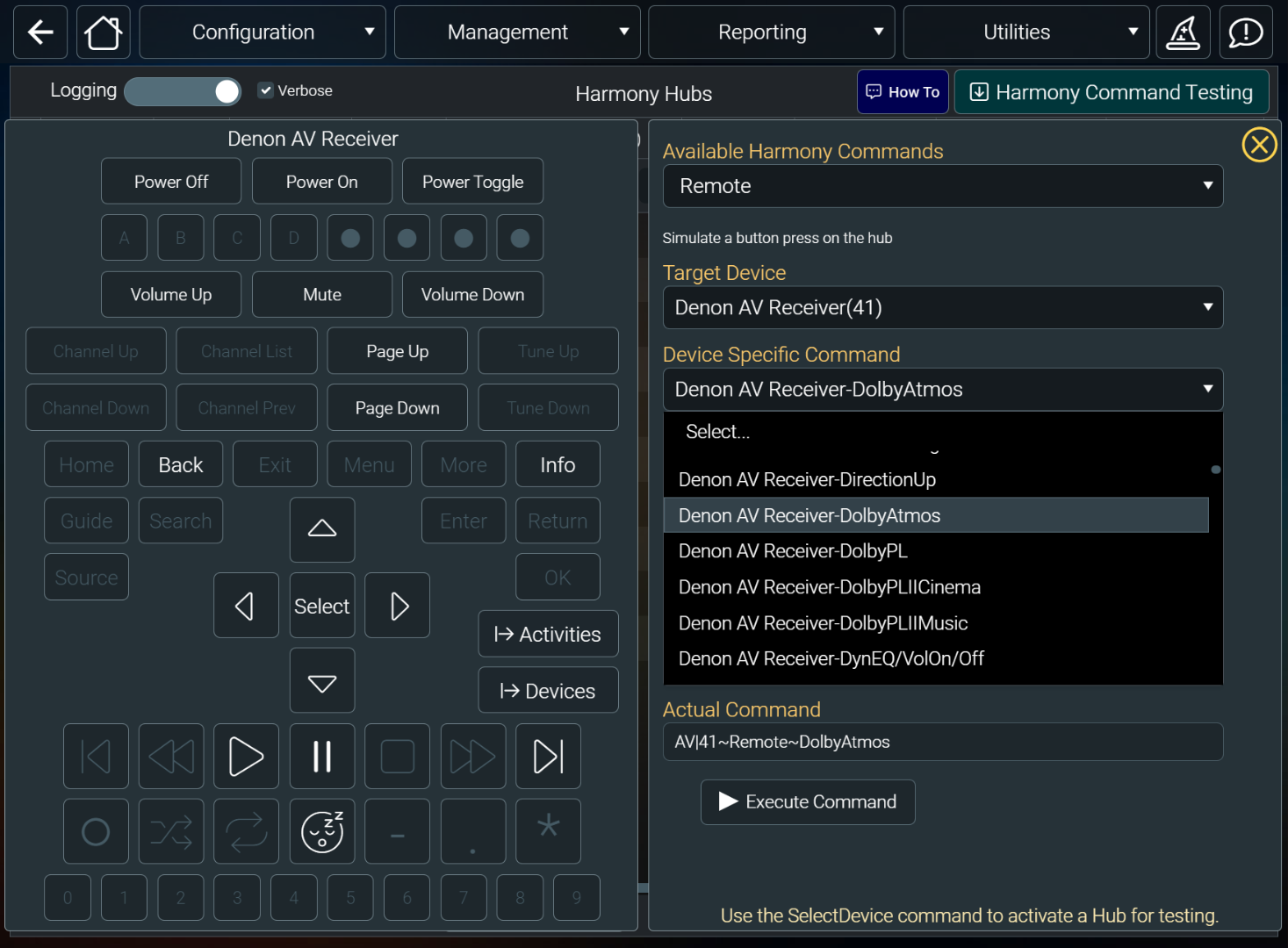
Select the Remote command. Then select the target device. e.g. the Denon.
Then the Device Specific Command dropdown will show all the available Denon commands
Use the Actual command on the server command on a button on your custom scene.
Please Log in or Create an account to join the conversation.
Time to create page: 0.839 seconds

Copyright © 2026 Allonis. All Rights Reserved.