

Client Support
Working backlight ETA?


Re: Working backlight ETA?
2 months 1 week ago
What I have noticed is that if the backlight turns off and the display is still lit, motion will not activate the backlight. But once the display has turned off, motion activates both the display and the backlight.
Please Log in or Create an account to join the conversation.

Re: Working backlight ETA?
2 months 1 week ago - 2 months 1 week ago
I updated the project but didn't clear the cache. I understand there are various caches in Android devices like system cache, etc. I only figured out how to clear the Google cache and the browser cach.
In any event my remote is now operating as described by cjisble. Maybe that is as good as it is going to get. I set my sleep timeout to match my backlight timeout so any time the remote is awake the light will be on. This seems satisfactory so far.
Thanks, everyone, for helping me work through this issue.
Chris
In any event my remote is now operating as described by cjisble. Maybe that is as good as it is going to get. I set my sleep timeout to match my backlight timeout so any time the remote is awake the light will be on. This seems satisfactory so far.
Thanks, everyone, for helping me work through this issue.
Chris
Last edit: 2 months 1 week ago by Chrisan.
Please Log in or Create an account to join the conversation.
Re: Working backlight ETA?
2 months 1 week ago - 2 months 1 week agoThe best way I found to deal with this was to go into MyDesigner and turn each button press into a macro and append "WakeupMyRemote|{{clientname}}" to each hard button command.What I have noticed is that if the backlight turns off and the display is still lit, motion will not activate the backlight. But once the display has turned off, motion activates both the display and the backlight.
For example, my volume up command used to be "volumeup.{{activeroom_{{clientname}}". Now it's "Macro|volumeup.{{activeroom_{{clientname}}}}!WakeupMyRemote|{{clientname}}!"
This resets the backlight off timer each time a button is pressed regardless of the display state, and if the backlight has already turned off it forces the remote to turn it back on the next time you press a button without waiting for the screen to sleep. It's a little bit of tedious work but it has no discernable impact on responsiveness and works extremely well.
Last edit: 2 months 1 week ago by Nillaz.
Please Log in or Create an account to join the conversation.
Re: Working backlight ETA?
2 months 1 week ago - 2 months 1 week ago
That's an interesting solution. I tried the wakeupmyremote command through MyServer with the remote sleeping on my desk and it did not wake up the remote. I then added it to a function button on the remote and kept pressing it periodically after the remote woke up. It kept the screen alive after the 30 second time out I set but the buttons went dark after the backlight timeout (also 30 seconds).
Thx, Chris
Edit: This seems to be working now. Working command is WakeupMyRemote|Chris
Thanks for the tidbit!!
Thx, Chris
Edit: This seems to be working now. Working command is WakeupMyRemote|Chris
Thanks for the tidbit!!
Last edit: 2 months 1 week ago by Chrisan.
Please Log in or Create an account to join the conversation.


Re: Working backlight ETA?
2 months 1 week ago
Note the difference between "!WakeupMyRemote|{{clientname}}!"
and "WakeupMyRemote|Chris"
is that the former works no matter what you call your SmartRemote (ie: you have a "MasterBedroom" remote that can use the same template)
and "WakeupMyRemote|Chris"
is that the former works no matter what you call your SmartRemote (ie: you have a "MasterBedroom" remote that can use the same template)
Please Log in or Create an account to join the conversation.
Re: Working backlight ETA?
2 months 1 week ago - 2 months 1 week ago
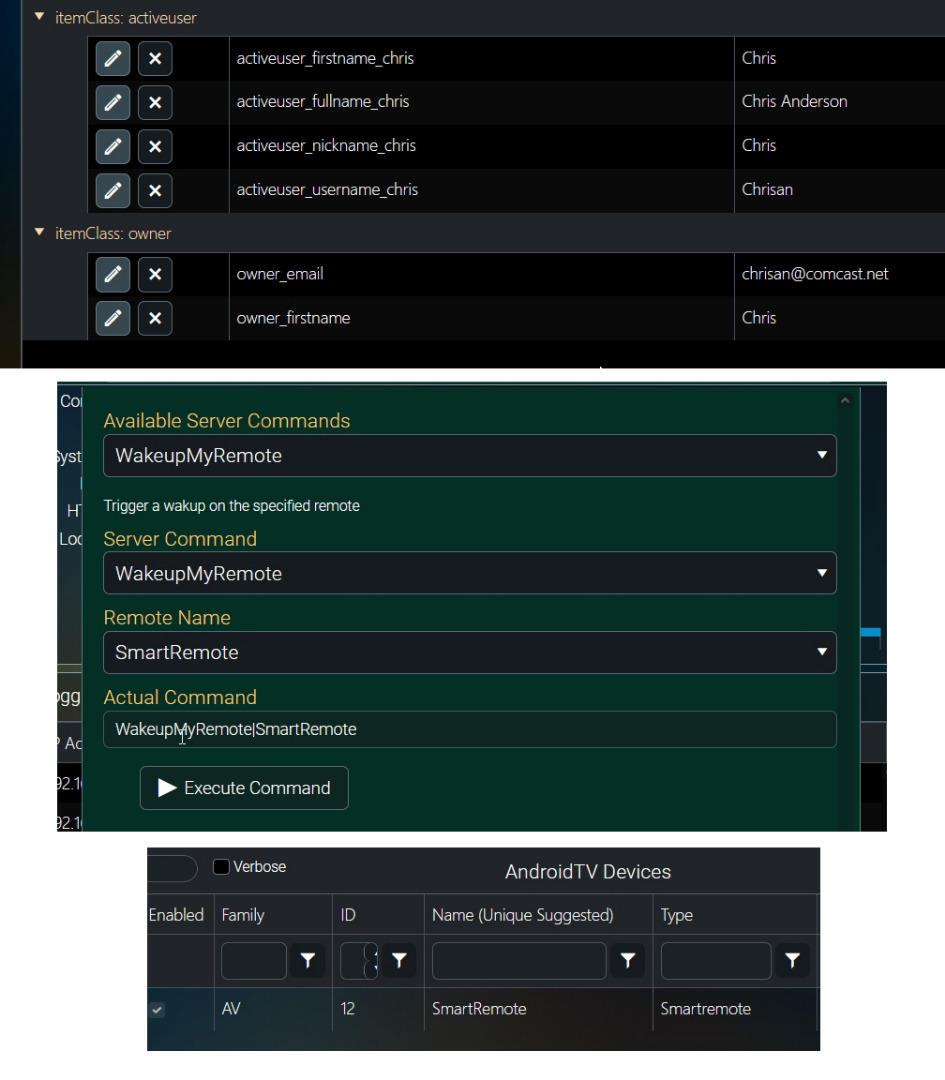
This is interesting David and I am hoping you will have the time to enlighten me and maybe some other folks. !WakeupMyRemote|{{clientname}}! does not wake up the remote. I also tried it without the exclamation points. It will wake up with WakeupMyRemote|Chris. The remote is named "smartremote," not Chris. Command builder seems to want the remote name, not the client name. And speaking of clientname I can't find that variable in MyServer. But if it's there it does not seem to have a value of Chris. I did see a variable "harmony_active_device_chris" with a value of 1,
I'm puzzled and would really like to be able to wrap my head around all this.
Thx, Chris
 =12.0pt
I'm puzzled and would really like to be able to wrap my head around all this.
Thx, Chris
Last edit: 2 months 1 week ago by Chrisan.
Please Log in or Create an account to join the conversation.
Time to create page: 0.309 seconds

Copyright © 2026 Allonis. All Rights Reserved.