

Client Support
MyDesigner Crashes when Adding Overlay


Re: MyDesigner Crashes when Adding Overlay
5 months 3 weeks ago
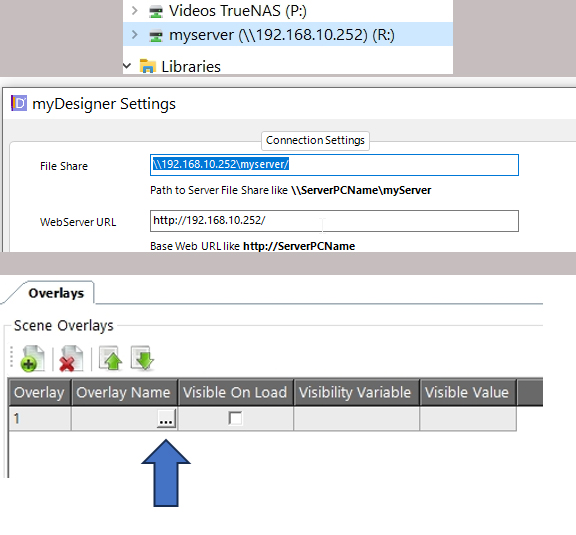
Thanks. I typed \\192.168.10.252\myserver when mapping a network drive and assigned it available drive letter R. Windows assigned it to R and it shows up in file manager. For some reason Windows dropped the \myserver part. When I click on the share in file manager I can navigate to the files including overlays and I seem to have read/write access.. MyDesigner is configured like the attached picture. Some progress but MyDesigner still crashes when I try to select an overlay to add (click on the button with the 3 dots.
Please Log in or Create an account to join the conversation.

Re: MyDesigner Crashes when Adding Overlay
5 months 3 weeks ago
Could it be something as simple as removing the extra forward slash after myserver in your settings?
Please Log in or Create an account to join the conversation.
Re: MyDesigner Crashes when Adding Overlay
5 months 3 weeks ago
I added that for some reason. Let me try removing it. Thx
Please Log in or Create an account to join the conversation.
Re: MyDesigner Crashes when Adding Overlay
5 months 3 weeks ago
Removing the slash did not correct the issue. Dang.
Please Log in or Create an account to join the conversation.
Re: MyDesigner Crashes when Adding Overlay
5 months 3 weeks ago - 5 months 3 weeks ago
If that doesn't work, try R: now that you have mapped the network drive.
Last edit: 5 months 3 weeks ago by cjisble.
Please Log in or Create an account to join the conversation.
Time to create page: 0.289 seconds

Copyright © 2026 Allonis. All Rights Reserved.