

Client Support
IP Cameras - a struggle
 Topic Author

Re: IP Cameras - a struggle
2 years 2 weeks ago
Still no joy with the MediaMTX driver. I have got it to work, but only by installing MediaMTX and streaming from a different machine.
I compiled MediaMTX in a fresh virtual machine on my NAS and after very basic tinkering with the yaml file to add the RTSP URLs I got it to work by using the URLs for the new MediaMTX server's output HLS streams into the IP camera component of MyDesigner 6. Oddly enough it did not work with the HLS player component, but did with the IP camera component (stream type set to hlsll).
So I now can view my security cameras on the Smart Remote (which is great) but only by running MediaMTX on an entirely separate machine (which is not great). I would obviously prefer MediaMTX to run on the same Pi 5 that MyServer is running on.
In terms of steps, using the dashboard I added the localhost (but it worked only when I replaced 'localhost' with the actual IP of the Pi), installed the driver and the dashboard confirms it is running. Beyond that it proved impossible. No method of adding the RTSP URLs worked at all (my CCTV does not have Onvif working) but that should not matter when I know the URLs - I don't need to 'discover' anything - I have the URLs (formatted correctly with user and password for authentication) - proof being MediaMTX works flawlessly when installed on my separate server...
So - half way there - I can serve up the remuxed HLS video feed to the remote - but I would like to be able to do the setup through the Dashboard GUI and have the driver running natively on the MyServer pi...
I compiled MediaMTX in a fresh virtual machine on my NAS and after very basic tinkering with the yaml file to add the RTSP URLs I got it to work by using the URLs for the new MediaMTX server's output HLS streams into the IP camera component of MyDesigner 6. Oddly enough it did not work with the HLS player component, but did with the IP camera component (stream type set to hlsll).
So I now can view my security cameras on the Smart Remote (which is great) but only by running MediaMTX on an entirely separate machine (which is not great). I would obviously prefer MediaMTX to run on the same Pi 5 that MyServer is running on.
In terms of steps, using the dashboard I added the localhost (but it worked only when I replaced 'localhost' with the actual IP of the Pi), installed the driver and the dashboard confirms it is running. Beyond that it proved impossible. No method of adding the RTSP URLs worked at all (my CCTV does not have Onvif working) but that should not matter when I know the URLs - I don't need to 'discover' anything - I have the URLs (formatted correctly with user and password for authentication) - proof being MediaMTX works flawlessly when installed on my separate server...
So - half way there - I can serve up the remuxed HLS video feed to the remote - but I would like to be able to do the setup through the Dashboard GUI and have the driver running natively on the MyServer pi...
Please Log in or Create an account to join the conversation.

Re: IP Cameras - a struggle
2 years 2 weeks ago
There should be no reason why you cannot run mediamtx on the pi. I'll need to remote into your system so I can look at the config. Can you turn TeamViewer back on so I can have a look?
Please Log in or Create an account to join the conversation.
Topic Author
Re: IP Cameras - a struggle
2 years 2 weeks ago
Absolutely, and have done. The issue is not getting mediamtx (the service) to run on the Pi. I think it is running (by adding the host, installing the service etc) - certainly the dashboard reports that the driver is up and running.
The issue is how to configure MediaMTX so I can point it to my RTSP streams. The dashboard interface doesn't seem to allow me to do it - I've wrangled with the MedaiMTX command builder (the most obvious one being 'AddRTSP camera', but seemingly no matter what I put in the fields, the preview never displays the feed.
I suppose in very simple terms my question is this - given I know the URL for each RTSP stream (in standard Hikvision format rtsp://username:password@IPADDRESSOFCCTVSERVER:554/Streaming/channels/101 (201/301/401 or 102/202/302/402 for the lower resolution sub-streams) )
What exactly do I do via the dashboard to point MediaMTX to them and get them working?
The issue is how to configure MediaMTX so I can point it to my RTSP streams. The dashboard interface doesn't seem to allow me to do it - I've wrangled with the MedaiMTX command builder (the most obvious one being 'AddRTSP camera', but seemingly no matter what I put in the fields, the preview never displays the feed.
I suppose in very simple terms my question is this - given I know the URL for each RTSP stream (in standard Hikvision format rtsp://username:password@IPADDRESSOFCCTVSERVER:554/Streaming/channels/101 (201/301/401 or 102/202/302/402 for the lower resolution sub-streams) )
What exactly do I do via the dashboard to point MediaMTX to them and get them working?
Please Log in or Create an account to join the conversation.
Topic Author
Re: IP Cameras - a struggle
2 years 2 weeks agoAbsolutely, and have done. The issue is not getting mediamtx (the service) to run on the Pi. I think it is running (by adding the host, installing the service etc) - certainly the dashboard reports that the driver is up and running.
The issue is how to configure MediaMTX so I can point it to my RTSP streams. The dashboard interface doesn't seem to allow me to do it - I've wrangled with the MedaiMTX command builder (the most obvious one being 'AddRTSP camera', but seemingly no matter what I put in the fields, the preview never displays the feed.
I suppose in very simple terms my question is this - given I know the URL for each RTSP stream (in standard Hikvision format rtsp://username:password@IPADDRESSOFCCTVSERVER:554/Streaming/channels/101 (201/301/401 or 102/202/302/402 for the lower resolution sub-streams) )
What exactly do I do via the dashboard to point MediaMTX to them and get them working?
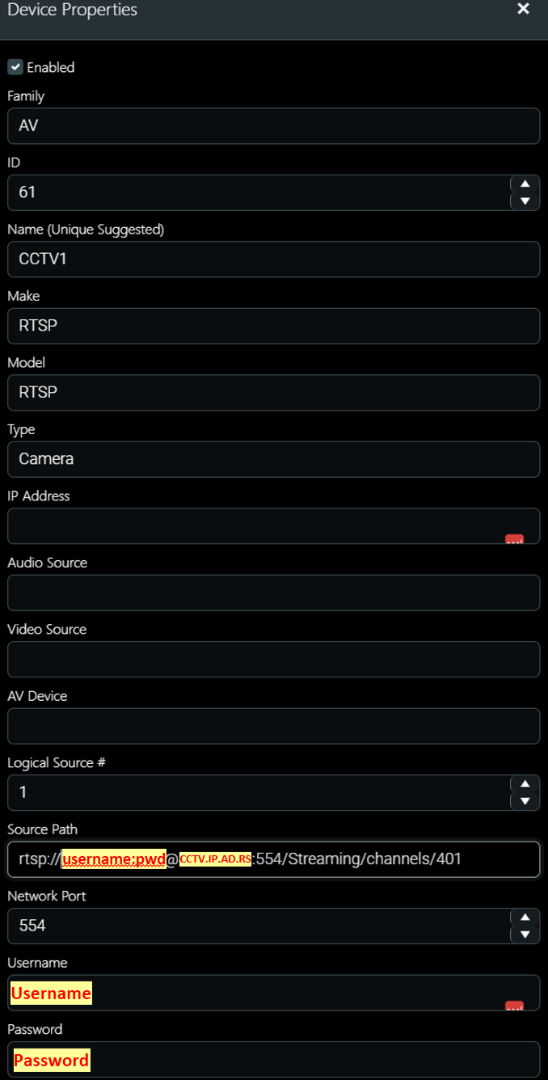
These are the fields which are autocreated after running the 'AddRTSPCamera' command, save I have changed the Network Port from '0' to 554 (the correct port for RTSP).
It seems to me that most of the fields must be redundant - surely the only field that matters is the URL to the RTSP stream?
Please Log in or Create an account to join the conversation.
Re: IP Cameras - a struggle
2 years 2 weeks ago
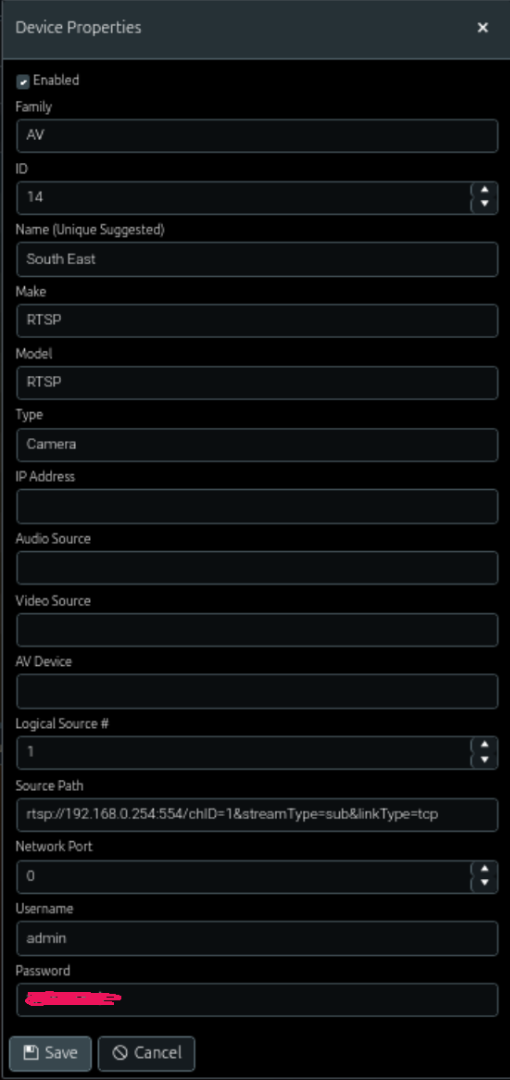
There are so many fields because the MediaMatrix driver is capable of digesting many forms of video sources and converting them to a webrtc stream that can be viewed on any browser. RTSP is probably the easiest to configure. Here is an example showing the required fields for an RTSP camera. You do not embed the username and password on the stream. Set them in the defined fields.
Then go to Device Previewing and make sure it works
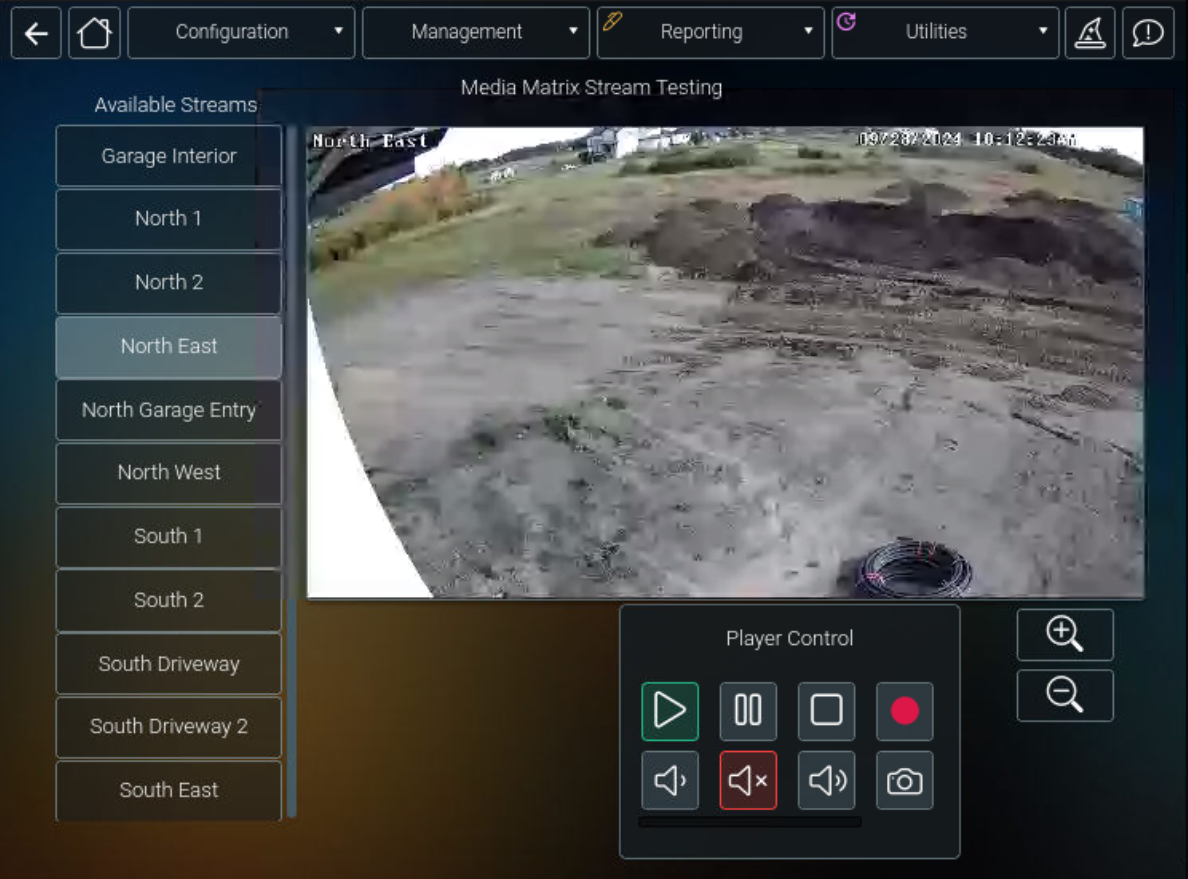
Then go to Device Previewing and make sure it works
Please Log in or Create an account to join the conversation.
Topic Author
Please Log in or Create an account to join the conversation.
Time to create page: 0.284 seconds

Copyright © 2026 Allonis. All Rights Reserved.