

Client Support
IP Cameras - a struggle
 Topic Author

IP Cameras - a struggle
2 years 2 weeks ago
I am trying to integrate my CCTV cameras, so I can view them on the Smart Remote. I am having very limited luck.
The cameras are located outside my LAN and require authentication. I can access the cameras via the manufacturer's (Hikvision) web-interface and app. I can also directly stream the RTSP feed (ie straight into VLC player for example) - by configuring the rtsp address to include my username and password (eg
rtsp://username:password@myddns.net:554/Streaming/channels/101
All the above work fine.
I'm clearly doing something v wrong with myServer and/or myDesigner.
1, First attempt was to simply use the IP Camera component in myDesigner6 without installing any drivers in myServer at all. I put the correctly formed RTSP address into the 'camera URL' field, but there is no ability to directly stream RTSP.
2. I then installed the IPCameras driver (6.8.1.0) into mySever, but have got very stuck. I attempted the follow the brief instructions that appear when choosing 'Driver Command Testing' with very little luck. This is where I got to when attempting to add my system. Clicking 'Discover via Onvif' results in nothing happening. The logs are not particularly helpful (no error message thrown up).
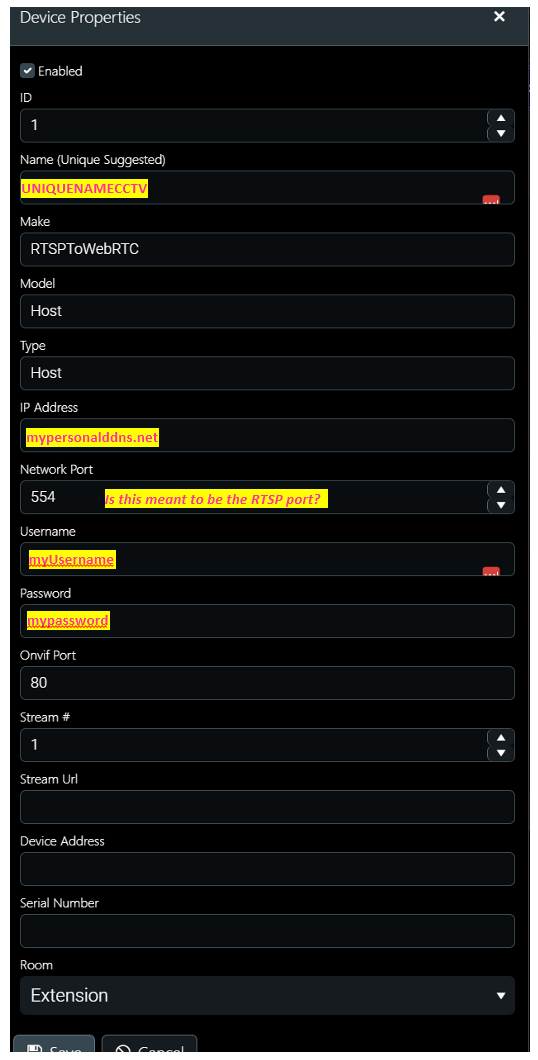
Any pointers to what I may be doing wrong. My suitably anonymised config below:
The cameras are located outside my LAN and require authentication. I can access the cameras via the manufacturer's (Hikvision) web-interface and app. I can also directly stream the RTSP feed (ie straight into VLC player for example) - by configuring the rtsp address to include my username and password (eg
rtsp://username:password@myddns.net:554/Streaming/channels/101
All the above work fine.
I'm clearly doing something v wrong with myServer and/or myDesigner.
1, First attempt was to simply use the IP Camera component in myDesigner6 without installing any drivers in myServer at all. I put the correctly formed RTSP address into the 'camera URL' field, but there is no ability to directly stream RTSP.
2. I then installed the IPCameras driver (6.8.1.0) into mySever, but have got very stuck. I attempted the follow the brief instructions that appear when choosing 'Driver Command Testing' with very little luck. This is where I got to when attempting to add my system. Clicking 'Discover via Onvif' results in nothing happening. The logs are not particularly helpful (no error message thrown up).
Any pointers to what I may be doing wrong. My suitably anonymised config below:
Please Log in or Create an account to join the conversation.
Topic Author
Re: IP Cameras - a struggle
2 years 2 weeks agoI am trying to integrate my CCTV cameras, so I can view them on the Smart Remote. I am having very limited luck.
The cameras are located outside my LAN and require authentication. I can access the cameras via the manufacturer's (Hikvision) web-interface and app. I can also directly stream the RTSP feed (ie straight into VLC player for example) - by configuring the rtsp address to include my username and password (eg
rtsp://username:password@myddns.net:554/Streaming/channels/101
All the above work fine.
I'm clearly doing something v wrong with myServer and/or myDesigner.
1, First attempt was to simply use the IP Camera component in myDesigner6 without installing any drivers in myServer at all. I put the correctly formed RTSP address into the 'camera URL' field, but there is no ability to directly stream RTSP.
2. I then installed the IPCameras driver (6.8.1.0) into mySever, but have got very stuck. I attempted the follow the brief instructions that appear when choosing 'Driver Command Testing' with very little luck. This is where I got to when attempting to add my system. Clicking 'Discover via Onvif' results in nothing happening. The logs are not particularly helpful (no error message thrown up).
Any pointers to what I may be doing wrong. My suitably anonymised config below:
I am relatively confident onvif port is 80. Re Network port, I've tried the RTSP port of 554, I've tried ports 8080, 8000 and 800. None seem to work. All those ports are correctly forwarded.
Please Log in or Create an account to join the conversation.


Re: IP Cameras - a struggle
2 years 2 weeks agoPlease Log in or Create an account to join the conversation.
Topic Author
Re: IP Cameras - a struggle
2 years 2 weeks ago
perfect thanks, will try this later. I did try very hard to find the answer myself first in the documentation - not sure how I missed this, but the documentation is not that easy to navigate. Will let you know how I get on.
Please Log in or Create an account to join the conversation.
Topic Author
Re: IP Cameras - a struggle
2 years 2 weeks ago
I tried and I just can't get this to work. Really not sure what the problem is. I have the URLs for all my RTSP camera streams. I have tried (and failed) to add them all to the appropriate driver so that the RTSPtoWeb service works with them. I have followed the instructions but no joy.
Please Log in or Create an account to join the conversation.
Re: IP Cameras - a struggle
2 years 2 weeks ago
Sorry, I linked you to out of date info. MediaMTX driver is the current way to integrate IP cameras.
allonis.com/support/documentation?view=category&id=229
Documentation is a work in progress.
allonis.com/support/documentation?view=category&id=229
Documentation is a work in progress.
Please Log in or Create an account to join the conversation.
Time to create page: 0.313 seconds

Copyright © 2026 Allonis. All Rights Reserved.