

Client Support
Is this possible?
 Topic Author

Re: Is this possible?
2 years 5 months agoIf I had to guess, it looks like there's a missing or extra exclamation point in your activation script. MyServer is trying to run the comments in your script, not the actual commands.
Can you copy and paste your activation script into a text file and post a copy, and also show a screenshot of the activation command in MyDesigner?
Kyle
I really appreciate this. I have no doubt whatsoever that it'll be something I've done or not done
Neil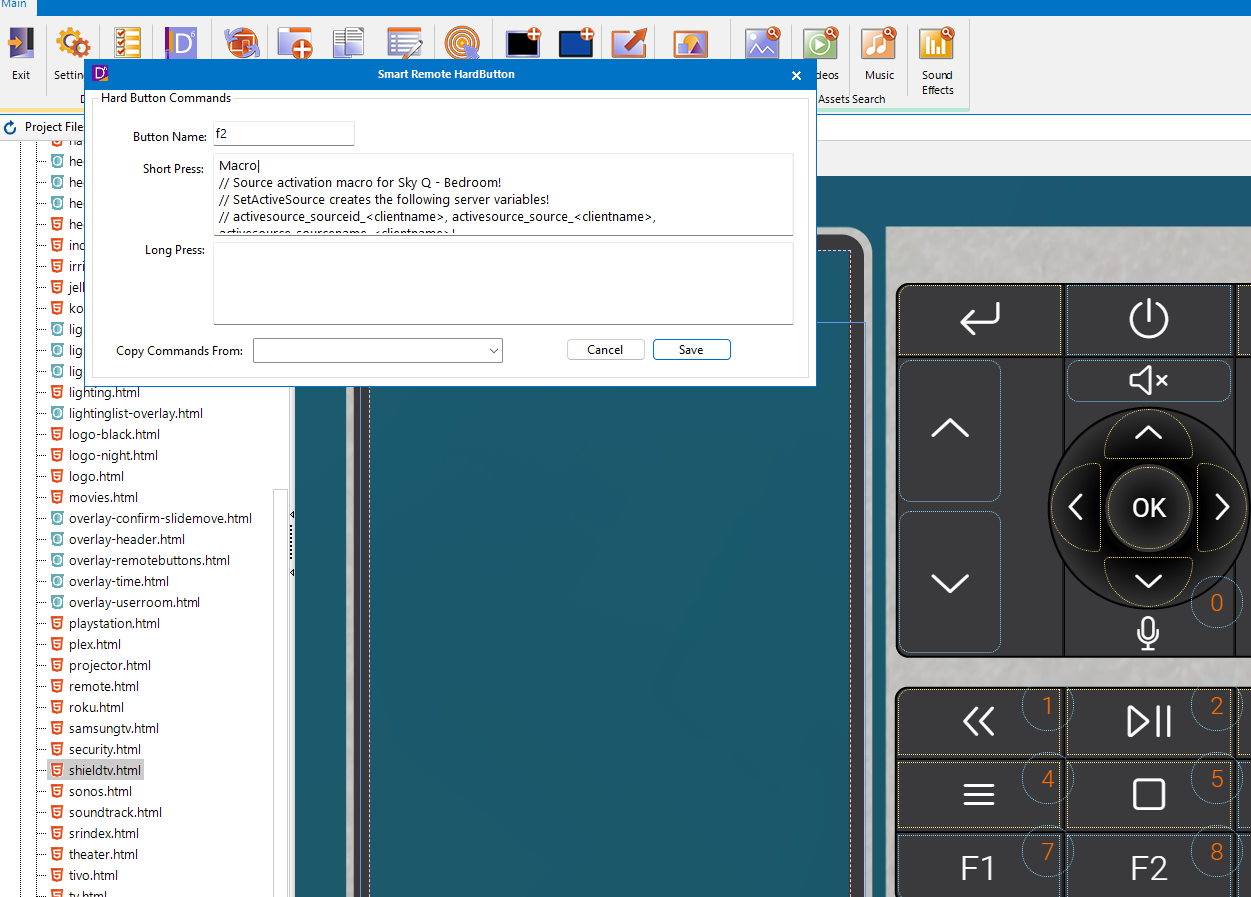
Please Log in or Create an account to join the conversation.
Re: Is this possible?
2 years 5 months ago - 2 years 5 months ago
Thanks! To call the activate source macro, just reference the macro itself instead of copying the text from it.
For instance, I put this command in MyDesigner on a test button: activate-source.bluray-theateroppo
This button was in my Tivo activity. If I clicked the button, it would run the activate-source macro for my Bluray player, which would turn on my AVR and TV if needed, change the inputs on both if needed, turn on the BluRay player, and bring up my Bluray activity. I think this what you want to do.
I would encourage you to put your command to turn on and change the input on your TV/AVR within the corresponding activate-source macro, unless you have a need to control the device without seeing its output. This will help keep everything in sync and you don't have to repeat the change of input in multiple places.
If you want to change the source at the same time, try this: macro|AV|{{active_tv_{{clientname}}}}~Remote~INPUT HDMI 1!activate-source.XX
Replace "activate-source.XX" with the name of your activate-source macro.
An exclamation point is used to separate commands in the macro.
For instance, I put this command in MyDesigner on a test button: activate-source.bluray-theateroppo
This button was in my Tivo activity. If I clicked the button, it would run the activate-source macro for my Bluray player, which would turn on my AVR and TV if needed, change the inputs on both if needed, turn on the BluRay player, and bring up my Bluray activity. I think this what you want to do.
I would encourage you to put your command to turn on and change the input on your TV/AVR within the corresponding activate-source macro, unless you have a need to control the device without seeing its output. This will help keep everything in sync and you don't have to repeat the change of input in multiple places.
If you want to change the source at the same time, try this: macro|AV|{{active_tv_{{clientname}}}}~Remote~INPUT HDMI 1!activate-source.XX
Replace "activate-source.XX" with the name of your activate-source macro.
An exclamation point is used to separate commands in the macro.
Last edit: 2 years 5 months ago by PhoenixF15E.
Please Log in or Create an account to join the conversation.
Topic Author
Re: Is this possible?
2 years 5 months ago
I am so grateful for your help. I won’t get a chance to try this until tomorrow. I’ll let you know how I get on
Neil
Neil
Please Log in or Create an account to join the conversation.
Re: Is this possible?
2 years 5 months ago - 2 years 5 months agoTo get control of the Sky Q box I am backing out of the Shield and then selecting the Sky Q on the Smart Remote. I realise this is very much a first world problem.
I think this is actually the intended way of switching sources. If you have ever worked with a harmony remote this is basically the way they work. By calling the activation macro directly from the F1 key you're doing the same thing but with less button presses.
Last edit: 2 years 5 months ago by bowlingbeeg.
Please Log in or Create an account to join the conversation.
Topic Author
Re: Is this possible?
2 years 5 months agoThanks! To call the activate source macro, just reference the macro itself instead of copying the text from it.
For instance, I put this command in MyDesigner on a test button: activate-source.bluray-theateroppo
This button was in my Tivo activity. If I clicked the button, it would run the activate-source macro for my Bluray player, which would turn on my AVR and TV if needed, change the inputs on both if needed, turn on the BluRay player, and bring up my Bluray activity. I think this what you want to do.
I would encourage you to put your command to turn on and change the input on your TV/AVR within the corresponding activate-source macro, unless you have a need to control the device without seeing its output. This will help keep everything in sync and you don't have to repeat the change of input in multiple places.
If you want to change the source at the same time, try this: macro|AV|{{active_tv_{{clientname}}}}~Remote~INPUT HDMI 1!activate-source.XX
Replace "activate-source.XX" with the name of your activate-source macro.
An exclamation point is used to separate commands in the macro.
It's not working yet but it feels like it's not too far away. I have put the 2 attached Macros into the TV html, one of them in f2 the other in f3. I can successfully launch the Sky Q macro and that works fine. If I then launch the Shield it's page briefly appears on the SmartRemote but then quickly changes back to the Sky Q which of course means I can't control it. I can't find a way to keep the Shield page on the SmartRemote. No matter how I launch it, it quickly changes to Sky Q
Neil
Please Log in or Create an account to join the conversation.
Topic Author
Re: Is this possible?
2 years 5 months agoThanks! To call the activate source macro, just reference the macro itself instead of copying the text from it.
For instance, I put this command in MyDesigner on a test button: activate-source.bluray-theateroppo
This button was in my Tivo activity. If I clicked the button, it would run the activate-source macro for my Bluray player, which would turn on my AVR and TV if needed, change the inputs on both if needed, turn on the BluRay player, and bring up my Bluray activity. I think this what you want to do.
I would encourage you to put your command to turn on and change the input on your TV/AVR within the corresponding activate-source macro, unless you have a need to control the device without seeing its output. This will help keep everything in sync and you don't have to repeat the change of input in multiple places.
If you want to change the source at the same time, try this: macro|AV|{{active_tv_{{clientname}}}}~Remote~INPUT HDMI 1!activate-source.XX
Replace "activate-source.XX" with the name of your activate-source macro.
An exclamation point is used to separate commands in the macro.
It's not working yet but it feels like it's not too far away. I have put the 2 attached Macros into the TV html, one of them in f2 the other in f3. I can successfully launch the Sky Q macro and that works fine. If I then launch the Shield it's page briefly appears on the SmartRemote but then quickly changes back to the Sky Q which of course means I can't control it. I can't find a way to keep the Shield page on the SmartRemote. No matter how I launch it, it quickly changes to Sky Q
Neil
Please Log in or Create an account to join the conversation.
Time to create page: 0.283 seconds

Copyright © 2026 Allonis. All Rights Reserved.