

Client Support
Is this possible?


Re: Is this possible?
2 years 5 months ago - 2 years 5 months ago
I noticed that in your macro the following line is commented out
// SetVariable|{{activeroom_{{clientname}}}}_display_input~HDMI!
But then later you're trying to use that variable in this line
If|isNE##{{{{activeroom_{{clientname}}}}_display_input}}####AV|{{{{activeroom_{{clientname}}}}_display_id}}~source~{{{{activeroom_{{clientname}}}}_display_input}}!
So if you set the "display_input" variable correctly then you don't need to change the input on your F2/F3 button. You can just call the macro and it will automatically switch to the right input.
Unfortunately that doesn't explain why your skyq scene comes back after switching to the shield.
// SetVariable|{{activeroom_{{clientname}}}}_display_input~HDMI!
But then later you're trying to use that variable in this line
If|isNE##{{{{activeroom_{{clientname}}}}_display_input}}####AV|{{{{activeroom_{{clientname}}}}_display_id}}~source~{{{{activeroom_{{clientname}}}}_display_input}}!
So if you set the "display_input" variable correctly then you don't need to change the input on your F2/F3 button. You can just call the macro and it will automatically switch to the right input.
Unfortunately that doesn't explain why your skyq scene comes back after switching to the shield.
Last edit: 2 years 5 months ago by bowlingbeeg.
Please Log in or Create an account to join the conversation.
Re: Is this possible?
2 years 5 months ago
For the issue where your skyq scene is showing after switching to the shield scene. Is there a command in the properties of the sheildtv.html that could be doing it?
Please Log in or Create an account to join the conversation.
Re: Is this possible?
2 years 5 months agoThat's the default code in the source activation macros. The display input variable can't be set without knowing what the correct input will be, so it is commented out when the macro is created. If the display variable isn't set, the If statement won't do anything.I noticed that in your macro the following line is commented out
// SetVariable|{{activeroom_{{clientname}}}}_display_input~HDMI!
But then later you're trying to use that variable in this line
If|isNE##{{{{activeroom_{{clientname}}}}_display_input}}####AV|{{{{activeroom_{{clientname}}}}_display_id}}~source~{{{{activeroom_{{clientname}}}}_display_input}}!
So if you set the "display_input" variable correctly then you don't need to change the input on your F2/F3 button. You can just call the macro and it will automatically switch to the right input.
Unfortunately that doesn't explain why your skyq scene comes back after switching to the shield.
I agree--setting the input variable and changing the input in the activation macros is the cleanest approach. I think we need to see what kind of TV the OP has and what the proper command is for setting it to the proper input.
I also use the activation macro to turn on the associated equipment as well. This parallels what the Harmony does--click on the activity and everything is powered on and set to the correct input. It makes it easier for someone else to pick the remote up and figure out how to use it. I use a long press of the home button to get back to the initial screen with the room devices.
Kyle
Please Log in or Create an account to join the conversation.
Topic Author
Re: Is this possible?
2 years 5 months ago
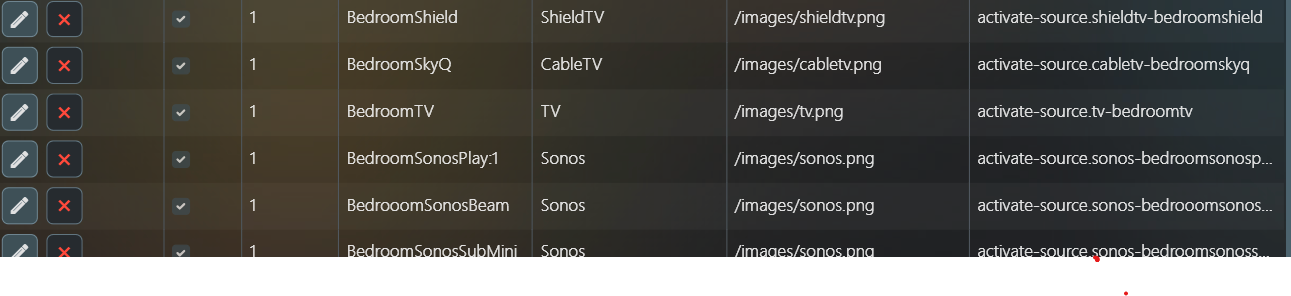
The TV is a Panasonic. I had to set it up using IR Database, Generic IR & TV IR. Following on from one of your replies I have renamed it (and Sky & Shield) to BedroomTV
Can I ask how to comment or uncomment ?
Neil
Can I ask how to comment or uncomment ?
Neil
Please Log in or Create an account to join the conversation.
Re: Is this possible?
2 years 5 months ago - 2 years 5 months ago
If a line in a macro begins with "//" then everything after that until the exclamation point is a comment and is ignored. Bowlingbee showed the commented SetVariable command--if the leading "//" is removed and HDMI is replaced by the proper source for your TV, the later line with the If statement will change the input on your TV,
Now that you've renamed your sources, your activation macros should change names as well.
Just to double check--all three of your devices (Sky Q, Shield, and TV) have unique names?
Now that you've renamed your sources, your activation macros should change names as well.
Just to double check--all three of your devices (Sky Q, Shield, and TV) have unique names?
Last edit: 2 years 5 months ago by PhoenixF15E.
Please Log in or Create an account to join the conversation.
Topic Author
Re: Is this possible?
2 years 5 months ago
Yes everything has it's own unique name
Thank you for explaining comment/uncomment. I have learnt so much from you both and I am extremely grateful
Thank you for explaining comment/uncomment. I have learnt so much from you both and I am extremely grateful
Please Log in or Create an account to join the conversation.
Time to create page: 0.276 seconds

Copyright © 2026 Allonis. All Rights Reserved.