

Client Support
Ecobee

Ecobee
2 years 5 months ago
Did a search and didnt see any topics on Ecobee.
We needed a new thermostat and decided to go with an Ecobee since it would be able to be controlled by the Smart Remote and they get good reviews. I was able to get the thermostat authorized and then discovered - just like the documentation says to do.
It auto puts the thermostat in "equipment" room and not my active theater room. If I change the room to theater it shows up, but the info doesnt show up on the driver on the remote- it just shows the climate page with blank buttons that do not send any commands. I can go back in the command center and select device and it will then show up on the driver command page and commands can be sent that way but not on the remote.
Whats strange, is if I leave the thermostat in the equipment room, it auto brings up the thermostat controls on the command center and does not need to be selected first. Ive tried a few different ways to get the macro to sync with it and everytime just brings me back to the same blank climate screen.
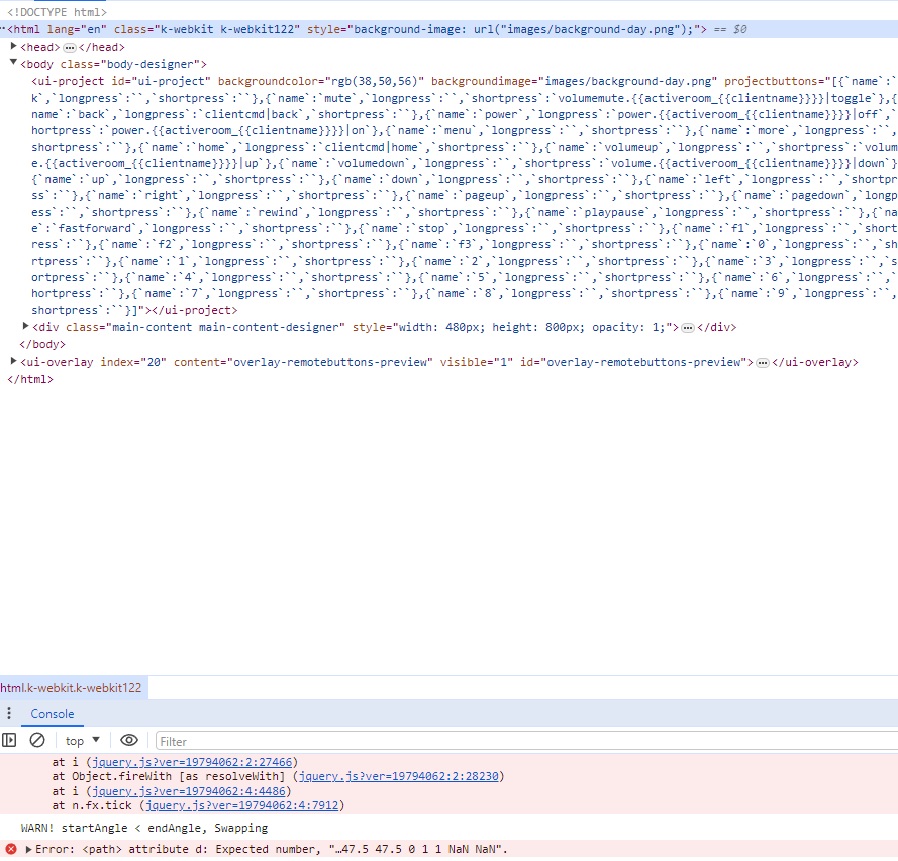
Hitting F12 when you hit launch on MyDesigner on the climate page shows three errors and it also appears it doesn't get linked to the drivers in any way. Ive looked at the F12 page a few times to see how rooms are linked to certain premade pages to use elsewhere. However, all the climate page is showing me right now are all the button info and thats all.
Just wondering what Im doing wrong or if anyone else has been able to get their Ecobee thermostats set up correctly? Any help would be greatly appreciated!
We needed a new thermostat and decided to go with an Ecobee since it would be able to be controlled by the Smart Remote and they get good reviews. I was able to get the thermostat authorized and then discovered - just like the documentation says to do.
It auto puts the thermostat in "equipment" room and not my active theater room. If I change the room to theater it shows up, but the info doesnt show up on the driver on the remote- it just shows the climate page with blank buttons that do not send any commands. I can go back in the command center and select device and it will then show up on the driver command page and commands can be sent that way but not on the remote.
Whats strange, is if I leave the thermostat in the equipment room, it auto brings up the thermostat controls on the command center and does not need to be selected first. Ive tried a few different ways to get the macro to sync with it and everytime just brings me back to the same blank climate screen.
Hitting F12 when you hit launch on MyDesigner on the climate page shows three errors and it also appears it doesn't get linked to the drivers in any way. Ive looked at the F12 page a few times to see how rooms are linked to certain premade pages to use elsewhere. However, all the climate page is showing me right now are all the button info and thats all.
Just wondering what Im doing wrong or if anyone else has been able to get their Ecobee thermostats set up correctly? Any help would be greatly appreciated!
Please Log in or Create an account to join the conversation.


Re: Ecobee
2 years 5 months ago - 2 years 5 months ago
allonis.com/support/documentation?view=category&id=348
did you follow that?
My recollection is you tell Ecobee.com where it is when you register it, and myServer just grabs that.
But you are bringing up that you should be able to switch it to a myServer managed room
For now, ensure the room spelling is same.
Ensure you are first searching the formal documentation, and then the forum if you answer isn't found in docs.
did you follow that?
My recollection is you tell Ecobee.com where it is when you register it, and myServer just grabs that.
But you are bringing up that you should be able to switch it to a myServer managed room
For now, ensure the room spelling is same.
Ensure you are first searching the formal documentation, and then the forum if you answer isn't found in docs.
Last edit: 2 years 5 months ago by David Li.
Please Log in or Create an account to join the conversation.
Re: Ecobee
2 years 5 months agoThe first place I always check is the DOCUMENTATION because I know that is the answer for most all questions that are asked..."Did you follow the documentation??"allonis.com/support/documentation?view=category&id=348
did you follow that?
My recollection is you tell Ecobee.com where it is when you register it, and myServer just grabs that.
But you are bringing up that you should be able to switch it to a myServer managed room
For now, ensure the room spelling is same.
Ensure you are first searching the formal documentation, and then the forum if you answer isn't found in docs.
The site you referred to is the same page that pulls up if you click the How To button on the driver page. Its registered correctly, just not getting to My designer like it automatically should. The issue seems to be the .html page does not have any reference to the thermostat. For example, if I launch the remote, click on the lighting, and then hit F12, it shows code about each lighting source and which ID those control. The thermostat page doesnt display any of that but instead just the hard buttons. The picture is the exact F12 picture and is clear there is something left out when the page was written to get the info from the thermostat and sync up how it should.
Please Log in or Create an account to join the conversation.
Re: Ecobee
2 years 5 months agoEnsure the particular thermostat has been chosen as "active". I can't easily check on the template to see how that is chosen...usually a dropdown to pick from multiple thermostats.The first place I always check is the DOCUMENTATION because I know that is the answer for most all questions that are asked..."Did you follow the documentation??"allonis.com/support/documentation?view=category&id=348
did you follow that?
My recollection is you tell Ecobee.com where it is when you register it, and myServer just grabs that.
But you are bringing up that you should be able to switch it to a myServer managed room
For now, ensure the room spelling is same.
Ensure you are first searching the formal documentation, and then the forum if you answer isn't found in docs.
The site you referred to is the same page that pulls up if you click the How To button on the driver page. Its registered correctly, just not getting to My designer like it automatically should. The issue seems to be the .html page does not have any reference to the thermostat. For example, if I launch the remote, click on the lighting, and then hit F12, it shows code about each lighting source and which ID those control. The thermostat page doesnt display any of that but instead just the hard buttons. The picture is the exact F12 picture and is clear there is something left out when the page was written to get the info from the thermostat and sync up how it should.
Please Log in or Create an account to join the conversation.
Re: Ecobee
2 years 5 months agoIs the drop down box in my server or in myDesigner? Not sure what drop down box you’re referring to or where it is.Ensure the particular thermostat has been chosen as "active". I can't easily check on the template to see how that is chosen...usually a dropdown to pick from multiple thermostats.The first place I always check is the DOCUMENTATION because I know that is the answer for most all questions that are asked..."Did you follow the documentation??"allonis.com/support/documentation?view=category&id=348
did you follow that?
My recollection is you tell Ecobee.com where it is when you register it, and myServer just grabs that.
But you are bringing up that you should be able to switch it to a myServer managed room
For now, ensure the room spelling is same.
Ensure you are first searching the formal documentation, and then the forum if you answer isn't found in docs.
The site you referred to is the same page that pulls up if you click the How To button on the driver page. Its registered correctly, just not getting to My designer like it automatically should. The issue seems to be the .html page does not have any reference to the thermostat. For example, if I launch the remote, click on the lighting, and then hit F12, it shows code about each lighting source and which ID those control. The thermostat page doesnt display any of that but instead just the hard buttons. The picture is the exact F12 picture and is clear there is something left out when the page was written to get the info from the thermostat and sync up how it should.
Documentation doesn’t say anything about a drop down box or selecting an active thermostat in it anywhere. It just explains how to activate or authorize my server on ecobees platform.
Please Log in or Create an account to join the conversation.

Re: Ecobee
2 years 5 months ago
I just went through the process desribe on the documentation page. I authorized myserver to access my data at ecobee.com and then went back and hit the command to getdevices. It took a couple minutes but it did find all four of my ecobees and it seems to be communicating with ecobee.com to update values for some of those thermostats although it takes 10-15 seconds to update the thermostat if I change something. However, in my moonlight app on my PC I changed the temp setting 2 degrees down on the ecobee in my shop that is right behind my desk. Nothing has happened in the actual ecobee thermostat or online at ecobee.com so I'd say the moonlight app is not responding to button presses to lower the set temp.
I just tried to change the mode from the moonlight app o my PC and that responds. The icon on the Moonlight app changes in about 6-7 seconds and the display on ecobee.com changes in about 15 seconds. I'm not convinced that the actual thermostat is responding but it might be. Its kinda like watching grass grow.
I just tried to change the mode from the moonlight app o my PC and that responds. The icon on the Moonlight app changes in about 6-7 seconds and the display on ecobee.com changes in about 15 seconds. I'm not convinced that the actual thermostat is responding but it might be. Its kinda like watching grass grow.
Please Log in or Create an account to join the conversation.
Time to create page: 0.315 seconds

Copyright © 2026 Allonis. All Rights Reserved.