

Client Support
Apps displayed but non-clickable
 Topic Author

Apps displayed but non-clickable
2 years 8 months ago
I am in the process of setting up the SmartRemote. I am able to get the remote to connect to myServer, see my users, rooms, sources, and apps; but when I click on an app nothing happens. No error, no message, it just does nothing.
Is there an additional step to configuring the apps after defining them and placing them in the correct room(s)?
Thanks!
Is there an additional step to configuring the apps after defining them and placing them in the correct room(s)?
Thanks!
Please Log in or Create an account to join the conversation.


Re: Apps displayed but non-clickable
2 years 8 months agoThe easy answer is please follow the documentation step for step. If you did something out of order, or not exactly how it's supposed to be done, then this will happen.I am in the process of setting up the SmartRemote. I am able to get the remote to connect to myServer, see my users, rooms, sources, and apps; but when I click on an app nothing happens. No error, no message, it just does nothing.
Is there an additional step to configuring the apps after defining them and placing them in the correct room(s)?
Thanks!
Send me an email with your Teamviewer ID and I can take a look.
Please Log in or Create an account to join the conversation.
Topic Author
Re: Apps displayed but non-clickable
2 years 8 months ago - 2 years 8 months ago
Steps completed today:
1) Updated OS
2) Updated myServer software to 6.7.3210.42954
3) Defined Users
4) Defined Rooms
5) Defined Sources
6) Installed additional software for my devices
7) Configured drivers
 Configured Applets
9) configured Sources & Apps By Rooms
10) Setup myDesigner6
11) Renamed smartremote-sample to smartremote
12) Connected smartremote
13) See icons, when I touch them nothing happens
14) Looking at the Live Event Log, I don't see any errors or actions happen when I try selecting any app
15) Verified my license shows permanent instead of trial
16) Using Raspberry Pi official power supply
17) Pi temperature is < 70C
I'm using Sonos, Weather, and Heos Applets as my test subjects since those seem like the most basic to setup / prevent screwing up.
Just a few pointers on what to check would be helpful, will help me learn.
1) Updated OS
2) Updated myServer software to 6.7.3210.42954
3) Defined Users
4) Defined Rooms
5) Defined Sources
6) Installed additional software for my devices
7) Configured drivers
Configured Applets9) configured Sources & Apps By Rooms
10) Setup myDesigner6
11) Renamed smartremote-sample to smartremote
12) Connected smartremote
13) See icons, when I touch them nothing happens
14) Looking at the Live Event Log, I don't see any errors or actions happen when I try selecting any app
15) Verified my license shows permanent instead of trial
16) Using Raspberry Pi official power supply
17) Pi temperature is < 70C
I'm using Sonos, Weather, and Heos Applets as my test subjects since those seem like the most basic to setup / prevent screwing up.
Just a few pointers on what to check would be helpful, will help me learn.
Last edit: 2 years 8 months ago by abigmoocow.
Please Log in or Create an account to join the conversation.
Re: Apps displayed but non-clickable
2 years 8 months agoI didn't see your myServer online. did you figure out the problem?Steps completed today:
1) Updated OS
2) Updated myServer software to 6.7.3210.42954
3) Defined Users
4) Defined Rooms
5) Defined Sources
6) Installed additional software for my devices
7) Configured drivers
9) configured Sources & Apps By Rooms
10) Setup myDesigner6
11) Renamed smartremote-sample to smartremote
12) Connected smartremote
13) See icons, when I touch them nothing happens
14) Looking at the Live Event Log, I don't see any errors or actions happen when I try selecting any app
15) Verified my license shows permanent instead of trial
16) Using Raspberry Pi official power supply
17) Pi temperature is < 70C
I'm using Sonos, Weather, and Heos Applets as my test subjects since those seem like the most basic to setup / prevent screwing up.
Just a few pointers on what to check would be helpful, will help me learn.
The temp typically should be less than 50C. 70 is too high. Does it have a heat sink and fan now?
What icons are not doing anything when you click them?
Please Log in or Create an account to join the conversation.
Topic Author
Re: Apps displayed but non-clickable
2 years 8 months ago
The Pi has always had heatsinks on all 3 compute chips, including yesterday.
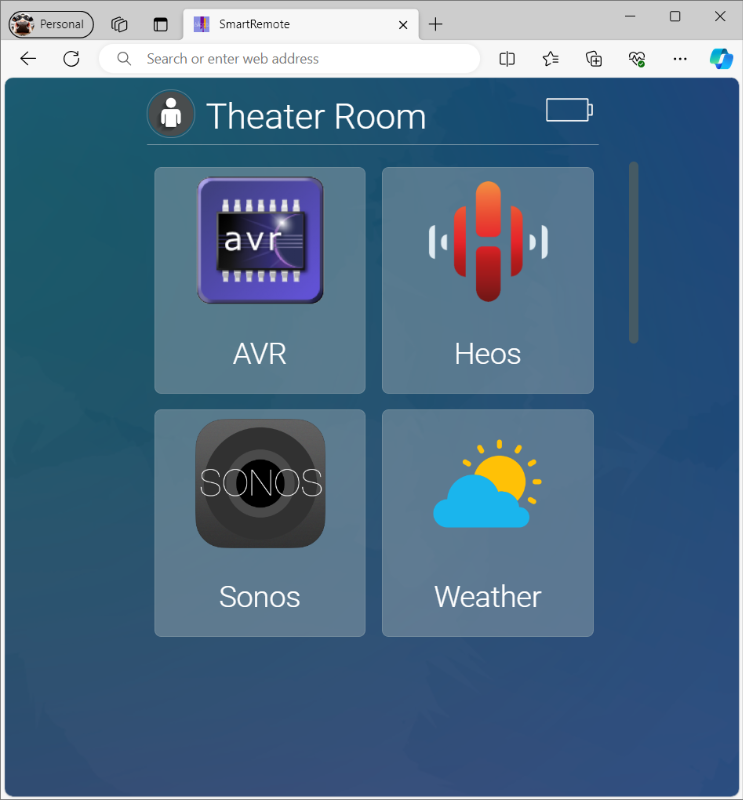
Attached is a screenshot from my webbrowser for demonstration, but it's basically what the remote is showing (remote displays properly the battery, etc).
Selecting any of the four icons (AVR, Heos, Sonos, Weather) does nothing.
Attached is a screenshot from my webbrowser for demonstration, but it's basically what the remote is showing (remote displays properly the battery, etc).
Selecting any of the four icons (AVR, Heos, Sonos, Weather) does nothing.
Please Log in or Create an account to join the conversation.
Re: Apps displayed but non-clickable
2 years 8 months ago - 2 years 8 months agoOk, good. What is the temp of the CPU that is displayed in the myServer Dashboard? Should be 50C or lower. 70C is way too high and is where the RaspberryOS / firmware starts to drop CPU performance to self protect. You typically need heat sinks AND a fan to keep temps down. Also, are you still seeing the "Low Power" message on the top right of the Raspberry OS dashboard? If so, then there is a power supply problem still. These aren't a myServer / Allonis issue, it's standard Raspberry Pi requirements.The Pi has always had heatsinks on all 3 compute chips, including yesterday.
Attached is a screenshot from my webbrowser for demonstration, but it's basically what the remote is showing (remote displays properly the battery, etc).
Selecting any of the four icons (AVR, Heos, Sonos, Weather) does nothing.
Your system still shows as offline so we can't assist any further. Send us an email if you need additional assistance with both your TeamViewer myServer ID and your TV ID / password for the myDesigner Windows PC.
Thanx!!!
Last edit: 2 years 8 months ago by David Li.
Please Log in or Create an account to join the conversation.
Time to create page: 0.421 seconds

Copyright © 2026 Allonis. All Rights Reserved.