

Client Support
Weather Variables Won't Load


Weather Variables Won't Load
1 year 7 months ago
V6 is is up and running and I have been having fun playing with it. I can't seem to get weather variables to show up in the System Server Variables area. I have the latest weather app installed and followed the procedure in the tutorial (copied below). I selected Zip then City and tried to force a weather update a couple times. No dice. Maybe because I'm still on a "trial version?" I hit activate a couple days ago but it is not yet activated.
Thx, ChrisClick the dropdown to the right of the Select City to Add field that appeared.Select your city from the list and click Submit.Your city should have been added to the list of your cities. The first time you do this it will be enabled by default. You can edit that city to add Marine data for large body of water facing cities.The units of measure can be set to Metric using the Command BuilderYou can click the Update function in Command Builder to force an update. Typically the weather data will be ongoing downloaded a few times per day as long as the myServer controller has access to the Internet.
Thx, ChrisClick the dropdown to the right of the Select City to Add field that appeared.Select your city from the list and click Submit.Your city should have been added to the list of your cities. The first time you do this it will be enabled by default. You can edit that city to add Marine data for large body of water facing cities.The units of measure can be set to Metric using the Command BuilderYou can click the Update function in Command Builder to force an update. Typically the weather data will be ongoing downloaded a few times per day as long as the myServer controller has access to the Internet.
Please Log in or Create an account to join the conversation.


Re: Weather Variables Won't Load
1 year 7 months ago
Took a quick look. the Weather App was not loaded from Software Updater. myServer needed an update as well. Added Detroit.
Please Log in or Create an account to join the conversation.
Re: Weather Variables Won't Load
1 year 7 months ago
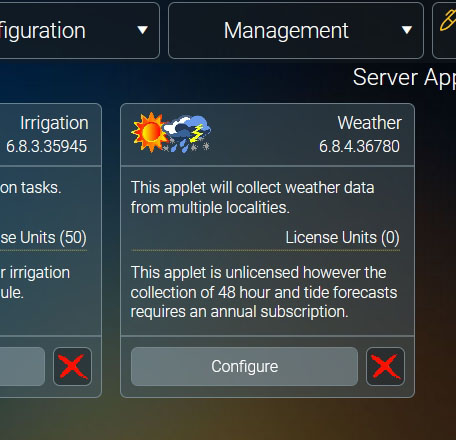
Thanks David. " the Weather App was not loaded from Software Updater." Did I download the wrong thing? Attached is a screenshot of what shows up under Management ==> Applets. It does seem to work now. I don't live in Detroit, though. I live in West Bloomfield.
Please Log in or Create an account to join the conversation.
Re: Weather Variables Won't Load
1 year 7 months ago
Checked this morning, still no new weather variables are loaded. There appears to be some standard weather maps in there but nothing more. Attached pic shows the app that is installed - 6.8.4.36780.
And I'm still on a trial version for some reason. Should I hit the "Activate" button again?
Thx
And I'm still on a trial version for some reason. Should I hit the "Activate" button again?
Thx

Please Log in or Create an account to join the conversation.
Re: Weather Variables Won't Load
1 year 7 months ago
On a hunch, I re-installed the weather app. Seems to be working now. I'm going to try the same thing with some of the other apps I initially installed.
Still on trial version, though and would like to get that fixed.
Thx
Still on trial version, though and would like to get that fixed.
Thx
Please Log in or Create an account to join the conversation.
Re: Weather Variables Won't Load
1 year 7 months ago
Still no West Bloomfield weather, though. Just Detroit, which can be way different than us. Any way to include a closer weather station to West Bloomfield? Farmington or something?
Thx.
Thx.
Please Log in or Create an account to join the conversation.
Time to create page: 0.289 seconds

Copyright © 2026 Allonis. All Rights Reserved.