

Client Support
Driver Releases


Re: Driver Releases
2 years 5 months ago - 2 years 5 months agoHave you used the out of the box user interfaces with HEOS? I use my HEOS daily. Works great. So, what are you trying to do?
yes I do use it and it works brilliantly - have linked to it from my own index.html and it works great.
What I am trying to do it is this:
- The HEOS app allows favourites to be saved (playlists, internet radio stations etc). Those favourite are assigned a number by the app.
- In the MyDesigner Heos scene, pressing the hamburger opens heos-overlay-browser
- The options in the browser are 'Deezer, Local Music, Playlists... Favorites'
- Choosing Favorites lists those favorites.
I want to be able to assign certain of those Favorites to the hard-button Function keys and also to soft button icons I create.
If the driver is using the CLI to communicate with Heos (as per the Denon document I linked) there is a function to select a favorite by number.
That is what I am trying to achieve - loading a favorite from the Function keys (the aim being to have the function keys assigned to different internet radio stations so that I can flick between them with a quick press of the button rather than navigating the menu structure).
The command 'SelectItem' sometimes seems to work, and sometimes not... (does it require the overlay to be visible perhaps?)
Last edit: 2 years 5 months ago by CrabbyPatties.
Please Log in or Create an account to join the conversation.

Re: Driver Releases
2 years 5 months ago - 2 years 5 months ago
SelectItem is picking an entry off a browser list. So it really cannot be called ad-hoc to do anything.
You could do what you want to do but it involves some fishing. I created a Heos Favorite and it shows up like this.
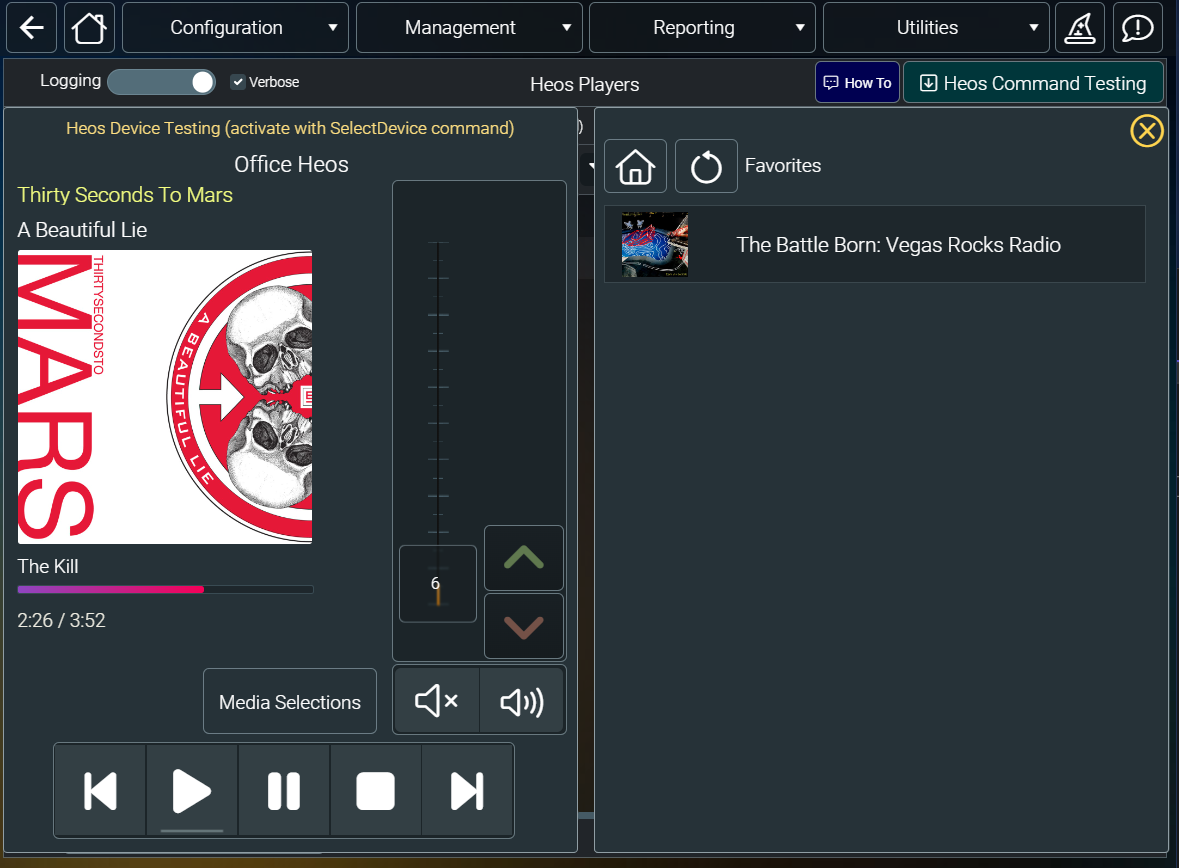
If I turn on verbose logging on the driver and I click on the favorite to play it the log shows this

From the log I grabbed the heos:// url
heos://browse/play_stream?pid=2117691565&sid=1028&mid=4586579727037038354&name=The Battle Born: Vegas Rocks Radio
Then using the drivers Test command I added this command to a button
AV|{{active_heos_{{clientname}}}}~Test~heos://browse/play_stream?pid=2117691565&sid=1028&mid=4586579727037038354&name=The Battle Born: Vegas Rocks Radio
Clicking the button will now start playback of that favorite.
It might be easier to put that command into a macro and then call the macro from the button push.
You could do what you want to do but it involves some fishing. I created a Heos Favorite and it shows up like this.
If I turn on verbose logging on the driver and I click on the favorite to play it the log shows this
From the log I grabbed the heos:// url
heos://browse/play_stream?pid=2117691565&sid=1028&mid=4586579727037038354&name=The Battle Born: Vegas Rocks Radio
Then using the drivers Test command I added this command to a button
AV|{{active_heos_{{clientname}}}}~Test~heos://browse/play_stream?pid=2117691565&sid=1028&mid=4586579727037038354&name=The Battle Born: Vegas Rocks Radio
Clicking the button will now start playback of that favorite.
It might be easier to put that command into a macro and then call the macro from the button push.
Last edit: 2 years 5 months ago by davep.
Please Log in or Create an account to join the conversation.
Re: Driver Releases
2 years 5 months ago
I'm making progress but not there yet.
I opened a Telnet connection (port 1255) to my Heos (with Putty) and ran
heos://player/get_players
That returned my PID. Still in telnet, using that PID number I ran the following commands:
heos://browse/play_preset?pid=[INSERT PID NUMBER]&preset=1
heos://browse/play_preset?pid=[INSERT PID NUMBER]&preset=2
heos://browse/play_preset?pid=[INSERT PID NUMBER]&preset=3
That changed the radio station as expected between my first three saved Heos favourites.
I assumed I had cracked it and rushed to my designer to append it to the Test command and assign it to buttons... but it is NOT working with the test command - no idea why at all.
I've checked all the 'stupid' reasons (formatting, getting my PID correct, making sure heos is active -even replaced with the direct driver number ie 'AV|32~Test' etc) and it's nothing obvious.
My best guess is that the Test command just does not work for me. Nothing works at all with the Test command (even other CLI commands like mute etc) - but all of those commands work perfectly if via a direct Telnet connection.
First question - is the 'Test' command activated for regular plebs like me, or does it just work on developer systems? It really feels as if the Test command is not working.
From your post, your PID is 2117691565
If you save a few favorites into the Heos app, do the following commands work for you from the dashboard?
AV|{{active_heos_{{clientname}}}}~Test~heos://browse/play_preset?pid=2117691565&preset=1
AV|{{active_heos_{{clientname}}}}~Test~heos://browse/play_preset?pid=2117691565&preset=2
AV|{{active_heos_{{clientname}}}}~Test~heos://browse/play_preset?pid=2117691565&preset=3
?
I opened a Telnet connection (port 1255) to my Heos (with Putty) and ran
heos://player/get_players
That returned my PID. Still in telnet, using that PID number I ran the following commands:
heos://browse/play_preset?pid=[INSERT PID NUMBER]&preset=1
heos://browse/play_preset?pid=[INSERT PID NUMBER]&preset=2
heos://browse/play_preset?pid=[INSERT PID NUMBER]&preset=3
That changed the radio station as expected between my first three saved Heos favourites.
I assumed I had cracked it and rushed to my designer to append it to the Test command and assign it to buttons... but it is NOT working with the test command - no idea why at all.
I've checked all the 'stupid' reasons (formatting, getting my PID correct, making sure heos is active -even replaced with the direct driver number ie 'AV|32~Test' etc) and it's nothing obvious.
My best guess is that the Test command just does not work for me. Nothing works at all with the Test command (even other CLI commands like mute etc) - but all of those commands work perfectly if via a direct Telnet connection.
First question - is the 'Test' command activated for regular plebs like me, or does it just work on developer systems? It really feels as if the Test command is not working.
From your post, your PID is 2117691565
If you save a few favorites into the Heos app, do the following commands work for you from the dashboard?
AV|{{active_heos_{{clientname}}}}~Test~heos://browse/play_preset?pid=2117691565&preset=1
AV|{{active_heos_{{clientname}}}}~Test~heos://browse/play_preset?pid=2117691565&preset=2
AV|{{active_heos_{{clientname}}}}~Test~heos://browse/play_preset?pid=2117691565&preset=3
?
Please Log in or Create an account to join the conversation.

Re: Driver Releases
2 years 5 months agoI am not sure if this is required or not, but are you calling SelectDevice before sending other commands?First question - is the 'Test' command activated for regular plebs like me, or does it just work on developer systems? It really feels as if the Test command is not working.
Please Log in or Create an account to join the conversation.
Re: Driver Releases
2 years 5 months ago
If the driver supports a test command, Heos does, then it is available for everyone to use.
What did the verbose event log show when you issued that command?
You don't have to telnet into the Heos player. If you turn on verbose logging in the Heos driver the myServer event log will show all the communication to and from the Heos player.
What did the verbose event log show when you issued that command?
You don't have to telnet into the Heos player. If you turn on verbose logging in the Heos driver the myServer event log will show all the communication to and from the Heos player.
Please Log in or Create an account to join the conversation.
Re: Driver Releases
2 years 5 months ago - 2 years 5 months ago
I know you say the issue is not the 'Test' command, but that seems to be the problem here from what I can tell.
1. Choosing favourites by preset number using the Test command does not work. Verbose logging shows:
09/05/2024 19:24:01.24 · DEBUG · Server.doCommand - AV|{{active_heos_{{clientname}}}}~Test~heos://browse/play_preset?pid=-577515989&preset=1 from remote3
09/05/2024 19:24:01.24 · DEBUG · Server.doCommand - AV|32~Test~heos://browse/play_preset?pid=-577515989&preset=1
09/05/2024 19:24:01.24 · DEBUG · Heos.doCommand - Cmd=[32~Test~heos://browse/play_preset?pid=-577515989&preset=1] Client=[remote3]
and nothing happens.
2. However, if I make a direct Telnet connection to Heos (not because I need to, but because it allows me to check if there is an error in the command) and send:
heos://browse/play_preset?pid=-577515989&preset=1
it works as expected and the station changes. Same for preset=2 / 3 / 4 etc
3. Using 'volume up' as an example of a native driver command which does work, if I change the volume from the remote I get:
09/05/2024 19:27:48.27 · DEBUG · Server.doCommand - AV|{{active_heos_{{clientname}}}}~Volume~Up from remote3
09/05/2024 19:27:48.27 · DEBUG · Server.doCommand - AV|32~Volume~Up
09/05/2024 19:27:48.27 · DEBUG · Heos.doCommand - Cmd=[32~Volume~Up] Client=[remote3]
09/05/2024 19:27:48.27 · DEBUG · Heos.TX: (Denon AVR-X2800H) - heos://player/volume_up?pid=-577515989&step=3
09/05/2024 19:27:48.27 · DEBUG · Heos.RX: (Denon AVR-X2800H) - {"heos": {"command": "player/volume_up", "result": "success", "message": "pid=-577515989&step=3"}}
09/05/2024 19:27:48.27 · DEBUG · Heos.RX: (Denon AVR-X2800H) - {"heos": {"command": "event/player_volume_changed", "message": "pid=-577515989&level=47&mute=off"}}
09/05/2024 19:27:48.27 · DEBUG · Heos.RX: (Denon AVR-X2800H) - {"heos": {"command": "event/player_volume_changed", "message": "pid=-577515989&level=43&mute=off"}}
09/05/2024 19:27:48.27 · DEBUG · Heos.RX: (Denon AVR-X2800H) - {"heos": {"command": "event/player_volume_changed", "message": "pid=-577515989&level=47&mute=off"}}
4. However if I try to send the same 'Volume Up' request from the dashboard, but instead formatted as the 'Test' command, ie :
AV|32~Test~heos://player/volume_up?pid=-577515989&step=3
it does not work.
Logging:
09/05/2024 19:34:20.34 · DEBUG · Server.doCommand - {{server_testcommand}} from dashboard-fx-il4b
09/05/2024 19:34:20.34 · DEBUG · Server.doCommand - AV|32~Test~heos://player/volume_up?pid=-577515989&step=3
09/05/2024 19:34:20.34 · DEBUG · Heos.doCommand - Cmd=[32~Test~heos://player/volume_up?pid=-577515989&step=3] Client=[dashboard-fx-il4b]
......
PS - why does Heos only update the track position once every five seconds? Can it be changed to update once per second?
1. Choosing favourites by preset number using the Test command does not work. Verbose logging shows:
09/05/2024 19:24:01.24 · DEBUG · Server.doCommand - AV|{{active_heos_{{clientname}}}}~Test~heos://browse/play_preset?pid=-577515989&preset=1 from remote3
09/05/2024 19:24:01.24 · DEBUG · Server.doCommand - AV|32~Test~heos://browse/play_preset?pid=-577515989&preset=1
09/05/2024 19:24:01.24 · DEBUG · Heos.doCommand - Cmd=[32~Test~heos://browse/play_preset?pid=-577515989&preset=1] Client=[remote3]
and nothing happens.
2. However, if I make a direct Telnet connection to Heos (not because I need to, but because it allows me to check if there is an error in the command) and send:
heos://browse/play_preset?pid=-577515989&preset=1
it works as expected and the station changes. Same for preset=2 / 3 / 4 etc
3. Using 'volume up' as an example of a native driver command which does work, if I change the volume from the remote I get:
09/05/2024 19:27:48.27 · DEBUG · Server.doCommand - AV|{{active_heos_{{clientname}}}}~Volume~Up from remote3
09/05/2024 19:27:48.27 · DEBUG · Server.doCommand - AV|32~Volume~Up
09/05/2024 19:27:48.27 · DEBUG · Heos.doCommand - Cmd=[32~Volume~Up] Client=[remote3]
09/05/2024 19:27:48.27 · DEBUG · Heos.TX: (Denon AVR-X2800H) - heos://player/volume_up?pid=-577515989&step=3
09/05/2024 19:27:48.27 · DEBUG · Heos.RX: (Denon AVR-X2800H) - {"heos": {"command": "player/volume_up", "result": "success", "message": "pid=-577515989&step=3"}}
09/05/2024 19:27:48.27 · DEBUG · Heos.RX: (Denon AVR-X2800H) - {"heos": {"command": "event/player_volume_changed", "message": "pid=-577515989&level=47&mute=off"}}
09/05/2024 19:27:48.27 · DEBUG · Heos.RX: (Denon AVR-X2800H) - {"heos": {"command": "event/player_volume_changed", "message": "pid=-577515989&level=43&mute=off"}}
09/05/2024 19:27:48.27 · DEBUG · Heos.RX: (Denon AVR-X2800H) - {"heos": {"command": "event/player_volume_changed", "message": "pid=-577515989&level=47&mute=off"}}
4. However if I try to send the same 'Volume Up' request from the dashboard, but instead formatted as the 'Test' command, ie :
AV|32~Test~heos://player/volume_up?pid=-577515989&step=3
it does not work.
Logging:
09/05/2024 19:34:20.34 · DEBUG · Server.doCommand - {{server_testcommand}} from dashboard-fx-il4b
09/05/2024 19:34:20.34 · DEBUG · Server.doCommand - AV|32~Test~heos://player/volume_up?pid=-577515989&step=3
09/05/2024 19:34:20.34 · DEBUG · Heos.doCommand - Cmd=[32~Test~heos://player/volume_up?pid=-577515989&step=3] Client=[dashboard-fx-il4b]
......
PS - why does Heos only update the track position once every five seconds? Can it be changed to update once per second?
Last edit: 2 years 5 months ago by CrabbyPatties.
Please Log in or Create an account to join the conversation.
Time to create page: 0.277 seconds

Copyright © 2026 Allonis. All Rights Reserved.