

Client Support
NVIDIA Shield Pro 2019


Re: NVIDIA Shield Pro 2019
2 years 8 months ago
I am using Discovery. That is how I connected in the first place.
I tried running Discovery again. No change.
I tried removing the device, and then running Discovery. The device was found and added again.
I am not getting any prompt on the Shield to authorize. Running the command "adb devices" returns the IP address of the Shield, Port 5555, unauthorized.
I tried running Discovery again. No change.
I tried removing the device, and then running Discovery. The device was found and added again.
I am not getting any prompt on the Shield to authorize. Running the command "adb devices" returns the IP address of the Shield, Port 5555, unauthorized.
Please Log in or Create an account to join the conversation.


Re: NVIDIA Shield Pro 2019
2 years 8 months ago - 2 years 8 months agothat sounds like the Shield doesn't have ADB enabled in Developer mode. But typically the port 5555 would be closed if not enabled... What android OS / Shield version are you on?I am using Discovery. That is how I connected in the first place.
I tried running Discovery again. No change.
I tried removing the device, and then running Discovery. The device was found and added again.
I am not getting any prompt on the Shield to authorize. Running the command "adb devices" returns the IP address of the Shield, Port 5555, unauthorized.
Last edit: 2 years 8 months ago by David Li.
Please Log in or Create an account to join the conversation.
Re: NVIDIA Shield Pro 2019
2 years 8 months ago - 2 years 8 months ago
Screenshots showing versions and ADB settings are attached.
Also, my .android directory contains adb.5037 and adbkey. It does not have an adbkey.pub. Is this correct?
Also, my .android directory contains adb.5037 and adbkey. It does not have an adbkey.pub. Is this correct?
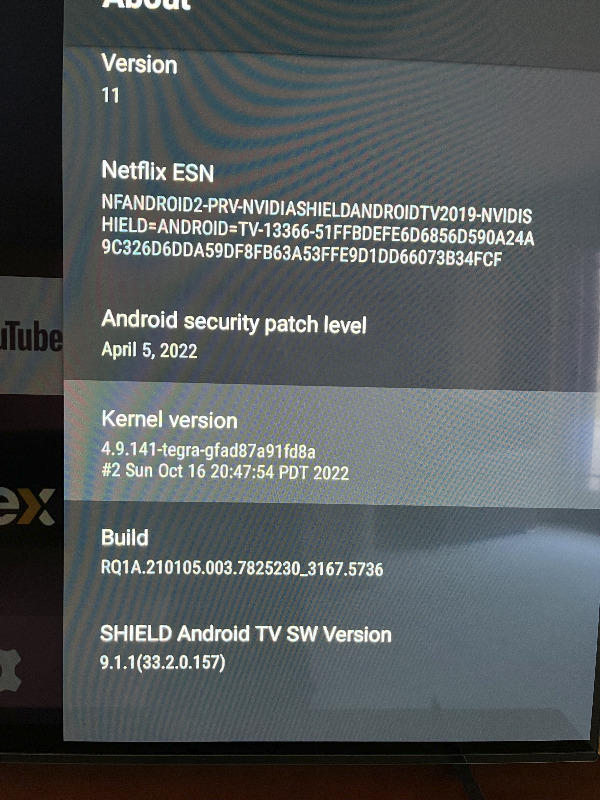
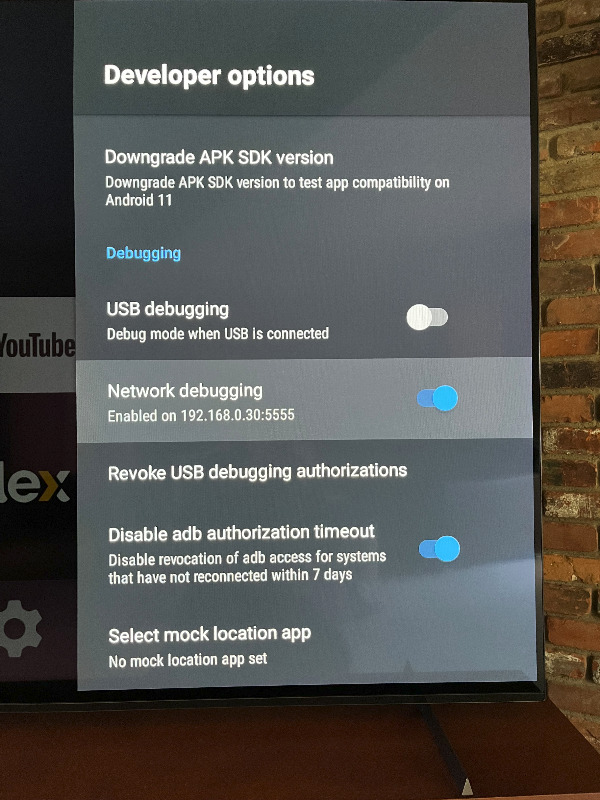
Last edit: 2 years 8 months ago by cjisble. Reason: Added info about keys
Please Log in or Create an account to join the conversation.
Re: NVIDIA Shield Pro 2019
2 years 8 months ago - 2 years 8 months ago
The Shield should show a prompt to choose to allow myServer connection. This has not been apparently not been approved yet.
AndroidTV driver will flush the ADB connection and the driver will auto attempt to connect again. You should then see the prompt again on the TV connected to the Shield to approve with the Shield's handheld remote control.
If you are using a non standard implementation re: a VM / Proxmox etc. Does your installation have the priviliges to do this? Is ADB installed in the VM? This is why this is not supported by Allonis....
AndroidTV driver will flush the ADB connection and the driver will auto attempt to connect again. You should then see the prompt again on the TV connected to the Shield to approve with the Shield's handheld remote control.
If you are using a non standard implementation re: a VM / Proxmox etc. Does your installation have the priviliges to do this? Is ADB installed in the VM? This is why this is not supported by Allonis....
Last edit: 2 years 8 months ago by David Li.
Please Log in or Create an account to join the conversation.
Re: NVIDIA Shield Pro 2019
2 years 8 months ago
I just setup my SmartRemote and it seems to be working. I ran discovery under the Android TV Devices, and the SmartRemote shows up.
From this, I conclude that ADB is setup correctly. I'm continuing to investigate, but I believe the problem is in the Shield.
From this, I conclude that ADB is setup correctly. I'm continuing to investigate, but I believe the problem is in the Shield.
Please Log in or Create an account to join the conversation.
Re: NVIDIA Shield Pro 2019
2 years 8 months agoYou can test with ADB commands in a Terminal Window from the myServer 6 Pi.I just setup my SmartRemote and it seems to be working. I ran discovery under the Android TV Devices, and the SmartRemote shows up.
From this, I conclude that ADB is setup correctly. I'm continuing to investigate, but I believe the problem is in the Shield.
like:
ADB Devices (will show you currently connected devices)
If you look in the AndroidTV driver documentation...lots of other commands / syntax and usages.
Do a NMAP on the Shields IP address to see what ports are open. Classicaly 5555 is used.
Please Log in or Create an account to join the conversation.
Time to create page: 0.263 seconds

Copyright © 2026 Allonis. All Rights Reserved.