Vizio TV driver missing source names

randyf's Avatar Topic Author
User User
  • Posts: 32
  • Thanks: 2

Vizio TV driver missing source names

2 years 7 months ago
#1011
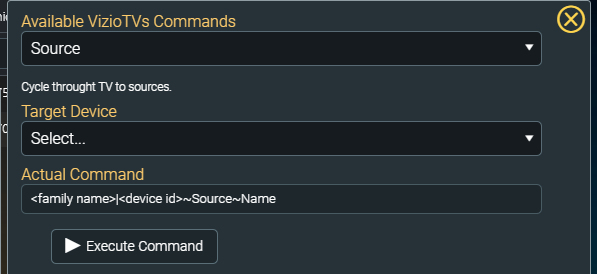
I'm trying to test the Vizio TV driver by changing inputs between HDMI2 to HDMI3 and as I'm using the driver command testing, I'm selecting the Source command and I see the Target Device and Actual Command example (which shows <family name>|<device id>~Source~Name).  After I select the device, I don't see a way to select the Source Name, like I see with the LG WebOS driver.  Is this something that's missing for the Vizio TV driver?

I tried to send the actual command of AV|2~Source~HDMI3 but it just opens the input menu on the TV and doesn't do anything else.

Thanks

Please Log in or Create an account to join the conversation.

randyf's Avatar Topic Author
User User
  • Posts: 32
  • Thanks: 2

Re: Vizio TV driver missing source names

2 years 6 months ago
#1124
Any chance of bumping this item up on the TODO list?  I can't do much if I can't change inputs.

Thanks

Please Log in or Create an account to join the conversation.

randyf's Avatar Topic Author
User User
  • Posts: 32
  • Thanks: 2

Re: Vizio TV driver missing source names

2 years 6 months ago - 2 years 6 months ago
#1488
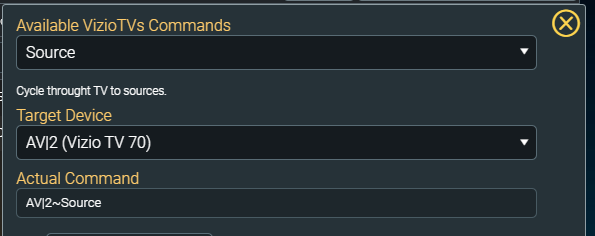
I see that a new Vizio TV driver was released but I'm still having issues changing the inputs.  When I select the Source command, I see the full command listed but then when I select the TV, the command seems to get truncated to not allow the last part.  I also tried entering an input at the end of the command manually, like so:  AV|2~Source~HDMI3

Is this something that is broken or maybe Vizio doesn't fully support this?

Here are some screen shots of what I'm seeing.


Thanks 

 
Last edit: 2 years 6 months ago by randyf.

Please Log in or Create an account to join the conversation.

Time to create page: 0.285 seconds