

Client Support
Caseta Smart Bridge (L-BDG2)


Re: Caseta Smart Bridge (L-BDG2)
1 month 1 week agoI'm not asking you to install it for me.I did a search for RustDesk, and found some basic instructions for setting it up to control a Headless Ubuntu server remotely.Allonis does not support or recommend VM installations with this being a case in point. So, you will have to figure TeamViewer access on your own. Let us know.
Is there a specific version number of RustDesk that I need to install?
There is no GUI in my installation. There are instructions on how to install a virtual X11 dummy monitor profile. I will need to do this, and force headless rendering. Can you do the debugging you need to do in this environment?
Please Log in or Create an account to join the conversation.


Re: Caseta Smart Bridge (L-BDG2)
1 month 1 week ago
Give me access to any PC the I can remote into and open the dashboard and look at log files. Access to Dashboard is what I need.
Please Log in or Create an account to join the conversation.
Re: Caseta Smart Bridge (L-BDG2)
1 month 1 week agoHow about a GoTo Meeting Invitation? I can share my screen and give you keyboard and mouse control.Give me access to any PC the I can remote into and open the dashboard and look at log files. Access to Dashboard is what I need.
Please Log in or Create an account to join the conversation.
Re: Caseta Smart Bridge (L-BDG2)
1 month 1 week ago
I sent an e-mail yesterday. Did you receive it?
Please Log in or Create an account to join the conversation.
Re: Caseta Smart Bridge (L-BDG2)
3 weeks 2 days ago - 3 weeks 2 days ago
I was finally able to connect with Dave P, and he got scenes and buttons working in the driver. Thanks Dave!
Also, with his help, I was able to get the default lighting setup onto my SmartRemote. Since I don't recall seeing any documentation about this, I thought I should share my notes with the group. Also, at the bottom, I added a few suggestions for improvements.
After following the instructions to configure the driver, assign each Dimmer and Scene to a room. The Smart Hub can be assigned to the Equipment Room.
If you have a Pico Remote, name each button for what it does:
Button 2 = top (ON)
Button 3 = middle (favorite preset)
Button 4 = bottom (OFF)
Button 5 = raise
Button 6 = lower
Next, you need to create a source to manage the lighting.Configuration, Sources & Apps,
Create New NON-AV Source(App)
Name = Lights
Type of Source or App = LightingConfiguration,
Sources & Apps by Rooms
Check to add the Lights to every room
The Room(s) now look like this:
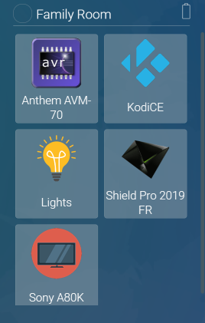
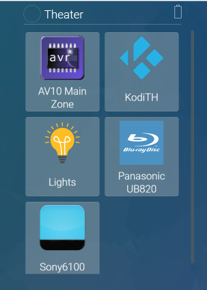
Selecting Lights brings up this screen:
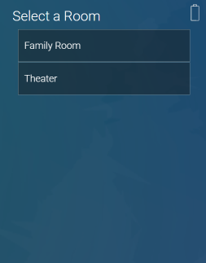
After selecting the Room, it looks like this. Note that the list is scrollable.
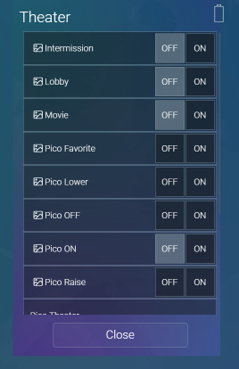
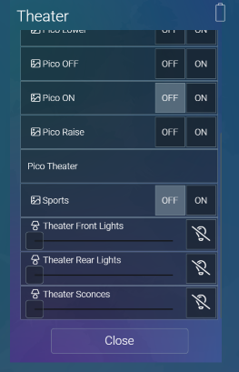
Some suggestions for improvement the layout:
For the Pico Remote, the remote itself appears in the list, along with each button. It would be nice if the buttons were in a sub-menu under the Remote. Selecting the Remote would expand the list and selecting it again would collapse it.
I tried assigning the Pico Remote to the Equipment Room, so that only the buttons would be displayed. That works, but it adds the Equipment Room to the list of rooms to choose from.
Buttons don’t have a toggle. Having both OFF and ON is confusing.
Scenes are just buttons on the Hub. They don’t need OFF and ON either.
It looks like everything is sorted alphabetically. It would be nice if they were sorted by group and then alphabetically within the group. In my case, all the scenes are at the top, except for one, which is at the bottom.
Since the Source is assigned to a Room, it would be nice if I could create two sources, one for each room. Then, instead of bringing up the “Select a Room” page, it could go straight to the lighting for that room.
Also, with his help, I was able to get the default lighting setup onto my SmartRemote. Since I don't recall seeing any documentation about this, I thought I should share my notes with the group. Also, at the bottom, I added a few suggestions for improvements.
After following the instructions to configure the driver, assign each Dimmer and Scene to a room. The Smart Hub can be assigned to the Equipment Room.
If you have a Pico Remote, name each button for what it does:
Button 2 = top (ON)
Button 3 = middle (favorite preset)
Button 4 = bottom (OFF)
Button 5 = raise
Button 6 = lower
Next, you need to create a source to manage the lighting.Configuration, Sources & Apps,
Create New NON-AV Source(App)
Name = Lights
Type of Source or App = LightingConfiguration,
Sources & Apps by Rooms
Check to add the Lights to every room
The Room(s) now look like this:
Selecting Lights brings up this screen:
After selecting the Room, it looks like this. Note that the list is scrollable.
Some suggestions for improvement the layout:
For the Pico Remote, the remote itself appears in the list, along with each button. It would be nice if the buttons were in a sub-menu under the Remote. Selecting the Remote would expand the list and selecting it again would collapse it.
I tried assigning the Pico Remote to the Equipment Room, so that only the buttons would be displayed. That works, but it adds the Equipment Room to the list of rooms to choose from.
Buttons don’t have a toggle. Having both OFF and ON is confusing.
Scenes are just buttons on the Hub. They don’t need OFF and ON either.
It looks like everything is sorted alphabetically. It would be nice if they were sorted by group and then alphabetically within the group. In my case, all the scenes are at the top, except for one, which is at the bottom.
Since the Source is assigned to a Room, it would be nice if I could create two sources, one for each room. Then, instead of bringing up the “Select a Room” page, it could go straight to the lighting for that room.
Last edit: 3 weeks 2 days ago by cjisble. Reason: Formatting
Please Log in or Create an account to join the conversation.
Re: Caseta Smart Bridge (L-BDG2)
2 weeks 6 days ago
Unfortunately, while the driver now handles lighting scenes correctly, the default lighting UI does not call those driver commands.
I sent an e-mail to Dave P with the details and log files last weekend. Let me know if you need anything else.
I sent an e-mail to Dave P with the details and log files last weekend. Let me know if you need anything else.
Please Log in or Create an account to join the conversation.
Time to create page: 0.293 seconds

Copyright © 2026 Allonis. All Rights Reserved.