


Welcome to the Plex App for myServer.
We'd like to announce that Plex integration has come to the myServer family of applications. If you are a Plex user then you can now integrate your Plex environment directly in a myServer user interface.
Plex is a large application and can do a lot of things. This initial release of the myServer Plex app concentrates on the integration of movies. This is probably the most used feature of Plex and we wanted to get this integration sound before tackling everything else Plex can do. So, with that in mind, if you'd like to test our Plex integration read on.
This an advanced beta release. We have tested playback on multiple devices including Windows, Linux, Android and iOS players. This release is focused on Movies playback. Trying to play Music or view photos will not work in this release.
When setting up the system, it's good to know "how it works"....myServer pulls the movie info from the Plex server and displays it on the web user interface. myServer also grabs the list of available, authorized plex client names that gets displayed. When a movie is selected and the Play command is issued, myServer tells the Plex server to have the chosen Plex client to play the movie.
System Requirements:
- myServer v5
- Microsoft Windows (7,8,10) with .Net
- PC with persistent Internet connection (for movie metadata lookup)
- PC accessible hard drive with enough room for movie storage (figure ~7gig per DVD and 28gig per Blu-Ray movie)
- Plex Server installed and running on a network accesible PC or other Plex compatible device (Nvidia Shield TV box as example).
- Plex does not support the use of ISO, IMG, Video_TS, or other "disk image" formats. For those formats, use Kodi player or Media Player Classic. You can convert those images to .mkv files using the Handbrake application.
- Plex user account setup and logged in within the Plex application.
Ensure that the Plex server has DLNA functions turned on so myServer can "find it" during "Discovery". Plex settings web page / Server settings / DLNA tab.
Setup Folder shares for your movie storage directories:
- On the windows 10 PC make sure the movie folder permissions have the group "Users" having full control.
- Share the folder with the group "Everyone" having read/write access. (At least read).
- From the other PCs click Start/Run and type \\<<windows 10 PC name>>\<<windows 10 share name>>. e.g. \\Server\Videos
- This should bring up an authorization dialog asking for a username and password for the Windows 10 pc.
- Enter the username in the form <<windows 10 PC name>>\<<windows 10 username>> e.g. Server\Admin
- Enter the Windows 10 user's password in the password box. Make sure "Remember" is checked off before clicking ok. That way you only have to do this once.
Setup Nvidia Shield Client (if you are using a Shield as your Plex player):
Configure the Shield shared library folder: READ THIS
Ensure you can playback a movie from your Plex Client before adding in myServer capability.
Plex App Installation:
- Download and run the Plex App installer from myInstaller on the primary myServer PC. It can be found within the "Apps" list.
- Download and install the sample Modern.Tablets scenes for myServer on your myServer PC.
- Restart myServer.
Plex Applet Configuration:
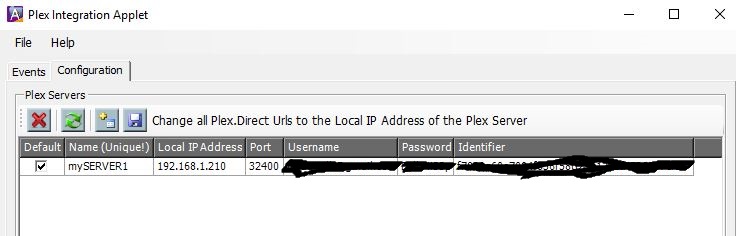
In the configuration tab visit the Plex Servers section. Click on the refresh button and your Plex server(s) should be automatically discovered. If you have more than one Plex server you need to designate one as the primary server.
The app assumes that Plex authentication is turned on. Please define your Plex users in the Plex Users section and mark one of them as the default user. All Plex queries against the server will be done using the default user's authentication.
It should look something like this:
State Variable Configuration:
To select the Plex player, you need to associate the Plex player as a "Watch" source.
- Open the State Variables panel
- Double click on "Watch", click the "+" button to add a new Watch menu choice.
- Copy and paste the below into the edit panel
- Name the Variable Lable as "Plex"
- Cick the Save button. Have patience while the changes are saved and the panel is closed
- Click the State Variable Save Edits button.
Watch CycleState:
If you are using the Watch CycleStates then you'll want to add a new state called Plex. Here is the boilerplate for the macro command.
Macro|SetVariable|{{zones_activezonename_{{clientname}}}}_source~Plex!SetVariable|{{zones_activezonename_{{clientname}}}}_app~plex!SetVariable|{{zones_activezonename_{{clientname}}}}_audio_switcher_input~0!SetVariable|{{zones_activezonename_{{clientname}}}}_video_switcher_input~0!If|IsNE##{{{{zones_activezonename_{{clientname}}}}_audio_switcher_input}}##0##AV|{{{{zones_activezonename_{{clientname}}}}_audio_switcher_id}}~Switch~{{{{zones_activezonename_{{clientname}}}}_audio_switcher_input}}~{{{{zones_activezonename_{{clientname}}}}_audio_switcher_output}}##!If|IsNE##{{{{zones_activezonename_{{clientname}}}}_video_switcher_input}}##0##Switching|{{{{zones_activezonename_{{clientname}}}}_video_switcher_id}}~Switch~{{{{zones_activezonename_{{clientname}}}}_video_switcher_input}}~{{{{zones_activezonename_{{clientname}}}}_video_switcher_output}}##!WebCmd|{{clientname}}~LoadScene|Plex
Play a movie:
- Open the Modern.tablets user interface within a browser.
- Select the Zone (bottom right)
- Select Source button
- Choose the Zone you would like to watch (and the one configured for Kodi player)
- Choose Plex
- Click on Media Category
- Click on Plex player (middle left)
- Select Browse Movies and click on a movie to watch
- Click on the Play Movie icon
- Movie should open within the Plex player and start playing the movie
- You can click the Remote Control button to remotely control the Plexi player transport controls.
- Enjoy the Movie!
UI Scenes:
The Modern.Tablets sample app has been updated to include scenes for Plex. Here's what they look like.
The Main Plex scene
- Main scene
Notice that the Cast button automatically finds all your Plex players on the network. Just select it from the drop down.
Since Plex contains multiple libraries of unique content the Media Category drop down will show your Movie and TV categories. select one from the drop down as your active category.
- Client and Categories
Browsing Movies
- Browse Movies
Movie Details
- Movie Details
Browse TV Shows
- Browse TV
TV Details
- TV details
TV Episodes Selector
- TV Episodes
Library Searching
- Searching
Plex Player Remote Control
Note that some types of Plex clients don't support all transport controls. This is apparantly an inconsistency within Plex.
- Remote Control
