

Client Support
Yamaha AVR driver


Yamaha AVR driver
2 years 7 months ago - 2 years 7 months ago
There doesn't seem to be a specific area for Yamaha driver(s) so I've started this topic to keep the general driver release thread clean of discussion of specific drivers.
At the moment it looks like I've got three server variables that were set up when the driver was configured (av_25_connected, av_25_name and av_25_power) but the av_25_power variable always stays as 'Standby' even when the amp is turned on by myServer. av_25_connected does correctly switch between 0 and 1 as the driver connects and disconnects.
I never get an av_25_volume variable created to mirror the volume.
Andrew
At the moment it looks like I've got three server variables that were set up when the driver was configured (av_25_connected, av_25_name and av_25_power) but the av_25_power variable always stays as 'Standby' even when the amp is turned on by myServer. av_25_connected does correctly switch between 0 and 1 as the driver connects and disconnects.
I never get an av_25_volume variable created to mirror the volume.
Andrew
Last edit: 2 years 7 months ago by andrew.
Please Log in or Create an account to join the conversation.
Re: Yamaha AVR driver
2 years 7 months ago - 2 years 7 months ago
Somehow I've ended up with two threads but I'll use this one as it's under the newly created "Yamaha AVR" category.
Current position with this driver:
Andrew
Current position with this driver:
- 'av_25_power' variable always stays as 'Standby' when the amp is turned on either by myServer or other control
- I never get an av_25_volume variable created to store the volume
- Driver disconnects after 40 seconds of inactivity then reconnects 10 seconds after that
Andrew
Code:
4.2.2.1 Auto Disconnection / Keep Alive
The Product will automatically disconnect TCP/IP connection in about 40 seconds
with no reception of commands or no status change (meaning no Auto Feedback
happens) while TCP/IP connection is alive. Therefore some commands have to be
issued periodically (within 40 seconds) in order to keep TCP/IP connection alive.
The following is recommended to use as a keep-alive command;
@SYS:MODELNAME=?[CR/LF]
Also see the example sequence of Keep Alive in section 5.2 Control Examples for details.
4.2.2.2 Necessity of keeping alive the connection
With YNCA control on Ethernet, although it is basically assumed that TCP/IP port
be kept alive, it can be once disconnected and re-connected as needed basis of
sending commands unless Auto Feedback is required in the control system that
you’re building. In other words, keep alive has to be done if Auto Feedback status
update is a must.
Last edit: 2 years 7 months ago by andrew.
Please Log in or Create an account to join the conversation.
Re: Yamaha AVR driver
2 years 7 months ago
PS I get the impression there should be a plethora of av_25_* variables created for this driver. I don't see any of them, only _connected, _name and _power (which never changes) as stated previously. It's as if the responses back from the amplifier aren't being processed by the driver and stored in variables.
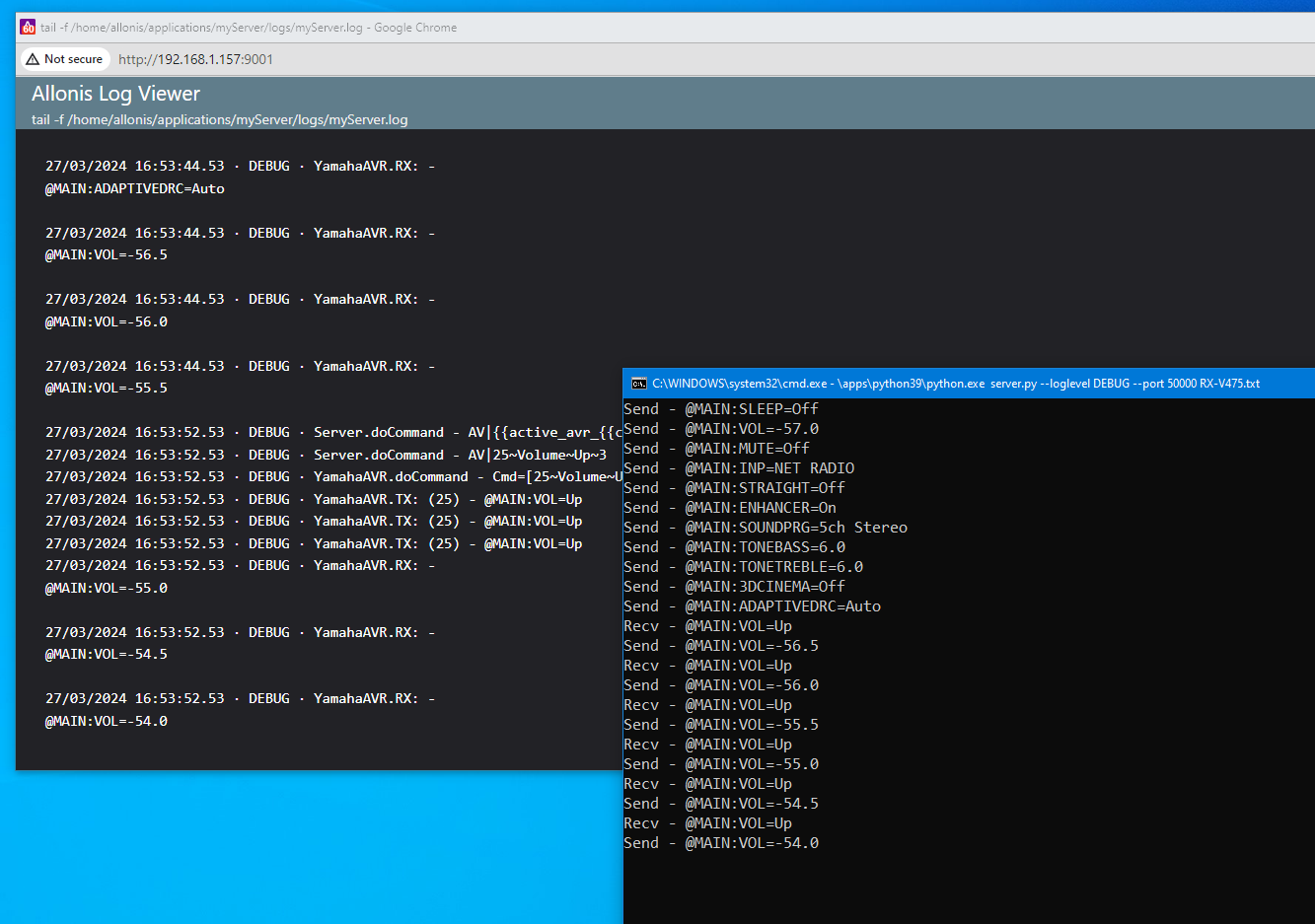
There's a python implementation of a YNCA driver here github.com/mvdwetering/ynca and it rather helpfully contains a Yamaha avr simulator. It doesn't implement the connection drop after 40s idle but apart from that it seems to work. You 'fill it up' on start up with data from a real amp (or made up) and it uses that in its responses. I've extracted just the relevant files needed to run it and attached them to this post. You can run it like this:
then use AddReceiver in myServer to add it and test some commands. Hopefully this will help with the debugging.
Andrew
There's a python implementation of a YNCA driver here github.com/mvdwetering/ynca and it rather helpfully contains a Yamaha avr simulator. It doesn't implement the connection drop after 40s idle but apart from that it seems to work. You 'fill it up' on start up with data from a real amp (or made up) and it uses that in its responses. I've extracted just the relevant files needed to run it and attached them to this post. You can run it like this:
Code:
$ /c/apps/python39/python.exe server.py --loglevel DEBUG --port 50000 RX-V475.txt
then use AddReceiver in myServer to add it and test some commands. Hopefully this will help with the debugging.
Andrew
Please Log in or Create an account to join the conversation.

Re: Yamaha AVR driver
2 years 7 months ago
The drivers only query for power, volume, mute and source by default. To get additional settings the polling commands will have to be modified.
Please Log in or Create an account to join the conversation.
Re: Yamaha AVR driver
2 years 7 months agoBut none of those are working at the moment, at least not that I can see.The drivers only query for power, volume, mute and source by default. To get additional settings the polling commands will have to be modified.
Andrew
Please Log in or Create an account to join the conversation.
Re: Yamaha AVR driver
2 years 7 months ago
I've forked the Python ynca project and updated the simulator so that it times out after 40 seconds of no activity from the myServer client. So that aspect of the driver can be debugged now too.
My fork is at github.com/andrewmk/ynca?tab=readme-ov-file#ynca-server and the simulator is run (as per the readme) from the root of the project:
python3.exe -m ynca.server --loglevel DEBUG --port 50000 /logs/RX-V475.txt
Andrew
My fork is at github.com/andrewmk/ynca?tab=readme-ov-file#ynca-server and the simulator is run (as per the readme) from the root of the project:
python3.exe -m ynca.server --loglevel DEBUG --port 50000 /logs/RX-V475.txt
Andrew
Please Log in or Create an account to join the conversation.
Time to create page: 0.265 seconds

Copyright © 2026 Allonis. All Rights Reserved.