

Client Support
Timed action


Re: Timed action
2 years 3 weeks agoOK so what you can try is this or something similarI saw some of your posts on doing volume I'll have to go back and look at them a little closer.
Thinking about how to do this was wondering is there a way to call a macro from a macro??
Thanks
Create a couple server variables. Name them whatever you like, but make them something you'll understand. You'll need:
One to track when to turn the overlay on and off. I call mine "display_volume"
One to track how long to keep the overlay visible onscreen. I call mine "display_volume_endtime"
I use separate macros for my volume up/down commands but they are identical. After creating these variables I've configured my volume up macro so it looks like this:
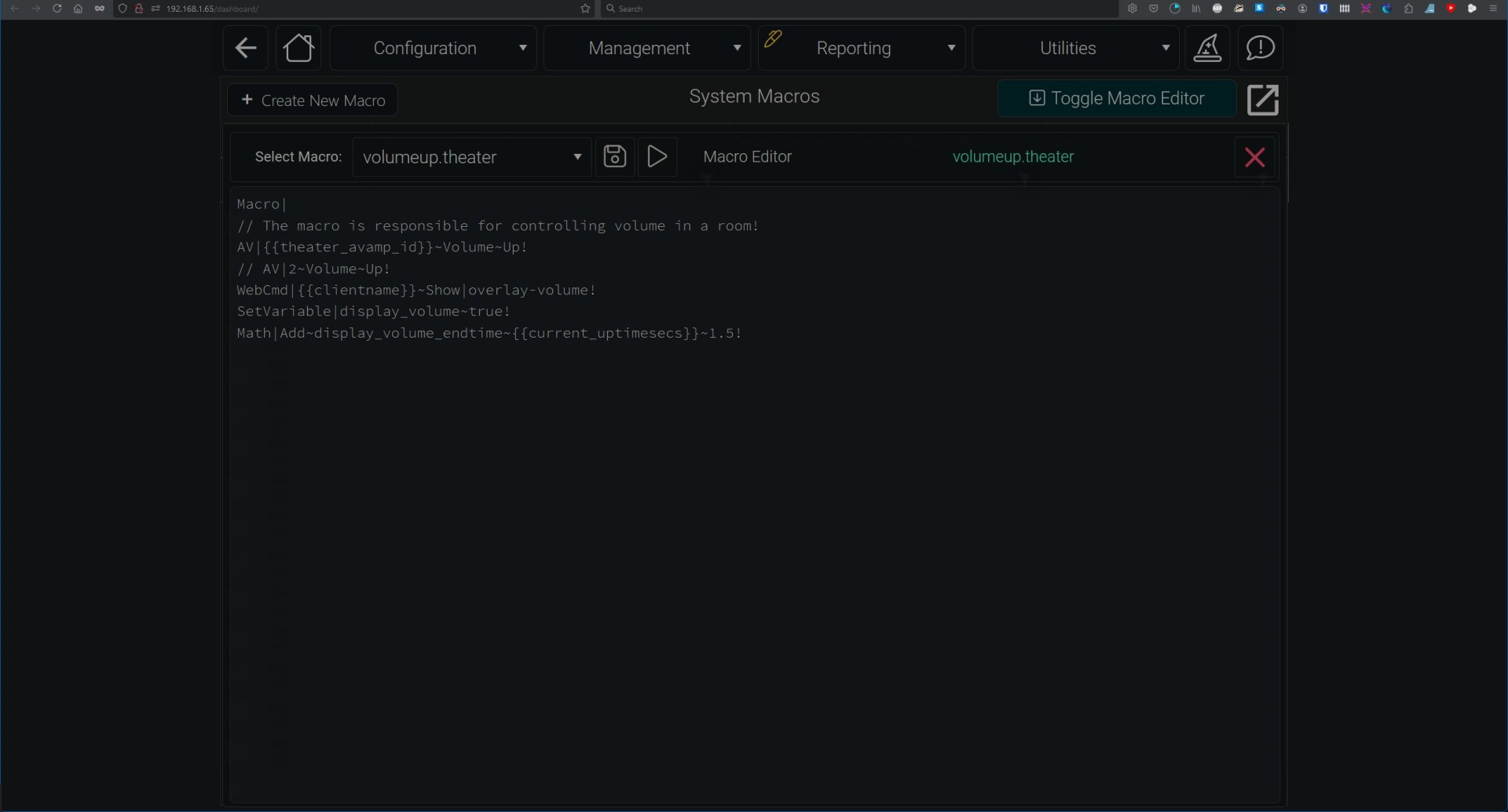
You can obviously ignore the commented lines, I was just being lazy.
The first AV command turns the volume up on the receiver.
The WebCmd line turns on the overlay on the remote. "overlay_volume" is the name of my volume overlay page in myDesigner. Yours will obviously be different.
The SetVariable line sets the tracking variable for whether the overlay is visible or not
The Math command sets the length of time the overlay is displayed before turning off. It's taking the total amount of time in seconds that the server has been online and adding whatever arbitrary amount of time you like. The only thing you should have to adjust is the numerical value at the end. I played with different amounts of time and settled on 1.5 seconds. For me it's long enough for me to easily see the volume level without being so long that it feels like the remote is hanging.
After this you need to create an automation to turn the overlay back off. Mine looks like this
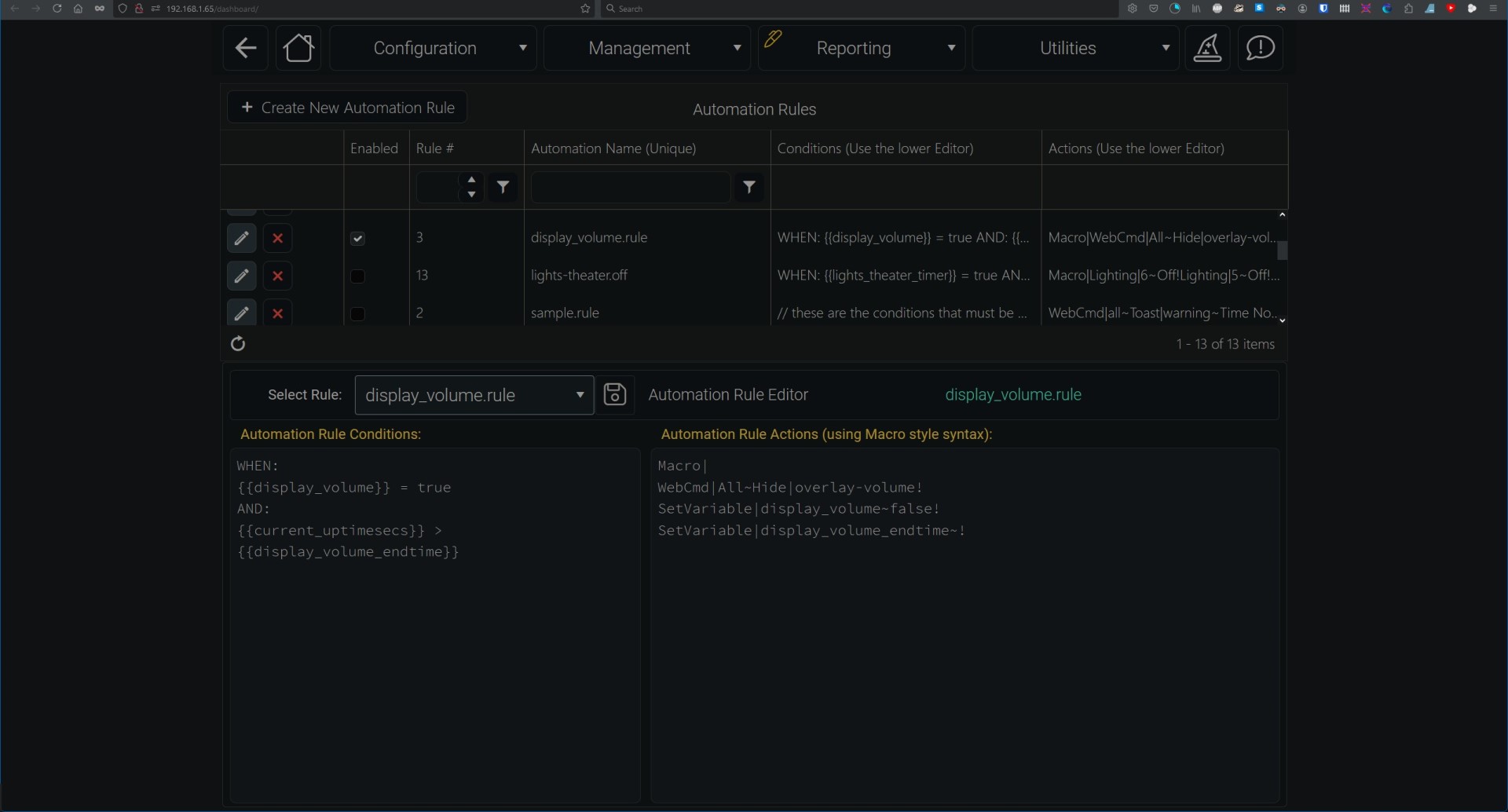
Parsed out, this rule says:
When the tracking variable we created shows that the overlay is visible, and the total uptime of the server exceeds the time we set as the overlay shutoff:
Hide the overlay
Set the tracking variable back to off
Zero out the variable that sets the time for the overlay to be visible
Hope this helps! Let me know if there's anything I can clarify further.
The following user(s) said Thank You: andrew
Please Log in or Create an account to join the conversation.
Re: Timed action
2 years 3 weeks ago - 2 years 3 weeks ago
Thanks for the help
The idea or concept I am aiming for is a full screen volume overlay with a bar or radial guage that also shows the sound settings of the reciever mode, dialog enhance, etc then clicking the screen before the few second timed close. Would allow the overlay to remain open and allow changing the sound settings before being dismissed with a onscreen button.
I have figured out how to convert Marantz volume level -80 to 12.5 into something usable.
Math|Subtract~volrange~12.5~-80!
Math|Subtract~volCSV~{{av_4_volume}}~-80!
Math|Multiply~volCSV2nd~{{volCSV}}~100!
Math|Divide~volpercentage~{{volCSV2nd}}~{{volrange}}!
The idea or concept I am aiming for is a full screen volume overlay with a bar or radial guage that also shows the sound settings of the reciever mode, dialog enhance, etc then clicking the screen before the few second timed close. Would allow the overlay to remain open and allow changing the sound settings before being dismissed with a onscreen button.
I have figured out how to convert Marantz volume level -80 to 12.5 into something usable.
Math|Subtract~volrange~12.5~-80!
Math|Subtract~volCSV~{{av_4_volume}}~-80!
Math|Multiply~volCSV2nd~{{volCSV}}~100!
Math|Divide~volpercentage~{{volCSV2nd}}~{{volrange}}!
Last edit: 2 years 3 weeks ago by Sat32.
Please Log in or Create an account to join the conversation.
Re: Timed action
2 years 3 weeks agoGotcha, I misunderstood. I'll have to roll that around in my head for a bit lolThanks for the help
The idea or concept I am aiming for is a full screen volume overlay with a bar or radial guage that also shows the sound settings of the reciever mode, dialog enhance, etc then clicking the screen before the few second timed close. Would allow the overlay to remain open and allow changing the sound settings before being dismissed with a onscreen button.
I have figured out how to convert Marantz volume level -80 to 12.5 into something usable.
Math|Subtract~volrange~12.5~-80!
Math|Subtract~volCSV~{{av_4_volume}}~-80!
Math|Multiply~volCSV2nd~{{volCSV}}~100!
Math|Divide~volpercentage~{{volCSV2nd}}~{{volrange}}!
Please Log in or Create an account to join the conversation.
Time to create page: 0.277 seconds

Copyright © 2026 Allonis. All Rights Reserved.