

Client Support
Anyone Using the iMatic Relay Driver? Need Help


Anyone Using the iMatic Relay Driver? Need Help
6 months 2 weeks ago
Having a hard time getting this to work. Suggested syntax to add the controller in command builder is:
iMatic|AddController~Name~Address~Port~Relays~room
I modify that to reflect my equipment and enter:
iMatic|AddController~IPRelayControl1~192.168.10.25~30000~8~Infrastructure
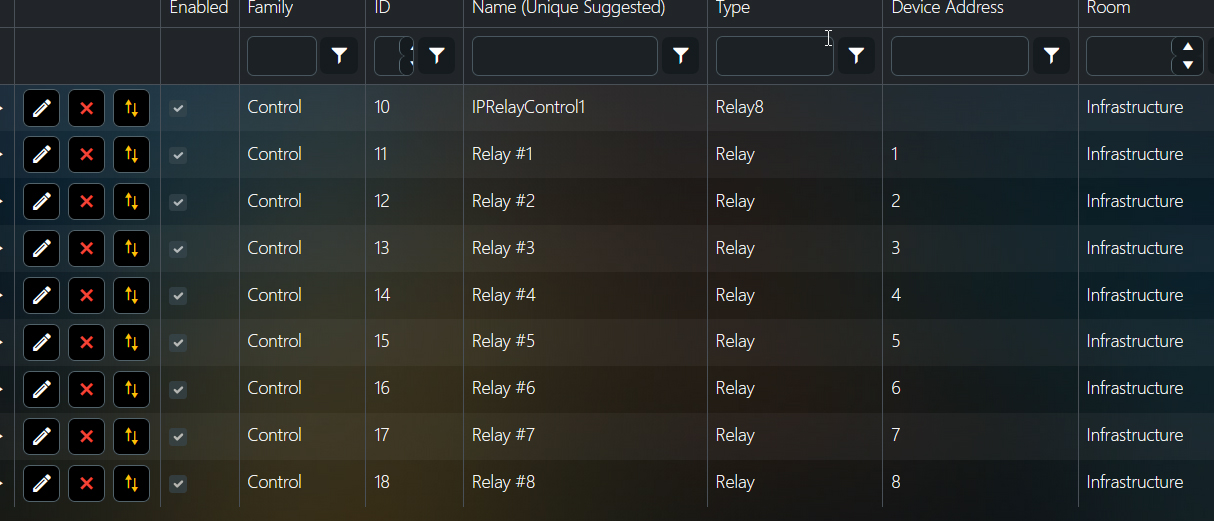
The controller and relays appear as shown in the attached pic. But I can't control the various relays. The commands are being logged as Cmd=[4-On] or similar by MyServer, But I don't hear the relay click. I can type 192.168.10.25/30000 into a browser and easily control the relays and the click is quite audible. Thoughts?
Thx
iMatic|AddController~Name~Address~Port~Relays~room
I modify that to reflect my equipment and enter:
iMatic|AddController~IPRelayControl1~192.168.10.25~30000~8~Infrastructure
The controller and relays appear as shown in the attached pic. But I can't control the various relays. The commands are being logged as Cmd=[4-On] or similar by MyServer, But I don't hear the relay click. I can type 192.168.10.25/30000 into a browser and easily control the relays and the click is quite audible. Thoughts?
Thx
Please Log in or Create an account to join the conversation.
Re: Anyone Using the iMatic Relay Driver? Need Help
6 months 2 weeks ago
If it's listening on port 30000 then you'd be typing this into a browser wouldn't you?
192.168.10.25:30000/
And if it's not listening on port 30000 and is using the normal http port then port should be 80.
Or does port not mean tcp port in this context?
192.168.10.25:30000/
And if it's not listening on port 30000 and is using the normal http port then port should be 80.
Or does port not mean tcp port in this context?
Please Log in or Create an account to join the conversation.
Re: Anyone Using the iMatic Relay Driver? Need Help
6 months 2 weeks ago
You might be on to something Andrew. Actually I type this into a browser:
192.168.10.25/30000
Then I remembered something I saw in the documentation:Note: the "Port" is not really a port number at all. It is just a custom URL path. So, the device is always on Port 80 and cannot be changed if you need to Port Forward your firewall for some reason.So I reconfigured the driver with an address like this:
Http://192.168.10.25:80
I get log entries like communication is taking place but the relays still don't click.

192.168.10.25/30000
Then I remembered something I saw in the documentation:Note: the "Port" is not really a port number at all. It is just a custom URL path. So, the device is always on Port 80 and cannot be changed if you need to Port Forward your firewall for some reason.So I reconfigured the driver with an address like this:
Http://192.168.10.25:80
I get log entries like communication is taking place but the relays still don't click.
Please Log in or Create an account to join the conversation.
Re: Anyone Using the iMatic Relay Driver? Need Help
6 months 2 weeks ago
I think if it were me at this point I'd be running wireshark or similar on your myServer box and seeing what it actually does on the network when it executes the commands that don't work, and comparing that with browser dev tools or wireshark on your PC when you use the browser method and it does work.
I noticed the hex digits in your screenshot looked like ASCII so I translated them.
48 54 54 50 2f 31 2e 30 20 32 30 30 20 4f 4b 0d 0a 43 6f 6e 74 65 6e 74 2d
translates to
HTTP/1.0 200 OK
Content-
so myServer is getting something back from a webserver somewhere. But it might be receiving the control web page from the relay box embedded web server instead of actually controlling the relays. Snooping on what's going over the wire and coming back with wireshark would let you see what's going on.
I noticed the hex digits in your screenshot looked like ASCII so I translated them.
48 54 54 50 2f 31 2e 30 20 32 30 30 20 4f 4b 0d 0a 43 6f 6e 74 65 6e 74 2d
translates to
HTTP/1.0 200 OK
Content-
so myServer is getting something back from a webserver somewhere. But it might be receiving the control web page from the relay box embedded web server instead of actually controlling the relays. Snooping on what's going over the wire and coming back with wireshark would let you see what's going on.
Please Log in or Create an account to join the conversation.
Re: Anyone Using the iMatic Relay Driver? Need Help
6 months 1 week agoI think if it were me at this point I'd be running wireshark or similar on your myServer box and seeing what it actually does on the network when it executes the commands that don't work, and comparing that with browser dev tools or wireshark on your PC when you use the browser method and it does work.
I noticed the hex digits in your screenshot looked like ASCII so I translated them.
48 54 54 50 2f 31 2e 30 20 32 30 30 20 4f 4b 0d 0a 43 6f 6e 74 65 6e 74 2d
translates to
HTTP/1.0 200 OK
Content-
so myServer is getting something back from a webserver somewhere. But it might be receiving the control web page from the relay box embedded web server instead of actually controlling the relays. Snooping on what's going over the wire and coming back with wireshark would let you see what's going on.
Thanks Andrew but this strikes me as something a developer should be doing not an end user. And frankly I have no clue what you are even talking about.
Please Log in or Create an account to join the conversation.
Re: Anyone Using the iMatic Relay Driver? Need Help
6 months 1 week ago
I'm afraid I think the only way you'll get what you want if you don't understand the technical side of what is going on is if you buy one of these
allonis.com/index.php?option=com_opencar...=relay&product_id=93
Or pay a developer to help you which will probably be more expensive.
Or pay a developer to help you which will probably be more expensive.
Please Log in or Create an account to join the conversation.
Time to create page: 0.231 seconds

Copyright © 2026 Allonis. All Rights Reserved.