

Client Support
Volume Variable not updating

Re: Volume Variable not updating
2 years 6 months ago
Thanks - I just saw a new driver out there and downloaded it. No change with the newest driver. Without appending ~1, the volume up / down commands do nothing and there is no Denon RX response in the logs.
Teamviewer shows as on and available - are you not able to access it?
Teamviewer shows as on and available - are you not able to access it?
Please Log in or Create an account to join the conversation.

Re: Volume Variable not updating
2 years 6 months ago
I saw there was another update today so I updated to that and the denon driver is now working without the need for the ~1. I still think it would be nice to be able to move in 0.5db increments like the receiver is meant to do but I do like the fact that the volume now changes on every button press. Thanks Dave.
Please Log in or Create an account to join the conversation.

Re: Volume Variable not updating
2 years 6 months ago
If you leave off the ~1 (or use ~1) then the Denon does inc/dec by 0.5db
Please Log in or Create an account to join the conversation.
Re: Volume Variable not updating
2 years 6 months ago
No it doesn't. Here is the proof.
25/03/2024 18:45:11.45 · DEBUG · Server.doCommand - AV|2~Volume~Up from dashboard-fx-l367
25/03/2024 18:45:11.45 · DEBUG · Denon.doCommand - Cmd=[2~Volume~Up] Client=[dashboard-fx-l367]
25/03/2024 18:45:11.45 · DEBUG · Denon.TX: (2) - MV58
25/03/2024 18:45:11.45 · DEBUG · Denon.RX - <<MV58>>
25/03/2024 18:45:11.45 · DEBUG · Server.doCommand - Math|Subtract~theater_display_volume_db_bjv~{{av_2_volume}}~80 from
25/03/2024 18:45:11.45 · DEBUG · Server.doCommand - Math|Subtract~theater_display_volume_db_bjv~58~80
25/03/2024 18:45:11.45 · DEBUG · Denon.RX - <<MVMAX 98>>
25/03/2024 18:45:26.45 · DEBUG · Server.doCommand - AV|2~Volume~Up from dashboard-fx-l367
25/03/2024 18:45:26.45 · DEBUG · Denon.doCommand - Cmd=[2~Volume~Up] Client=[dashboard-fx-l367]
25/03/2024 18:45:26.45 · DEBUG · Denon.TX: (2) - MV59
25/03/2024 18:45:26.45 · DEBUG · Denon.RX - <<MV59>>
25/03/2024 18:45:26.45 · DEBUG · Server.doCommand - Math|Subtract~theater_display_volume_db_bjv~{{av_2_volume}}~80 from
25/03/2024 18:45:26.45 · DEBUG · Server.doCommand - Math|Subtract~theater_display_volume_db_bjv~59~80
25/03/2024 18:45:26.45 · DEBUG · Denon.RX - <<MVMAX 98>>
25/03/2024 18:45:11.45 · DEBUG · Server.doCommand - AV|2~Volume~Up from dashboard-fx-l367
25/03/2024 18:45:11.45 · DEBUG · Denon.doCommand - Cmd=[2~Volume~Up] Client=[dashboard-fx-l367]
25/03/2024 18:45:11.45 · DEBUG · Denon.TX: (2) - MV58
25/03/2024 18:45:11.45 · DEBUG · Denon.RX - <<MV58>>
25/03/2024 18:45:11.45 · DEBUG · Server.doCommand - Math|Subtract~theater_display_volume_db_bjv~{{av_2_volume}}~80 from
25/03/2024 18:45:11.45 · DEBUG · Server.doCommand - Math|Subtract~theater_display_volume_db_bjv~58~80
25/03/2024 18:45:11.45 · DEBUG · Denon.RX - <<MVMAX 98>>
25/03/2024 18:45:26.45 · DEBUG · Server.doCommand - AV|2~Volume~Up from dashboard-fx-l367
25/03/2024 18:45:26.45 · DEBUG · Denon.doCommand - Cmd=[2~Volume~Up] Client=[dashboard-fx-l367]
25/03/2024 18:45:26.45 · DEBUG · Denon.TX: (2) - MV59
25/03/2024 18:45:26.45 · DEBUG · Denon.RX - <<MV59>>
25/03/2024 18:45:26.45 · DEBUG · Server.doCommand - Math|Subtract~theater_display_volume_db_bjv~{{av_2_volume}}~80 from
25/03/2024 18:45:26.45 · DEBUG · Server.doCommand - Math|Subtract~theater_display_volume_db_bjv~59~80
25/03/2024 18:45:26.45 · DEBUG · Denon.RX - <<MVMAX 98>>
Please Log in or Create an account to join the conversation.
Re: Volume Variable not updating
2 years 6 months ago - 2 years 6 months ago
Denon, YamahaAVR drivers have been updated. A PioneerAVR driver has been released. PioneerAVR is an experiment. Let me know if it works. The goal of these drivers is to provide the basic functionality for day to day use. They can be added to if necessary. The volume UP and DOWN commands implement the protocol commands for up and down which increment in 0.5 db steps.
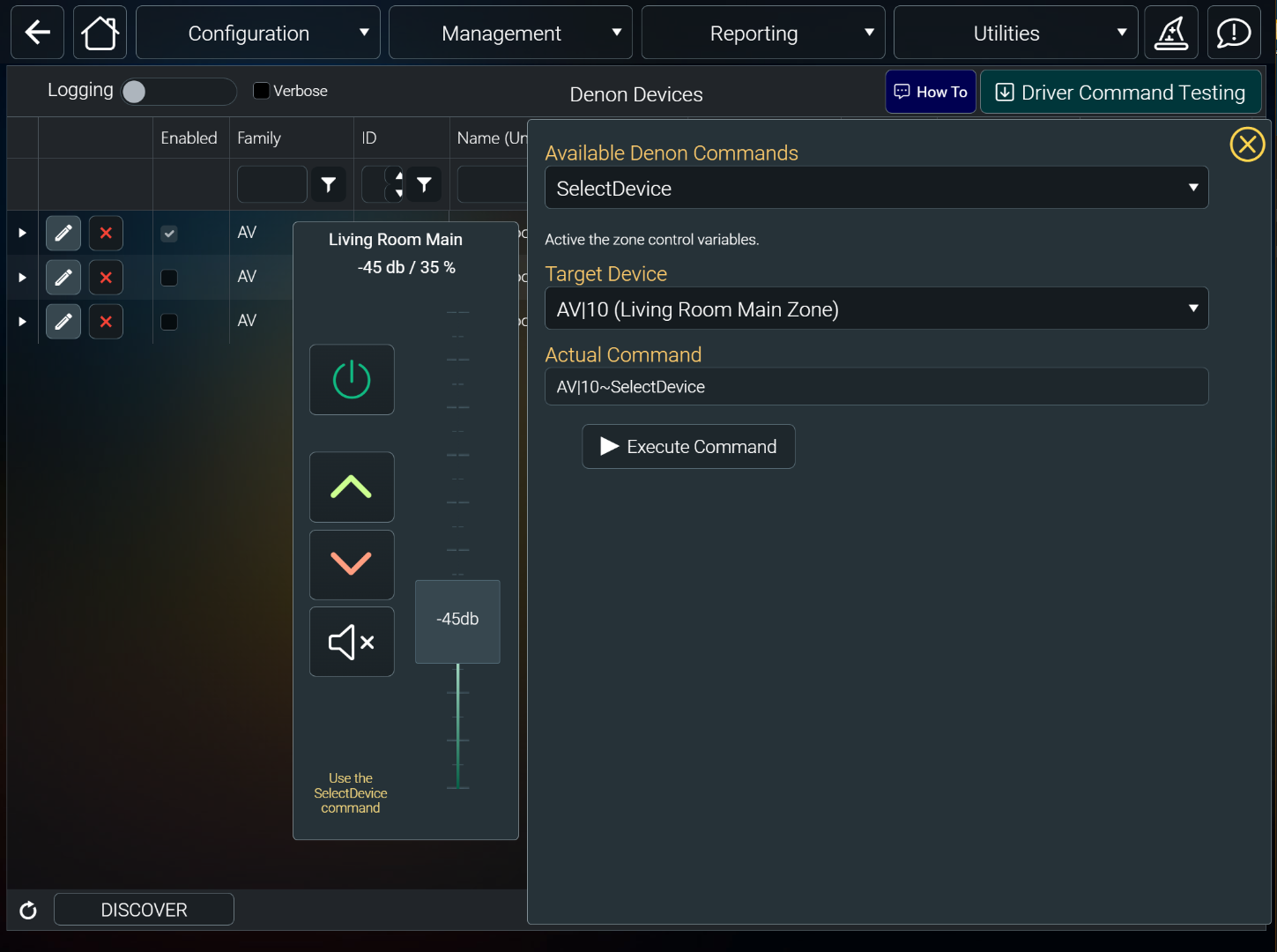
All three drivers introduce a volume_db variable that tracks the db values while the volume variable continues to track percentage.
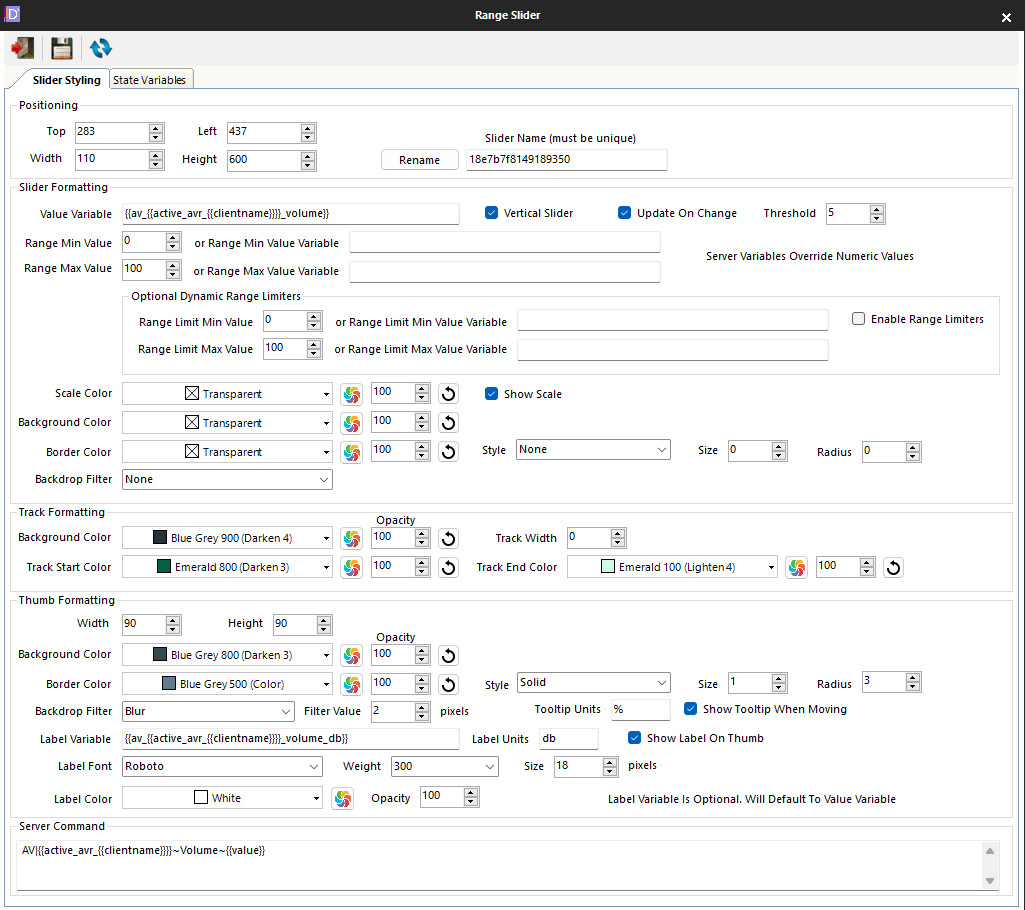
The volume slider web component has been modified to allow for using the db label variable on the slider thumb instead of showing percentage. Look at the individual driver pages in command builder pages to see how to implement.
Here is the Denon driver showing the db variable being used.
Here is the web object being edited in the Designer showing the new Thumb label variable.
All three drivers introduce a volume_db variable that tracks the db values while the volume variable continues to track percentage.
The volume slider web component has been modified to allow for using the db label variable on the slider thumb instead of showing percentage. Look at the individual driver pages in command builder pages to see how to implement.
Here is the Denon driver showing the db variable being used.
Here is the web object being edited in the Designer showing the new Thumb label variable.
Last edit: 2 years 6 months ago by davep.
The following user(s) said Thank You: bowlingbeeg, LimeyFK
Please Log in or Create an account to join the conversation.
Re: Volume Variable not updating
2 years 6 months ago
Just tried the Denon driver and things are working great. Increments of .5db and the new variable is working. Thanks Dave!
Please Log in or Create an account to join the conversation.
Time to create page: 0.255 seconds

Copyright © 2026 Allonis. All Rights Reserved.