
How To: Playing an audio file upon a button push
How we did it:
The button is a simple momentary contact button that is wired to an iTach Flex Sensor adapter. Here is how it is wired:
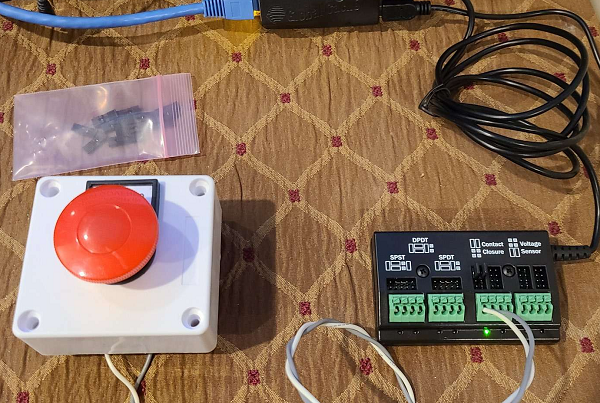
Then, in the Global Cache myServer 6 driver, set the iTach Flex like this:
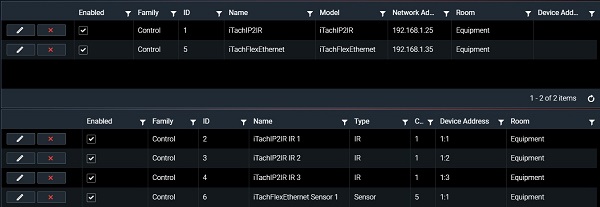
Next is to setup your audio device:
This uses Allonis's myAudioPlayer hardware as the streaming player. The stereo audio output is combined in the cable to mono which then goes into a DBX audio input. The DBX audio output is connected to an amplifier / speaker.
Here is the MediaPlayer Driver setup:

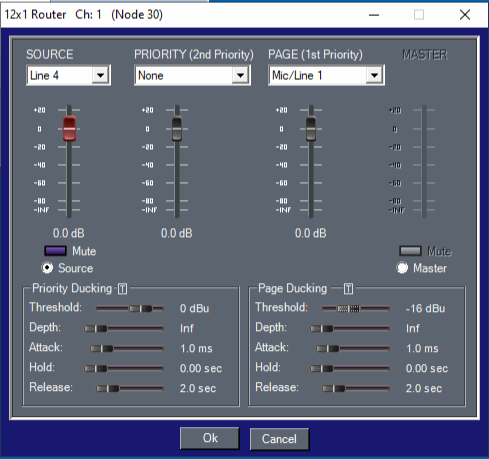
Here is the DBX setup:

Note you can also within the DBX software configure Microphone / Line In Ducking to prioritize the media file audio over the top of the current audio source. The current source then fades back in when the media file audio is done playing.
We used -16db threshold setting.
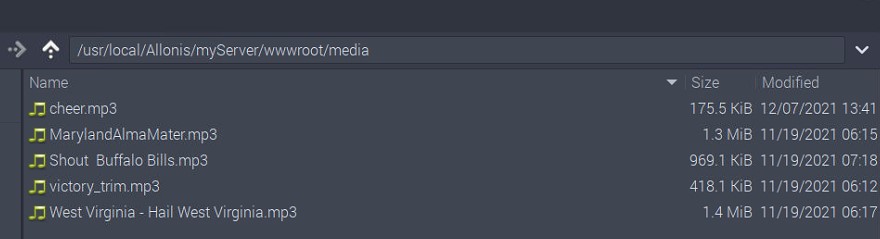
Upload your media file to stream. Note the file folder directory is in the web folder. This is because myServer's webserver is what is streaming the content to the myAudioPlayer hardware:
The myAudioPlayer is setup with the correct audio output device (like a HifiBerry DAC +).
Once you have the audio setup, then create an automation event like: (Note ipaddress should be that of myServer not myAudio player)

So, when the Button is pushed, the Flex sends a signal to myServer that the contact was closed which the GlobalCache driver changes a variable state (control_6_state in this example). This then fires the automation rule action that tells myAudioPlayer to play the mp3 audio file.
The above example can be used for countless use cases.