
JVC makes projectors very popular for Home Theaters.
myServer 6's JVC driver adds control of them.
Tested on JVC RS45. Should support: (X30/X70/X90/RS45/55/65)
Installation:
Add the JVC Driver from myServer 6 Software Updater
Add Device from the Driver Command Testing list. Assign it's IP address and associate it to a Room.
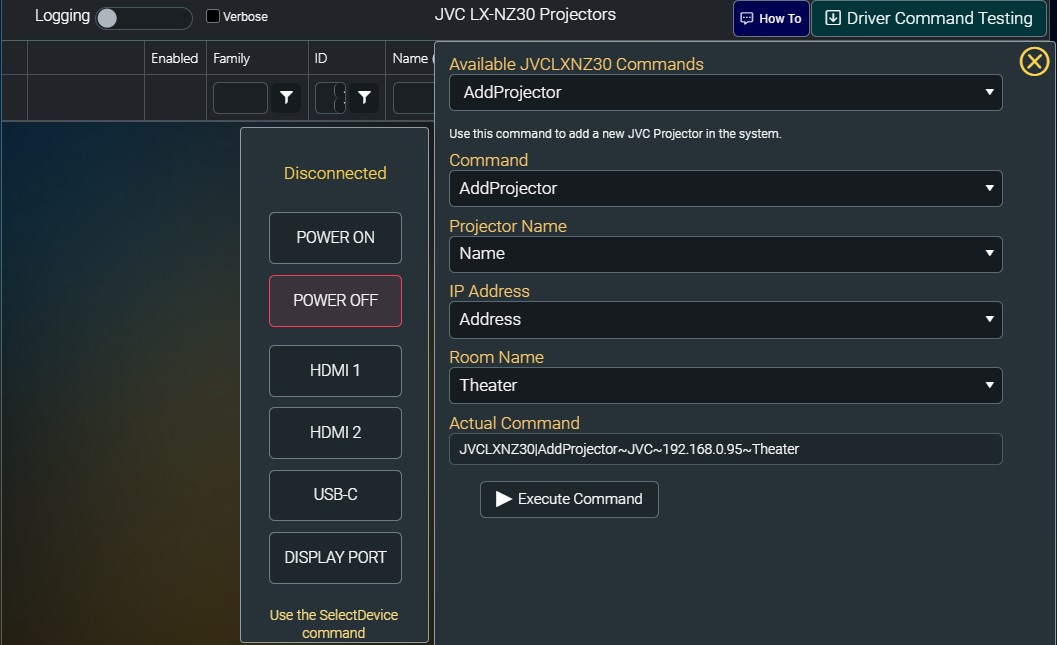
Command in the Command Builder include On / Off and choosing Video Input connection.
LENS MEMORY (X30/X70/X90/RS45/55/65)
Lens Memory Save
Lens Memory Select
ANAMORPHIC
Anamorphic - Off
Anamorphic - A
Anamorphic - B
3/15/2024: Driver updated. It will now automatically disconnect after every command. If it doesn't we will have to remote into a server that has a projector that does not automatically close and watch what it is doing.