

Client Support
Working backlight ETA?


Re: Working backlight ETA?
11 months 2 weeks ago - 11 months 2 weeks ago
Steps 1-7 are server based.
Steps 8-12 are done on remote.
I didn't do find my remote stuff as my remote can be in only one of two places. Arm of my chair or it's cradle.
Steps 8-12 are done on remote.
I didn't do find my remote stuff as my remote can be in only one of two places. Arm of my chair or it's cradle.
Last edit: 11 months 2 weeks ago by Fattykidd.
The following user(s) said Thank You: rec head
Please Log in or Create an account to join the conversation.
Please Log in or Create an account to join the conversation.
Re: Working backlight ETA?
11 months 2 weeks ago
Can someone make sure this google doc looks correct? I'm pretty sure Step 6 is where the problems occur so I haven't done it yet and that is as far as my notes go.
Notes on updating remote
Notes on updating remote
Please Log in or Create an account to join the conversation.
Last edit: 11 months 2 weeks ago by Fattykidd. Reason: update picture
Please Log in or Create an account to join the conversation.


Re: Working backlight ETA?
11 months 2 weeks ago
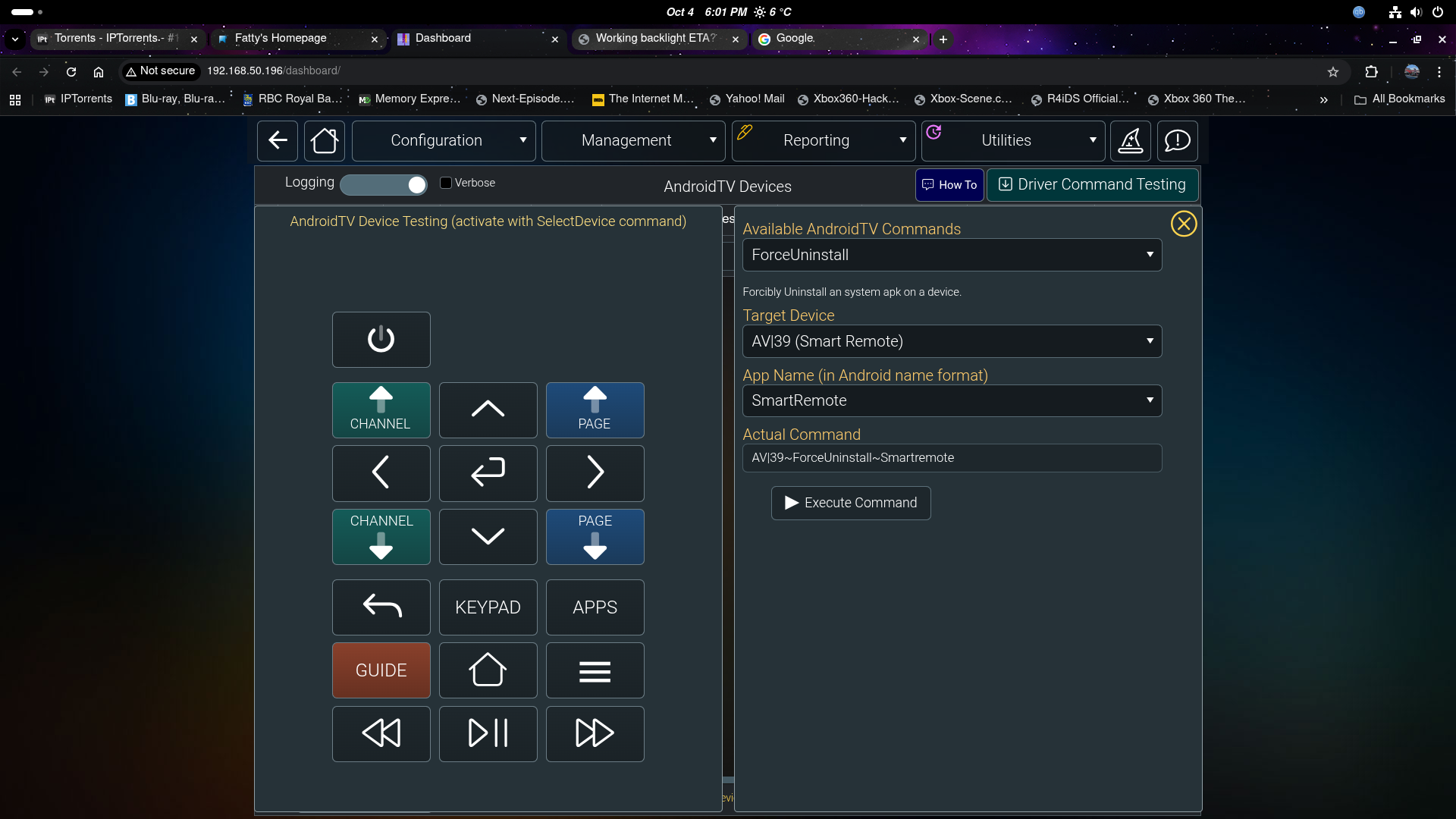
You need to select FORCED uninstall to remove the original apk software
From the AndroidTV Driver Commands window, (do these steps carefully!) select "Forced Uninstall" and select the SmartRemote device ID and select the smartremote app. Run the command. The SmartRemote icon will be removed, and the SmartRemote will reboot itself. Make sure you select "smartremote" so it gets included in the command to process!!! Forced Uninstall command is only used to remove the original smartremote.apk from the SmartRemote. Any subsequent uninstalls can be done with the "Uninstall" command which does not require a SmartRemote reboot.
From the AndroidTV Driver Commands window, (do these steps carefully!) select "Forced Uninstall" and select the SmartRemote device ID and select the smartremote app. Run the command. The SmartRemote icon will be removed, and the SmartRemote will reboot itself. Make sure you select "smartremote" so it gets included in the command to process!!! Forced Uninstall command is only used to remove the original smartremote.apk from the SmartRemote. Any subsequent uninstalls can be done with the "Uninstall" command which does not require a SmartRemote reboot.
Please Log in or Create an account to join the conversation.
Time to create page: 0.297 seconds

Copyright © 2026 Allonis. All Rights Reserved.