Allonis Allonis
  • Products
    • Sports Bar Systems
      • System Overview
      • System Demo
      • Installations
      • Sports Bar Info
        • Project Process
        • Competition
    • Customer Listening
      • Listening Overview
      • Listening Demo
    • Home Control
      • Control Overview
      • Control Demo
    • Product Type
      • Controllers
        • TVBox Controller
          • TVBox Getting Started
          • TVBox - Overview
      • Digital Signage
        • Signage Overview
        • Signage Demo
        • TableTopper
        • Overview
      • User Interfaces
        • SmartRemote
          • Introduction
        • SmartScreen
      • Audio
        • Audio Integration
        • Audio Streamer
      • Video
        • Video Integration
        • Mosaic Video Wall
      • RV / Marine
        • Shelly Relays - RV Slide Control
    • Supported Hardware
  • Shop
  • Support
    • Documentation
    • Get Help
      • Warranty
    • Forum
    • Downloads
      • Software
    • Dealers
    • About
  • Login
    • Order Form
    • myVehicle
    • Documentation - Mosets Tree
    • Documentation test
    • User Check Module
    • JoomCRM
Client Support
248-918-0123
Contact Us

Samsung produces excellent TVs for commercial usage in Sports Bars and Restaurants.

myServer 6 provides easy integration into the control system for reliable control.


There are two drivers to covers most of the Samsung IP controlled TVs (install the correct driver for the TV):

  1. Tizen (does not support Video Source discrete selection but "guesses" at the right HDMI input)
  2. TVs that have ports 1515 / 1516 open (non Tizen and most of the commercial TVs - supports discrete Video Source selection)


Prep the TV(s):

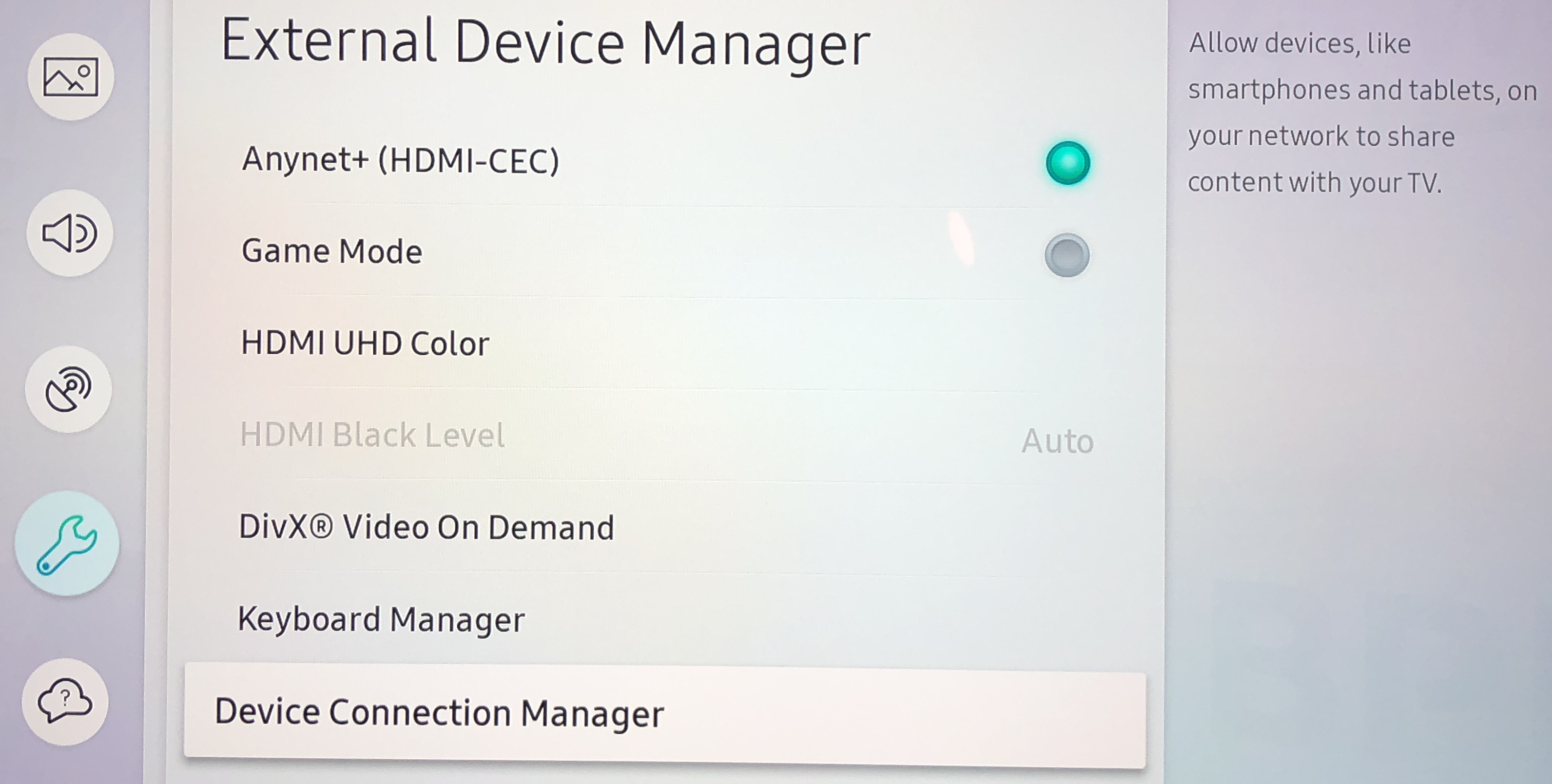
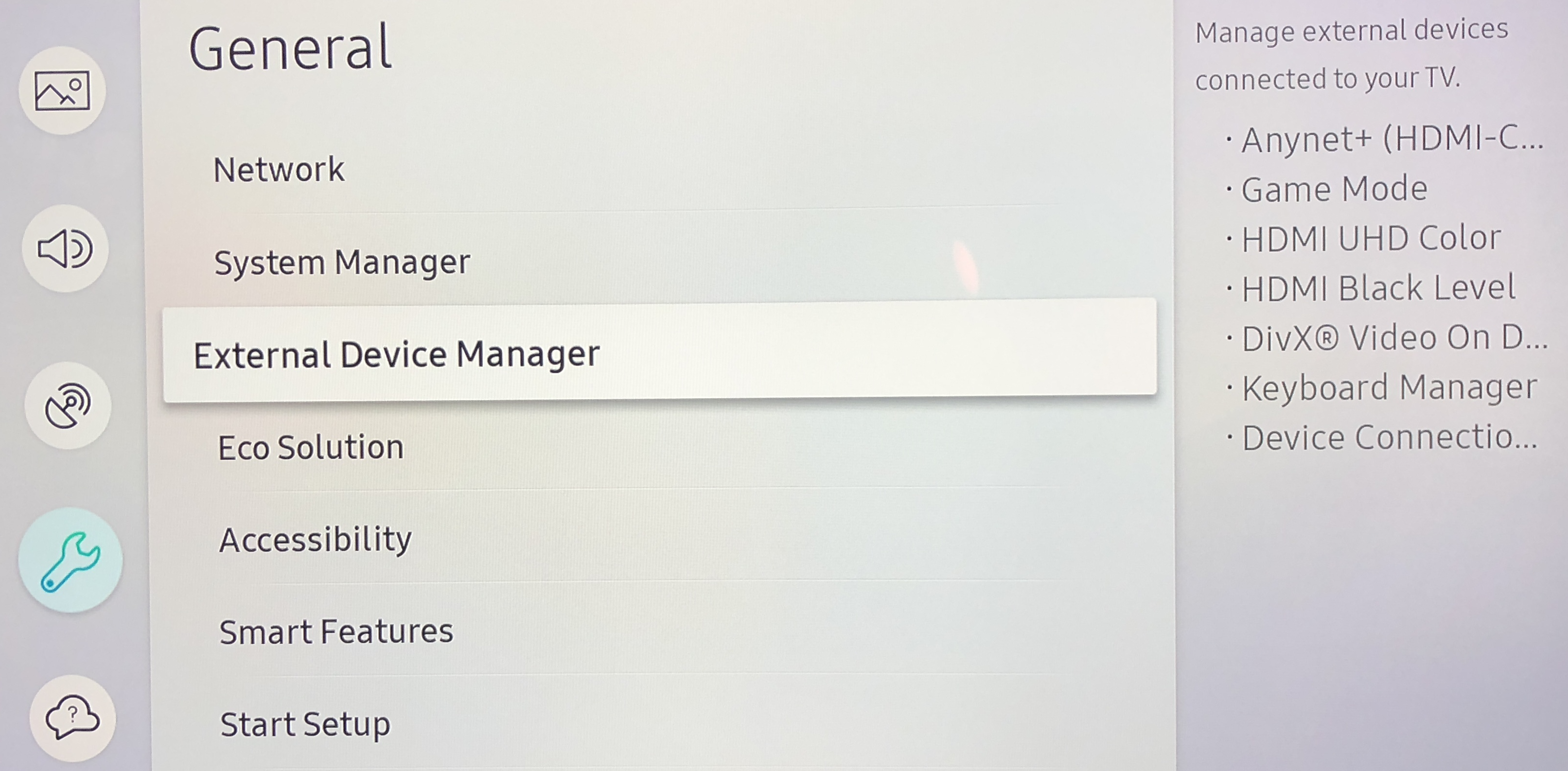
On newer TVs (about 2018 and newer), you need to enable "External Device Manager"

Settings -> General -> External Device Manager
 mceclip2

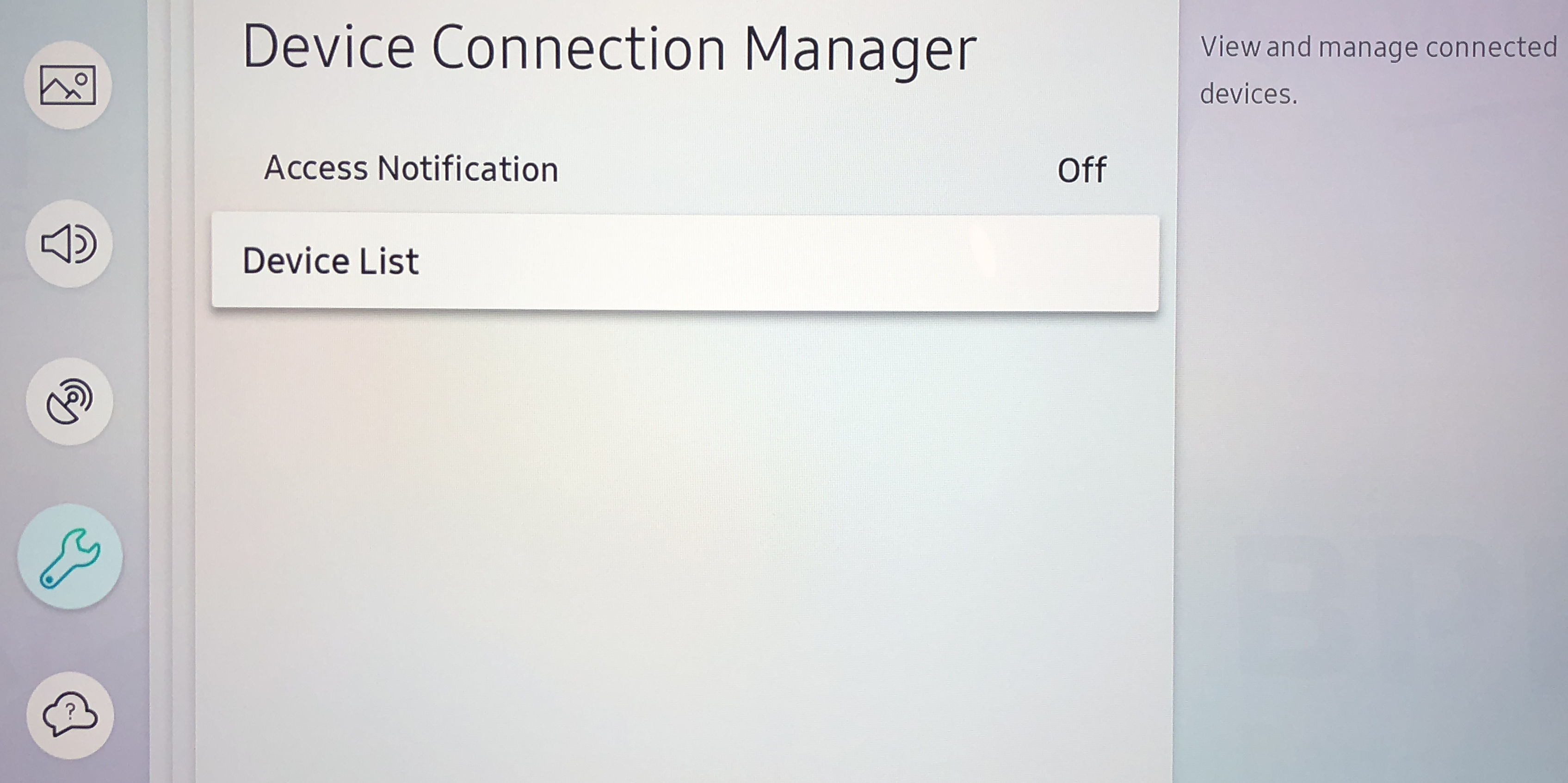
-> Device Connection Manager

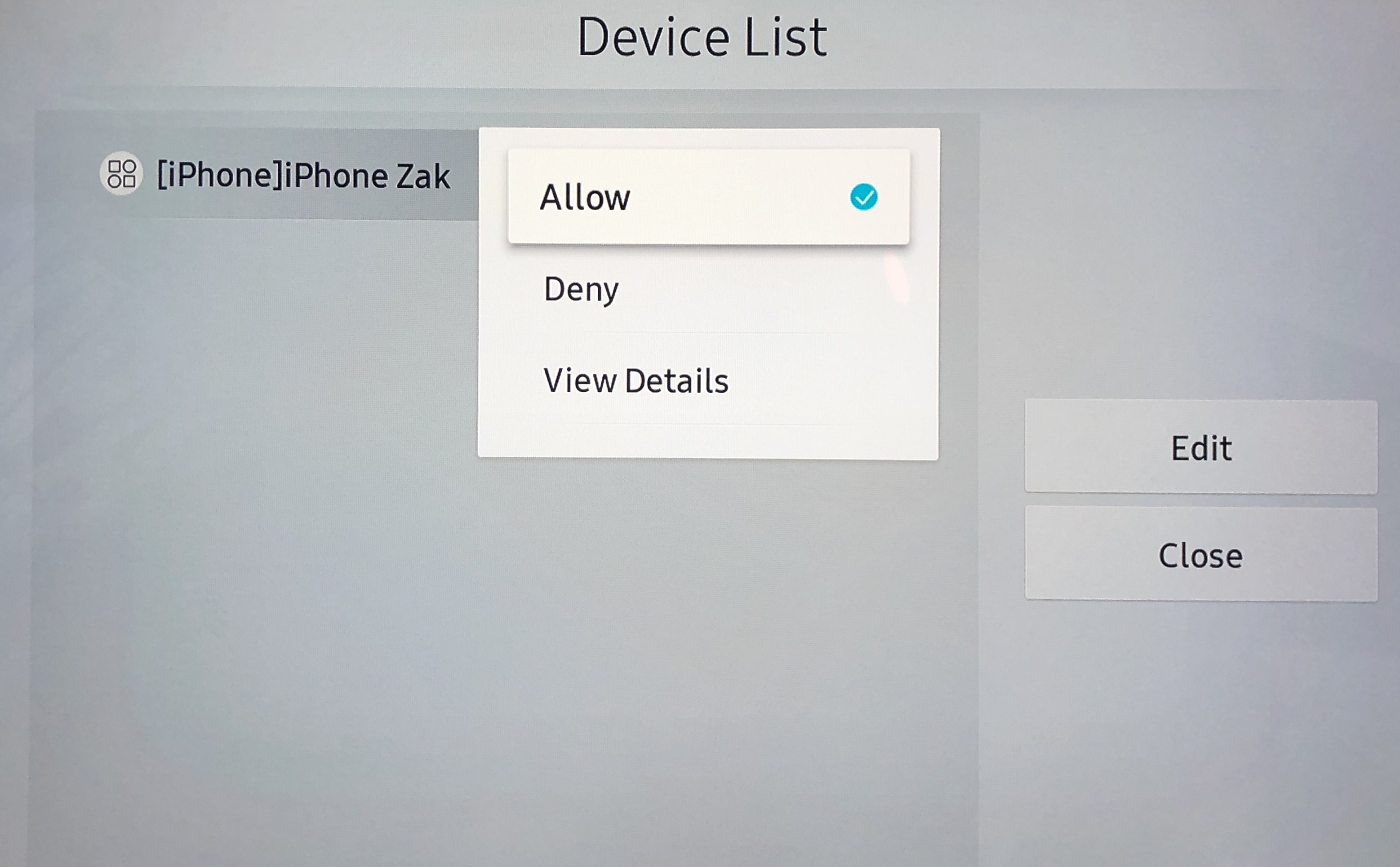
-> Device List
mceclip4

mceclip5

You have to click on iPhone/iPad item to choose Allow

You should confirm that the authentication notification is set for "First Time Only".

 For myServer to turn On the TV, you have to enable Wake On Lan support.  Go to Settings / General / Network / Expert Settings and turn on "Power on with Mobile".  Restart the TV to ensure all settings are active.  (NOTE: WOL will not work via WiFi if myServer is on ethernet so no Power On will work)

If you see "External IP Control" (or some words like that), then the TV might support the non Tizen driver - use that and uninstall the Tizen driver.  Enable IP control.

 The authentication is specific with one myServer's MAC address.  So, if you are using two myServer controllers (like a backup), you must authenticate each individually.


From Samsung Commercial TV manual:

Connecting an IP control device to the TV (left directional button)

Settings > All Settings > Connection > Network > Expert Settings > IP Remote > Try Now

You can connect an IP control device to the TV remotely to manage your IP device.

To use this function, Power On with Mobile must be turned on.

Turning this feature on may allow other IP control devices to control your TV. We recommend turning this feature on only if an authorized third-party custom controller is installed and configured specifically for a Samsung TV and if your Wi-Fi network is password protected.

This function may not be supported depending on the model.


Driver Installation:

Download the Samsung TV driver or the standard Samsung driver from the myServer 6 Software Updater.  The driver will self install.

Go to the Drivers section and select Configure for the Samsung driver.

The supported commands are listed in the Commands drop down list.

The easiest way to add a TV to control is to enable External Control on the TV, turn on all TVs, and then click the Discovery button in the driver.  You will see in the driver myServer scanning all IP addresses on all active NIC (ethernet and Wifi ports) for any TVs that the driver should support.  This will then auto add discovered TVs to the driver's list of configured TVs.  Once added, you can edit the TV device's Alias Name for easy identification.  For installations that have many TVs, use a logical naming convention like "TV1, TV2, TV3....".  You should also name the TVs in the order they are to be displayed, which should also be the order the TVs are installed into the video matrix switch (if used).

Optionally, use the AddTV command to add an Samsung TV to the network.  Enter the TV's IP address, MAC address including colons between value pairs (for Wake On Lan), and the friendly name of the TV (your choice).

You first must run the PAIR command for each TV.  This will request an authentication token from the TV.

Soon, you should see a Device management popup on the TV.  Accept the connection from "Allonis".

You should now be able to send commands to the TV from myServer.  Note that some commands only work when the TV is on certain screens or activities.

 To control power to individual Samsung TVs in the Sportsbar template:

Add to the api call on the scroller object in myDesigner 6:

/api/getpowercontrols?driver=samsungtizen,lgwebos  (omit lgwebos if only samsung TVs are uses)


Is this the right driver for your Samsung TV?

Determine if you can use the Samsung Commercial TV driver (that supports discrete power on / off and status)

From myServer's terminal window, explicitly check to see if ports 1515 or 1516 are open using sudo nmap -p 1515,1516 192.168.....

If you see ports 1515 or 1516 open, then use this driver.  If non existent or closed, ensure you have external control enabled and test again.  If still closed, then install the Samsung Tizen TV driver from myServer's Software Updater.

Port 1515 open means it's a "prosumer TV".  1516 open means it's a commercial duty TV.

 Commercial Samsung TVs:

Conflicting information from Samsung advises to use the BET-HU driver.

You may not be able to select discrete HDMI ports.  You may have to use the HDMI command to rotate through the available Inputs (TV Tuner / HDMI1, HDMI2 etc.)


Older Samsung TVs:

For 2016+ Samsung IP TVs, they support the "SamsungTVDriver" on port 55000.

Draft content below:

Older Samsung TVs (~2015 back) can be controlled via RS232.  There will be either a DB-9 or a minijack depending on TV model.  Both should use the same protocol so other than wiring differences, the myServer 6 Samsung driver should support both.

When a serial controlled Samsung TV is used with a matrix, the TV can be addressed using 1-99.  The Samsung Driver can then address the command that the appropriate TV will respond to.  The TVs are wired with their "serial Out" jack wired to the next TV's "serial In" jack in a daisy chain.  Only one serial com port is then needed for up to 99 TVs.  If each TV is wired to the central equipment rack (and not daisy chained), then you will need a serial com port for each TV which adds additional hardware.


The Samsung TV driver supports brightness control.

Here is a macro that you can edit to control multiple TVs

Macro|
// dimmer!
AV|44~Brightness~-3!
AV|45~Brightness~-3!
AV|46~Brightness~-3!
AV|47~Brightness~-3!
AV|48~Brightness~-3!
AV|49~Brightness~-3!
AV|50~Brightness~-3!

Then, use Scheduled Task Editor to create a time of day (like Dusk + 1 hr) to turn the brightness lower, and build a second macro with Brightness~0! with a second Scheduled Task to bring them bright at "9AM".


Samsung Frame TV specifics

The issue is that the Frame TVs go into Art mode when you turn them "Offf".

Below is unverified to work but worth a try:

"There is a  "magic packet" WoL issue with the Frame TV. One simple work around from within Art Mode settings: enable "turn off at night" and set "screen blank" standby mode time-out as well, most newer frames have motion sensors that can be tweaked to only show art when someone is in the room"

 

Search

Products
myServer 63
1.5U Modular Case1
1.5U Modular Case
Applications4
Advanced Presets1
Advanced Presets
Circadian App1
Circadian App
Kiosks1
Kiosks
myAudioStreamer Application1
myAudioStreamer Application
myCapture62
myCapture
myCapture Audio Streamers
myDigitalSignage1
myDigitalSignage
myIO Adapter for myServer 6 Pi Controllers
myIrrigation
myPreview1
myPreview
TVListings1
TV Listings Application1
TV Guide Application
myTV Application
myVehicle1
myVehicle App
Roku TV
RV / Truck
RV-C Integration
RV Media Systems1
RV Media Systems
Tire Pressure Monitoring System1
Tire Pressure Monitoring System
Shelly Relays - RV Lighting1
Shelly Relays - RV Lighting
Shelly Relays - RV Slide Control1
Room Slide Controller Automation - RV
Sonos1
Sonos Driver Installation
Weather1
Weather
myIrrigation Application1
myIrrigation Application
myWines1
myWines
Plex App Installation1
Plex App Installation
Voice Commands - Siri1
Voice Commands - Siri
myServer 6 Task Scheduler1
myServer 6 Task Scheduler
myServer 6 Maintenance1
myServer 6 System Management Options
Digital Signage
myVehicle
myUI
Netflix
Templates1
Trade Show Template1
Trade Show Template
Home Automation Control System
myIR12 Controller
Audio Matrix System Comparison
Operating Systems
Sports Bar Control System Comparison
Featured Projects
RV fresh and waste water Auto Dump1
RV fresh and waste water Auto Dump
SurfGate Control
Utica Comets1
Utica Comets
WakeSurf Boat Automation1
WakeSurf Boat Automation
Case Study - IP Cameras displayed in MultiView TV1
Case Study - IP Cameras displayed in MultiView TV
Planning your System
Allonis Services1
Allonis Networking Service1
Allonis Networking Service
Allonis Installation Service1
myServer Installation
Floorplans1
Floorplans
System Readiness Checklist1
System Readiness Checklist
Managed Services
Product Kiosks1
Product Kiosks
Smart Mirror
SmartRemote1
SmartRemote
SmartScreen - On Wall Display1
SmartScreen Getting Started
SportsBar System Packages
Sports Bar Demo
Sports Bar System Overview1
Sports Bar System Overview
Purchasing a Video Matrix1
Purchasing a Video Matrix
Video Over IP Feature Comparison1
Video Over IP Feature Comparison
TVBox - Overview
Drivers
Amplifiers
Audio Matrix
AES67 Audio IP Networking Overview1
What is AES67?
Allen and Heath Audio Matrix Driver1
Allen and Heath Audio Matrix Driver
Atlas Atmosphere Audio Driver1
Atlas Atmosphere Audio Driver
AVPro ACMax24A Audio Matrix1
AVPro ACMax24A Audio Matrix
BSS-100 Driver1
BSS-100 Driver
DBX - Driver1
DBX - Driver
DBX640 - Driver1
DBX640 - Driver
MonoPrice Blackbird Driver1
MonoPrice Blackbird Driver
MRC88 Audio Matrix Driver1
MRC88 Audio Matrix Driver
QSC Audio Driver1
QSC Audio Driver
RTIADx Audio Driver1
RTIADx Audio Driver
Russound Rio Driver1
Russound Rio Driver
Russound RNET Audio Driver1
Russound RNET Audio Driver
Wiring: Connecting RCA audio jacks to Phoenix Connectors1
Wiring: Connecting audio jacks to Phoenix Connectors
DSP444 AES67 Audio over IP Driver1
DSP444 4x4x4 audio processor
DSP4428 AES67 Audio over IP Driver1
DSP4428 4x4x28 audio processor
AES67 Virtual Windows Sound Card1
AES67 Virtual Windows Sound Card
Audio Video Receivers
Anthem AVR Driver1
Anthem Driver
Denon Driver1
Denon Driver Installation
Integra AV Receiver Driver1
Integra AV Receiver Driver
Marantz AudioVideo Receiver Driver1
Marantz AudioVideo Receiver Driver
Onkyo AVR Driver1
Onkyo AV Receiver Driver
Blinds
Lutron Blinds1
Lutron Blinds
Somfy RS485 Blinds1
Somfy RS485 Blinds
Somfy Synergy UAI+ Blinds1
Somfy Synergy UAI+ Blinds
Somfy Z-Wave Blinds1
Somfy Z-Wave Blinds
TRO.Y Blinds Controller Driver1
Screen Innovations TRO.Y Blind Control Driver
Bond Bridge - Shades1
Bond Bridge
Camera
BlueIris Camera NVR1
BlueIris Camera NVR
Hikvision IP PTZ Camera Setup1
Hikvision IP PTZ Camera Setup
IP Camera Integration1
IP Camera PTZ Driver1
IP Camera PTZ Driver
iP Camera Integration
Lumens Camera Driver1
Lumens Camera Driver
Ubiquiti IP Camera Setup1
Ubiquiti Camera Setup
Samsung NVR Driver1
Samsung NVR Driver
Armcrest IP Cameras1
Armcrest IP Cameras
IPCamera Wyze Integration1
Wyze Camera Integration
Contact / Motion Sensor
Control Device
Harmony Hub Driver1
Harmony Hub Driver
MyQ Garage Door Opener1
MyQ Garage Door Opener
Tablet Power Solutions1
Tablet Power Solutions
Infrared Control1
Infrared Control
UPS Monitor Driver1
UPS Monitor Driver
UPS myServer Pi Driver1
UPS myServer PI Driver
VideoStorm irUSB1
VideoStorm irUSB
Elgato Stream Deck1
Elgato Stream Deck
Shotbox Driver1
ShotBox Driver
Ratgdo Garage Door Control1
Ratgdo Garage Door Control
myIR1 WiFi to Infrared1
myIR1 WiFi to Infrared
myAtom1
myAtom
Energy
AccuEnergy Driver1
AccuEnergy Driver
Fan
Bond Bridge - Fans
Intercom
Keypad
Lighting
DMX Lighting1
DMX Lighting
Lutron Caseta Driver1
Lutron Caseta Driver
Lutron Driver1
Lutron Driver
Phillips Hue Driver1
Phillips Hue Driver
Lighting Sim Driver1
Lighting Sim Driver
Powerline DMX Pool Lighting1
Powerline DMX Pool Light Control
Shelly Automation Device Driver1
Shelly Device Driver
Media Player
Android V2 Driver2
Android V2 Driver
AndroidTV Driver
AppleTV control1
AppleTV control
Blu100 Driver1
Blu100 Driver
BluRay Player IR Control1
BlueRay IR Driver Installation
Cable TV - IR1
CableTV Driver
DLNA Media Player Driver Installation1
DLNA Media Player Driver Installation
Emby Media Server Configuration1
Emby Media Server Configuration
eStream4K Device Using IR1
eStream4K Device Using IR
FireTV 4K Installation1
FireTV 4K Installation
HEOS Driver1
HEOS Driver
Kodi Application1
Kodi Application
Live Streamer Driver1
Live Streamer Driver
MediaMatrix Streaming Media Driver1
MediaMatrix Streaming Media Driver
MediaPlayer Audio Amp1
MediaPlayer Audio Amp
myAudioPlayer1
myAudioPlayer
myMediaPlayer1
myMediaPlayer
Oppo Blu-Ray Player Driver1
Oppo Blu-Ray Player Driver
Roku Player Control1
Roku Player Control
Streaming Media Hardware Comparison1
Streaming Media Hardware Comparison
Streaming Music for Commercial Implementations1
Streaming Music for Commercial Implementations
Sony X1000 BluRay Driver1
Sony X1000 BluRay Driver
Tivo Player Driver1
Tivo Player Driver
Sonos Driver1
Sonos Driver
Zidoo Media Players1
Zidoo Media Players
Xfinity IP Driver1
Xfinity IP Driver
MediaEngine App1
MediaEngine App
Media Service
TuneIn Application
Pool
Jandy Pools1
Jandy Pools
Projector
Optoma Projector Driver1
Optoma Projector Driver
PJLink Driver1
PJLink Driver
BenQ Projector Driver1
BenQ Projector Driver
Mitsubishi Projector Driver1
Mitsubishi Projector Driver
NEC Projector Driver1
NEC Projector Driver
Sony Projector
Vivitek Projector Driver1
Vivitek Projector Driver
JVC Projector Driver1
JVC Projector Driver
Sony VPL Projector Driver1
Sony VPL Projector
JVC LX-NZ30 Projector Driver1
JVC LX-NZ30 Projector Driver
Receiver
Relay
Digital Loggers1
Digital Loggers Relay Driver
Dingtian Relay Driver1
Dingtian Relay Driver
Electronic Salon GPIO Relay1
Electronic Salon GPIO Relay
iMatic Relay Driver1
iMatic Relay Driver
Satellite
DirecTV Driver1
DirecTV Driver
Dish Network Driver1
DISH Network Driver
Security System
DSC Security System Driver1
DSC Security System Driver
ELK Driver Installation and Use1
ELK Driver Installation and Use
Security Simulator Driver1
Security Simulator Driver
Honeywell Security1
Honeywell Security
Outdoor Grill Integration
Traeger Grill Integration
Green Mountain Grill Driver
Sensor
1-Wire Temperature Sensor1
1-Wire Temperature Sensor
GPS Receiver Driver1
GPS Receiver Driver
Water Tank Level Sensing1
Water Tank Level Sensing
Television / Monitor
Controlling TVs via CEC1
Controlling TVs via CEC
Generic TVIR2
Generic TVIR Driver
Infrared TV Control
HiSense TV Control1
HiSense TV Control
NoHassle TV Driver1
NoHassle TV Driver
Insignia TV Control1
Insignia TV Control
LG TV Driver1
LG TV Driver
LGWebOS Driver1
LG WebOS Driver
Samsung BET Driver1
Samsung BET Driver
Samsung Signage TV Driver1
Samsung Signage TV Driver
Samsung Tizen TV Driver1
Samsung Tizen TV Driver
Samsung TV Driver1
Samsung TV Driver
Sony TV Driver1
Sony TV Control
Sharp TV Driver1
Sharp TV Driver
Sunbrite TV Driver1
Sunbrite TV Driver
Viewsonic TV Driver1
Viewsonic TV Driver
PJLink Driver1
PJLink Driver
TCL TV Driver1
TCL TV Driver
Peerless TV Driver1
Peerless TV Driver
Vizio TV Driver1
Vizio TV Driver
Thermostat
Climate Simulator1
Climate Simulator Driver
EcoBee Thermostat1
EcoBee Thermostat
Venstar Thermostat Driver1
Venstar Thermostat Driver
Tuner
Video Matrix
Video Wall Control1
Video Wall Control
AVPro QuadView Driver1
AVPro QuadView Driver
AVPro Video Matrix2
AVPro MXNet Driver
AVPro Driver
ANeuVideo Driver1
ANeuVideo Driver
Brightlink Video Switcher1
Brightlink Video Switcher
Factor A8 Matrix Switch Driver1
Factor A8 Matrix Switch Driver
HDTV HDBaseT Driver1
HDTV HDBaseT Driver
HDTV Video over IP Driver1
HDTV Video over IP Driver
AVOIP 4K Driver1
AVOIP900 Video Over IP 4K Driver
HDMI 36x36 Video Matrix1
HDMI 36x36 Video Matrix
HDMI Matrix Basics1
HDMI Matrix Basics
HDTV HDBitT Driver1
HDTV HDBitT Driver
HDTV Quad Driver1
HDTV Quad Driver
Just Add Power Driver1
Just Add Power Driver
Knox Video Switcher Driver1
Knox Video Switcher Driver
MOiP Video Matrix Driver1
MOiP Video Matrix Driver
Shinybow Video Driver1
Shinybow Video Driver
JTech Video Over IP ZTIP3001
JTech / Zenty Video Over IP IP300 Driver
Connectivity Technologies
CAN Driver1
CAN Driver
Connecting Bluetooth Devices to a Windows PC1
Connecting Bluetooth Devices to a Windows PC
Controlling a Water Valve via Tasmota Relay1
Controlling a Water Valve via Tasmota Relay
DMX
DMX - PKNight Art-Net controller setup1
DMX - PKNight Art-Net controller setup
Art-Net DMX Driver1
DMX - ArtNet Driver
GenericGPIO Relay Driver1
GenericGPIO Relay Driver
Generic Modbus Driver1
Generic Modbus Driver
Generic Serial Driver1
Generic Serial Driver
GlobalCache Driver1
GlobalCache Driver
IFTTT Configuration1
IFTTT Configuration
Infrared Control2
GenericIR Driver
Controlling devices via Infrared
Matter1
Matter - Does it matter?
MQTT Use1
MQTT Use
OBD/VIC Driver1
OBD/VIC Driver
OLA Service Monitor1
OLA Service Monitor
Raspberry BLE Device Driver1
Raspberry BLE Device Driver
Relays - IP controlled1
Relays - IP controlled
Sainsmart IP Relay Driver1
Sainsmart IP Relay Driver
Serial to Net for Pi Installation1
Serial to Net for Pi Installation
Sonoff Devices1
Sonoff Devices
Tasmota1
Tasmota
UPB Lighting Driver1
UPB Lighting Driver
Waveshare GPIO Relay Driver1
Waveshare GPIO Relay Driver
Zigbee Driver1
Zigbee Driver
Z-Wave JSUI Driver1
Z-Wave JSUI Driver
ZWay Raz Driver1
ZWay Raz Driver Installation
ESP32 Projects
ESP32 Doorbell Camera
ESP32 - Rotary Encoder1
ESP32 - Rotary Encoder
Allonis L3 Managed Switch Driver1
Allonis L3 Managed Switch Driver
Atomic IP2IR Driver1
Atomic IP2IR Driver

 allonis logo 700

4078 Waterland Drive Metamora, MI 48455

248-918-0123

info@allonis.com

    Copyright © 2026 Allonis. All Rights Reserved.
    Allonis LLC