

Client Support
fxComponents.js files very different between my project and sample project
 Topic Author

fxComponents.js files very different between my project and sample project
2 years 4 months ago
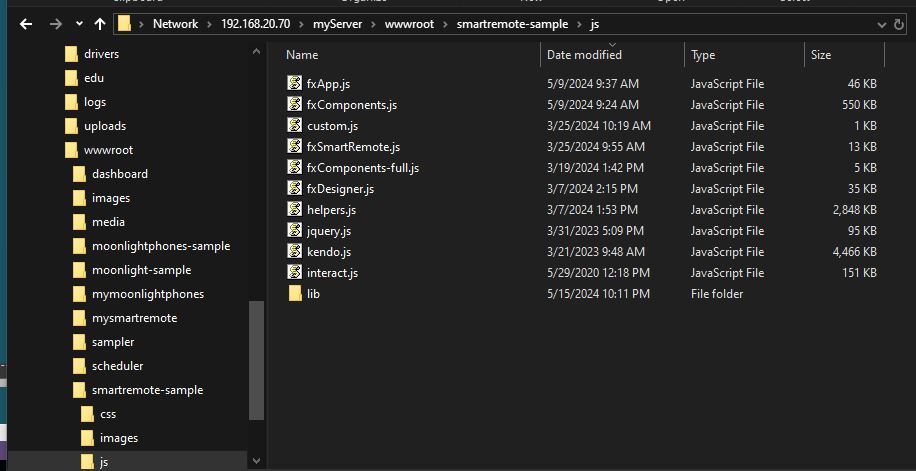
I'm trying to figure out if there is any issue with one of my javascript files in my project. The fxComponents.js is vastly different in my project vs the one downloaded with the smartremote sample project. Here is the view of the files right after I did an "update project" on the mysmartremote project and download the latest smartremote-sample. As you can see the fxComponents.js file is very different in size. I haven't noticed any issues using the remote but it seems odd to me that those files are so different in size(and I did a diff view of them too and they are very different).
Images/files are in the second post
Images/files are in the second post
Please Log in or Create an account to join the conversation.
Topic Author
Re: fxComponents.js files very different between my project and sample project
2 years 4 months ago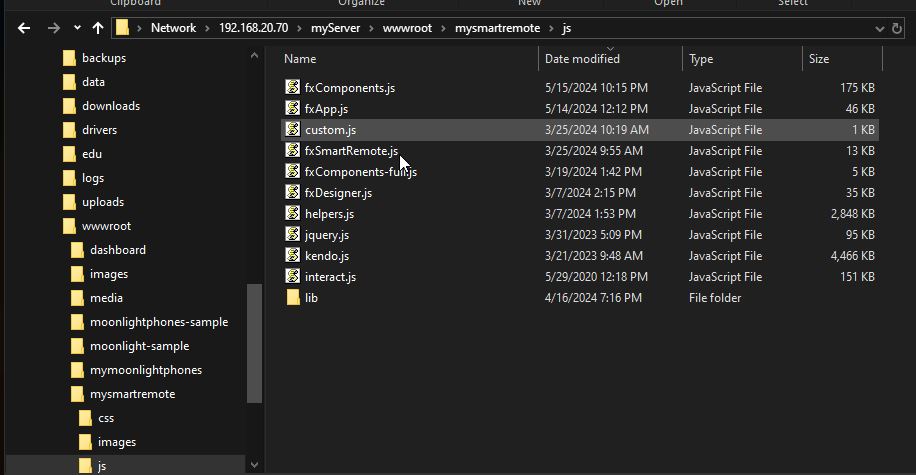
Please Log in or Create an account to join the conversation.


Re: fxComponents.js files very different between my project and sample project
2 years 4 months ago - 2 years 4 months ago
I see you have used myDesigner to update the files. I would copy the whole folder from the most current template and use them for now. Ensure you have the latest myDesigner before you update the files.
Last edit: 2 years 4 months ago by David Li.
Please Log in or Create an account to join the conversation.
Topic Author
Re: fxComponents.js files very different between my project and sample project
2 years 4 months ago
That was what I was doing(copying the files) but in another thread you said we could use the "update project" button in myDesigner. So when I tried it I noticed the discrepancy. I understand I can just copy them but if there is a bug then others may be hitting this issue and not know it so I figured it was best to open a thread to track the issue.
Please Log in or Create an account to join the conversation.
Re: fxComponents.js files very different between my project and sample project
2 years 4 months ago
Yes, we will look into why that file isn't being updated. Thanx for the research.
The following user(s) said Thank You: bowlingbeeg
Please Log in or Create an account to join the conversation.
Re: fxComponents.js files very different between my project and sample project
2 years 4 months ago - 2 years 4 months ago
The fxComponents.js file is dynamically created/updated whenever you make changes in the Designer. The file consists of the collection of web components that your project is currently using. Currently, there is a collection of 80 web components that live in the js/lib folder. One component file for every object that can be used on a page.
If we loaded all those web components all the time that would be a waste of time and memory. It is more efficient to only load the web components you need. That is exactly what the Designer is doing. When you save a page in the Designer it triggers a process to scan the file for the components you are using. It then gathers up a list of all the web components that the entire project is using and then creates the fxComponents.js file.
You should never have to touch the fxComponents-full.js and fxComponents.js files. Let the Designer manage them.
If we loaded all those web components all the time that would be a waste of time and memory. It is more efficient to only load the web components you need. That is exactly what the Designer is doing. When you save a page in the Designer it triggers a process to scan the file for the components you are using. It then gathers up a list of all the web components that the entire project is using and then creates the fxComponents.js file.
You should never have to touch the fxComponents-full.js and fxComponents.js files. Let the Designer manage them.
Last edit: 2 years 4 months ago by davep.
Please Log in or Create an account to join the conversation.
Time to create page: 0.309 seconds

Copyright © 2026 Allonis. All Rights Reserved.