

Client Support
Is this possible?
 Topic Author

Is this possible?
2 years 6 months ago
Morning
I'm hoping one of you maybe able to help me
I have used the following command in myDesigner and made it a short press command on Function button F1. I have repeated this on F2 & F3 for other inputs. Its working well but what I would like to achieve is when I press F1 for example, in addition to changing the input, the smartremote also changes to the correct device. Hope that makes sense
AV|{{active_tv_{{clientname}}}}~Remote~INPUT HDMI 1
I'm open to any suggestions anyone may have if you have a better way of doing this
Thanks in advance
I'm hoping one of you maybe able to help me
I have used the following command in myDesigner and made it a short press command on Function button F1. I have repeated this on F2 & F3 for other inputs. Its working well but what I would like to achieve is when I press F1 for example, in addition to changing the input, the smartremote also changes to the correct device. Hope that makes sense
AV|{{active_tv_{{clientname}}}}~Remote~INPUT HDMI 1
I'm open to any suggestions anyone may have if you have a better way of doing this
Thanks in advance
Please Log in or Create an account to join the conversation.
Re: Is this possible?
2 years 6 months ago
I'm not sure I totally follow what you want to do. Are you saying you want to switch to HDMI 1 and then control the source on HDMI1? So if HDMI 1 was connected to an AppleTV you would want to switch the input to HDMI1 and then control the AppleTV? If so there are a few ways to do it but I think the easiest and most bullet proof would be to do the same thing as the buttons on the index page do and call the activation macro for that source. Sure they may go and try and turn on your devices like the TV and AVR again but most of those have discrete on codes so it shouldn't really harm anything. Otherwise you could create your own macro that does everything the activation macro does but skip the poweron macro.
The following user(s) said Thank You: CurlyOscar
Please Log in or Create an account to join the conversation.
Topic Author
Re: Is this possible?
2 years 6 months agoI'm not sure I totally follow what you want to do. Are you saying you want to switch to HDMI 1 and then control the source on HDMI1? So if HDMI 1 was connected to an AppleTV you would want to switch the input to HDMI1 and then control the AppleTV? If so there are a few ways to do it but I think the easiest and most bullet proof would be to do the same thing as the buttons on the index page do and call the activation macro for that source. Sure they may go and try and turn on your devices like the TV and AVR again but most of those have discrete on codes so it shouldn't really harm anything. Otherwise you could create your own macro that does everything the activation macro does but skip the poweron macro.
Thanks for the reply, I really appreciate it. You have pretty much nailed what I'm trying to achieve. I'll name the devices - Satellite Box (Sky Q) & Nividia Shield. As you rightly say I can switch the TV's input using the function keys but the SmartRemote remains on the device that was being used - watching Shield, swap to Sky Q - TV changes to Sky Q but SmartRemote remains on Shield which leaves me with no control over the Sky Q box. To get control of the Sky Q box I am backing out of the Shield and then selecting the Sky Q on the Smart Remote. I realise this is very much a first world problem.
I have tried selecting the activation macro but I'll be honest I can't see where to put it. Clicking on a button on the index page opens a menu that includes an API Properties section including a command that is prepopulated with {{value}} is that where I would place the Macro?
Thanks again for taking the time to reply
Please Log in or Create an account to join the conversation.
Re: Is this possible?
2 years 6 months ago - 2 years 6 months ago
I think all you should need to do is put the activation macro for the appropriate device in the function key as the command to be executed. I've added commands in my activation macro that turn on my AVR and TV and then change the inputs on both to the correct source.
The last line in the activation macro is the command that brings up the appropriate page that controls the activity, so the SmartRemote will provide the appropriate controls.
Your alternative is to create a new macro that changes inputs and brings up the appropriate page, but that will mostly duplicate what the activation macros already do.
Kyle
The last line in the activation macro is the command that brings up the appropriate page that controls the activity, so the SmartRemote will provide the appropriate controls.
Your alternative is to create a new macro that changes inputs and brings up the appropriate page, but that will mostly duplicate what the activation macros already do.
Kyle
Last edit: 2 years 6 months ago by PhoenixF15E. Reason: Typo
Please Log in or Create an account to join the conversation.
Topic Author
Re: Is this possible?
2 years 6 months agoI think all you should need to do is put the activation macro for the appropriate device in the function key as the command to be executed. I've added commands in my activation macro that turn on my AVR and TV and then change the inputs on both to the correct source.
The last line in the activation macro is the command that brings up the appropriate page that controls the activity, so the SmartRemote will provide the appropriate controls.
Your alternative is to create a new macro that changes inputs and brings up the appropriate page, but that will mostly duplicate what the activation macros already do.
Kyle
Kyle
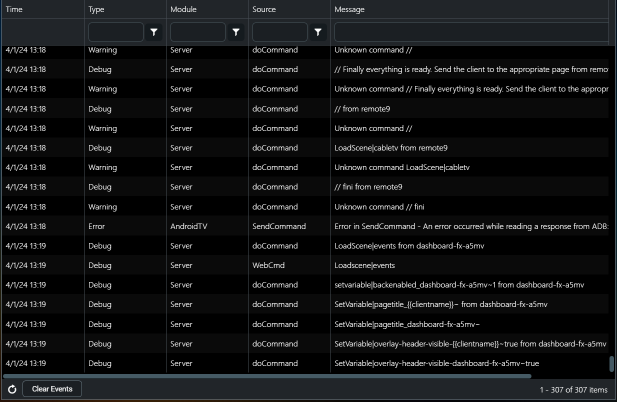
Thanks for the reply - much appreciated. I've done as you suggested and nothing happened so I had a look at the log and I can see that it's trying to do what I want but I'm getting lots of warnings and debugs about unknown commands.Any ideas?
Please Log in or Create an account to join the conversation.
Re: Is this possible?
2 years 6 months ago - 2 years 6 months ago
If I had to guess, it looks like there's a missing or extra exclamation point in your activation script. MyServer is trying to run the comments in your script, not the actual commands.
Can you copy and paste your activation script into a text file and post a copy, and also show a screenshot of the activation command in MyDesigner?
Kyle
Can you copy and paste your activation script into a text file and post a copy, and also show a screenshot of the activation command in MyDesigner?
Kyle
Last edit: 2 years 6 months ago by PhoenixF15E. Reason: Added a request for the MyDesigner activation command
Please Log in or Create an account to join the conversation.
Time to create page: 0.294 seconds

Copyright © 2026 Allonis. All Rights Reserved.