


- Details

If you’ve used HDMI with your TV before, then you’ve probably seen the abbreviation ARC and/or eARC on your device’s connection panel. In fact, you’ve likely used ARC/eARC without even knowing it! But what exactly do these terms mean? How do they improve the TV audio experience? Let’s clear the confusion.
When HDMI was released in 2002, it sought to simplify the process of using individual cables to send audio and video data to your TV. Think about your old game system or DVD player — rather than relying on two or even three separate connections to manage video and audio, HDMI condensed it all into one cable, streamlining device setup while containing more than enough power to handle the bandwidth of an HD signal. While HDMI is an excellent option when using your TV’s built-in speakers as an audio output, things become a bit more complicated when throwing an external speaker system into the mix. That’s where ARC and eARC come into play.
What Is ARC?
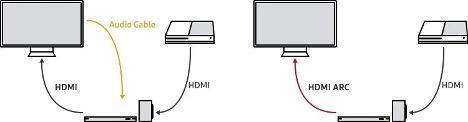
A feature introduced on the arrival of HDMI version 1.4, ARC (Audio Return Channel) improves the carrying capacity of standard HDMI cables. Traditionally, HDMI was developed to send video and audio in one direction (i.e., from your source device to your TV). That meant if you wanted to use an external sound device such as a soundbar or speaker system, then you’d need to utilize an analog or optical cable (now largely obsolete) to send your audio to your allocated playback device. While capable of sending audio and video in a single direction, ARC also features an audio return path, allowing audio signals from your TV to transfer to your playback device within the same connection. This cuts out the optical cable altogether. Both diagrams in the figure below achieve the same goal: connect TV audio to an external device. However, since ARC performs the duties of both the HDMI and audio cable, the diagram on the right does not need an additional audio cable to operate.
What Is eARC?
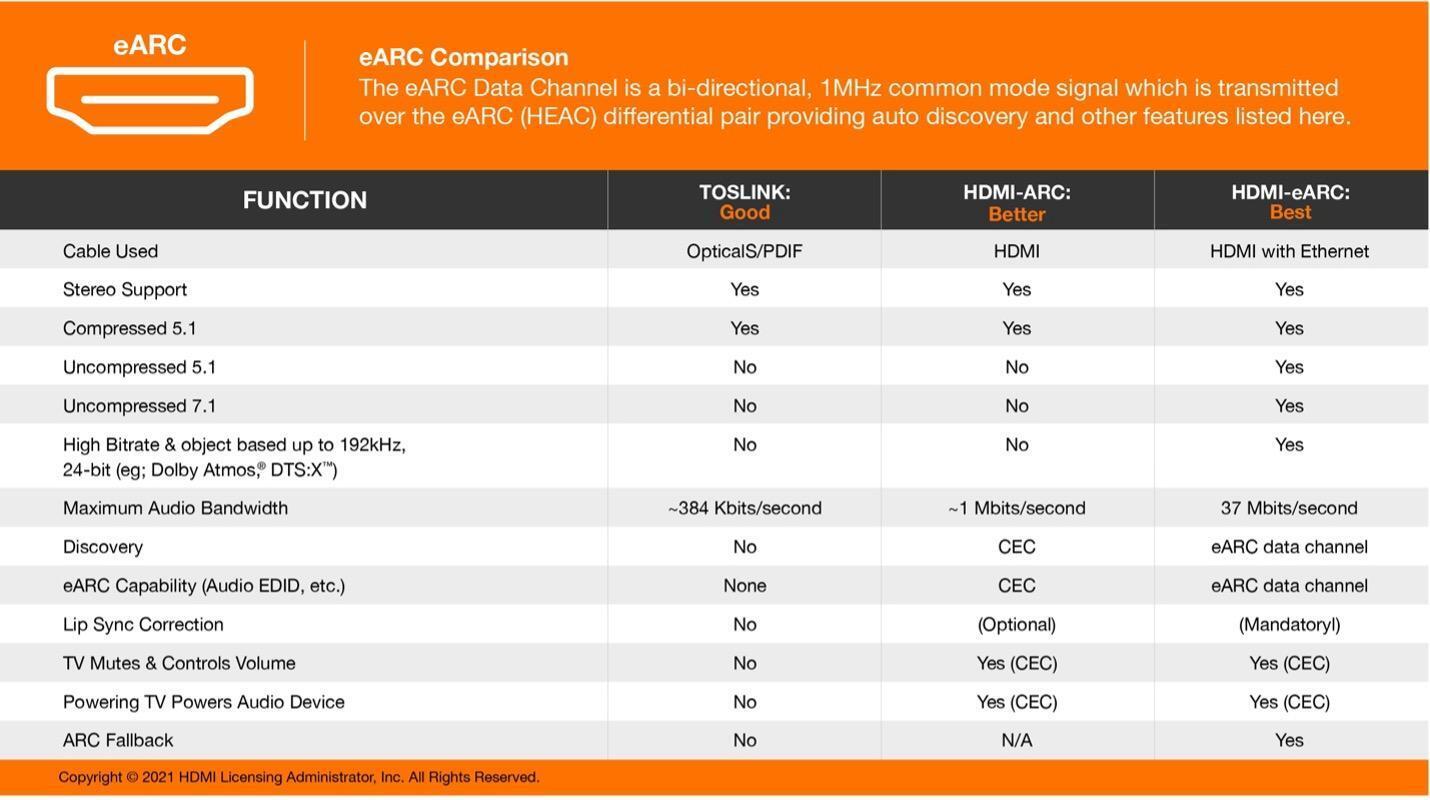
eARC (enhanced Audio Return Channel) functions more or less the same as ARC with one significant difference: increased bandwidth. By utilizing the boosted transfer rates supplied by HDMI’s 2.1 architecture, eARC boasts enough power to support uncompressed 5.1 or 7.1 surround sound audio as well as spatial audio formats such as Dolby Atmos, maximizing achievable sound quality and immersion when using external soundbars or speaker systems. Unlike standard ARC, eARC also provides onboard lip-sync correction, which automatically detects processor delays to keep audio and visuals in line at all times. As eARC connections are more modern and not always included in every setup on the market, eARC’s built-in ARC fallback feature ensures that your cable still supports standard ARC protocol when a device in your setup does not support eARC.
Do I Need ARC or eARC?
If you’re going to use your TV’s built-in speakers, then the answer is simple: neither. However, if you intend to use an external speaker system such as a soundbar, then ARC/eARC is the way to go. Casual listeners and movie buffs using a separate speaker should be more than happy with ARC in their setup because it cuts down on cables and enables control over your TV’s playback settings from a single remote. That said, if you’d like to retain an uncompressed audio signal or employ the benefits of Dolby Atmos or other spatial audio formats in your home theater setup, then eARC is likely the better route to take. No matter which format you choose, always check beforehand that your equipment supports it to avoid future headaches. Likewise, ARC and eARC require High Speed or Ultra High Speed HDMI cables in order to function properly. When in doubt, use an Ultra High Speed HDMI cable; these HDMI cables are backward compatible to support any eARC or lesser setup you may be using. The handy table below outlines the specific capabilities of ARC and eARC in comparison with old-school optical connections.
- Details
Sports Bar Configuration
Allonis is renowned for the easiest to use Audio / Video / Lighting control system for bar tenders and wait staff. Now, we strive to also make it easiest to get a quote, and to install to decrease the cost, time and stress of installing a professional control system. To do, so, we need to ask a couple of questions that will impact the system cost, the estimated time to deliver and the programming of the end system.
The system is HIGHLY customizable and configurable. Of course, all time Allonis spends on the project is billable.
So, here are the standard selections that are most popular that are the most cost effective:
- User interface device: iPad (under 5 devices connected at same time)
- 1.5U standard equipment mount case
- Uninterupptable Power Supply is highly recommended (and available from Allonis that integrate with myServer 6)
Q1: Is this a Bar or a Restaurant or Both
(Bar / Restaurant / Both / Other)
Q2: When would you like to install the system?
(Soon / No Rush / By X Date / Don't know)
Q3: Do you already have an installer?
(Yes / No - need one / I am an Integrator / I will install / Don't know)
Q4: Do you want to purchase Allonis's Remote Configuration / Programming Services?
(Yes / No)
Q4: How many TVs will be controlled?
(0 - 100)
Q4b (if Q4 >0): Do you want the control system to be able to also control TVs on / off?
(Yes / No / Tell Me More)
Q4c (if Q4>0): What brand(s) of TVs are to be controlled?
(All are same Brand: LG / Samsung / Sony / Sharp / Phillips / Roku / TCL / Not same brand)
Q4d (if q4c = Not same brand) Please answer in the order that the TVs are to be viewed on the user interface (ie: 1,2,3...)
(LG / Samsung / Sony / Sharp / Phillips / Roku / TCL / Other dynamic list based on how many TVs)
Q4e (if Q4 >0): How many feet is that TV from the equipment rack?
(under 50 / 220 / 330 / over 330) dynamic list next to TV brand for that TV
What Video resolution should the system support? (most sports bars use 1080p content sources)
(1080p / 2K / 4K:30 / 4K:60 / 8K)
Q5 (if Q4>0): How many Video walls will the system have?
(None, 1, 2, More than 2)
Q5b (if Q5> 0) How large is Video Wall 1? (2x2 TVs / 3x3 / Larger than 3x3)
Q6 Do you want the Control System to also control the Audio system?
(Yes / No / Tell me more)
Q6b (if Q6 = Yes) Do you already have an audio matrix? Brand?
(Allonis / Allen and Heath / Atlas / DBX / QSC / RTI / Other)
Q6c (if Q6 = Yes) Do you already have an amplifier? Type?
(70/100 volt / 2,4 or 8 ohm / I don't know)
Q7C (if Q6=Yes) Do you need speakers? If so, what type and quantity?
(Pendant / In wall / Subwoofer / None / Don't know) (select one or all)
- Details
 https://insaneimpact.com/wp-content/uploads/2022/07/simple-aspect-ratio-examples-1-300x180.jpg 300w, https://insaneimpact.com/wp-content/uploads/2022/07/simple-aspect-ratio-examples-1-768x461.jpg 768w" alt="screen resolution vs aspect ratio" width="1000" height="600" class="attachment-full size-full wp-image-13079 entered lazyloaded" style="box-sizing: border-box; border: none; height: auto; max-width: 100%; vertical-align: middle; border-radius: 5px; box-shadow: none; display: inline-block; width: 700px;" decoding="async" data-lazy-srcset="https://insaneimpact.com/wp-content/uploads/2022/07/simple-aspect-ratio-examples-1.jpg 1000w, https://insaneimpact.com/wp-content/uploads/2022/07/simple-aspect-ratio-examples-1-300x180.jpg 300w, https://insaneimpact.com/wp-content/uploads/2022/07/simple-aspect-ratio-examples-1-768x461.jpg 768w" data-lazy-sizes="(max-width: 1000px) 100vw, 1000px" data-lazy-src="https://insaneimpact.com/wp-content/uploads/2022/07/simple-aspect-ratio-examples-1.jpg" data-ll-status="loaded" />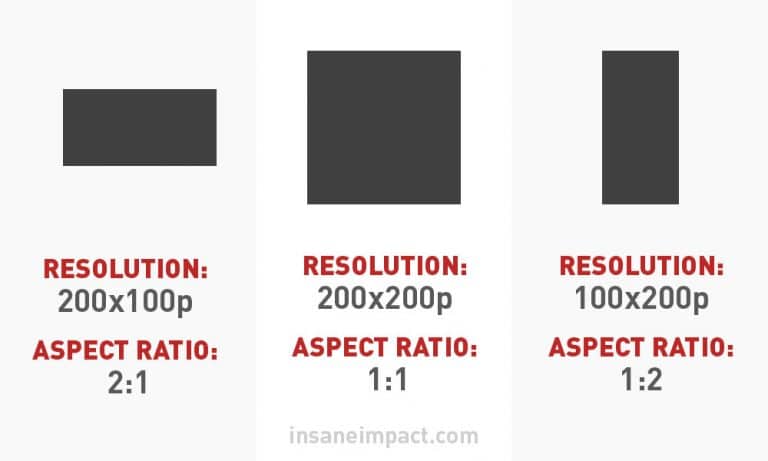
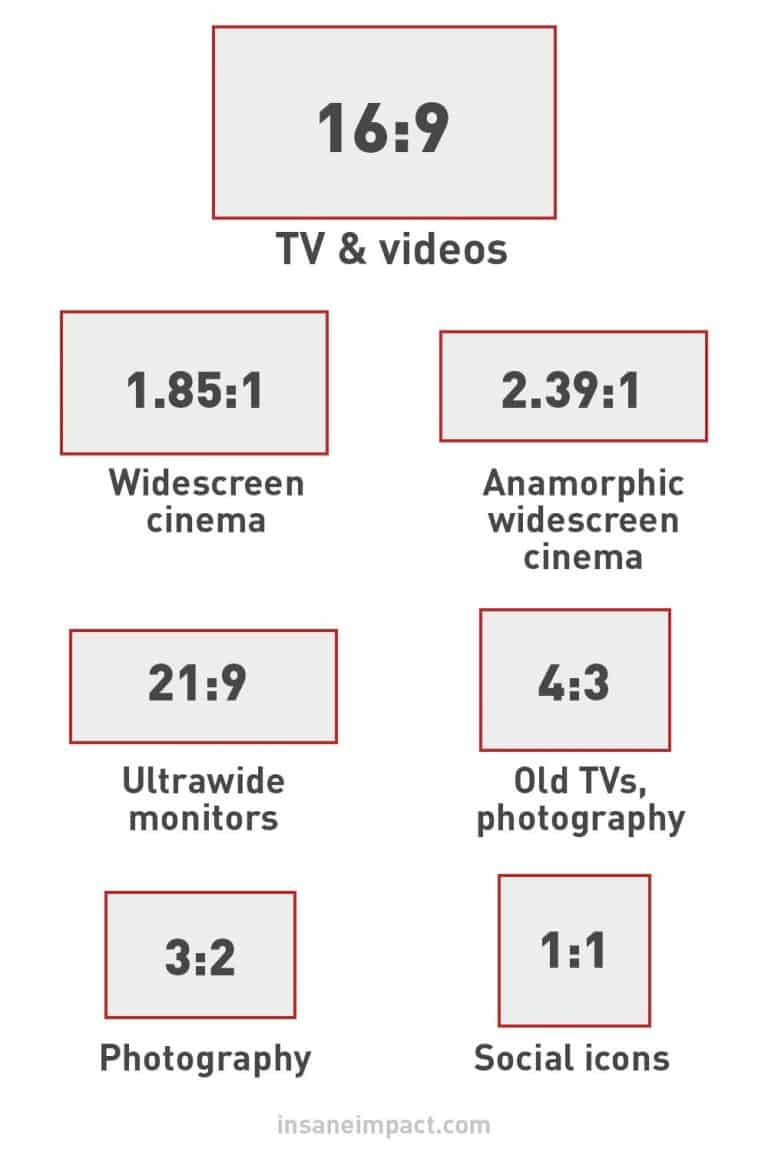
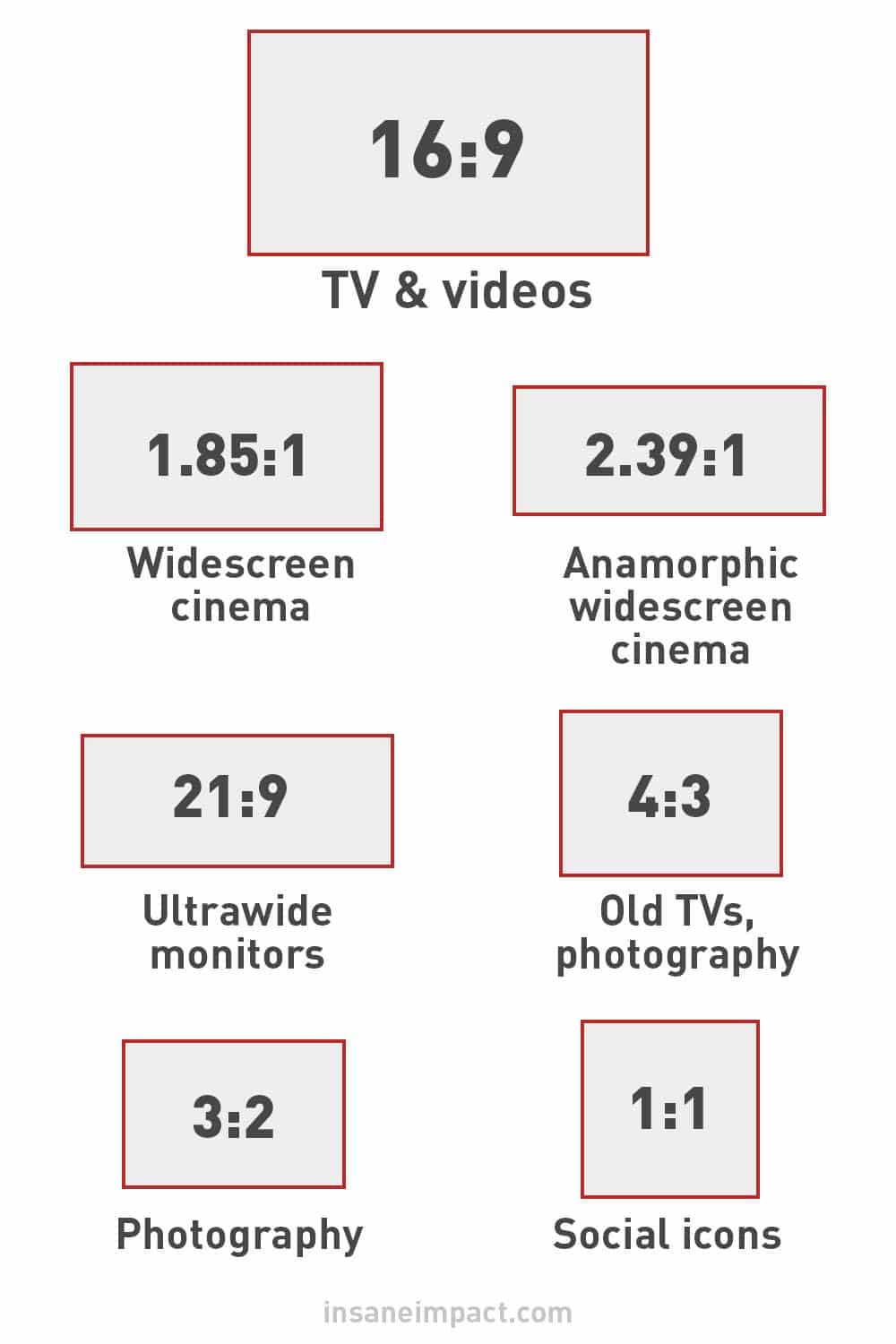 https://insaneimpact.com/wp-content/uploads/2022/07/common-aspect-ratios-1-200x300.jpg 200w, https://insaneimpact.com/wp-content/uploads/2022/07/common-aspect-ratios-1-683x1024.jpg 683w, https://insaneimpact.com/wp-content/uploads/2022/07/common-aspect-ratios-1-768x1152.jpg 768w" alt="aspect ratio infographic" width="1000" height="1500" class="attachment-full size-full wp-image-13083 entered lazyloaded" style="box-sizing: border-box; border: none; height: auto; max-width: 100%; vertical-align: middle; border-radius: 0px; box-shadow: none; display: inline-block; width: 600px;" decoding="async" data-lazy-srcset="https://insaneimpact.com/wp-content/uploads/2022/07/common-aspect-ratios-1.jpg 1000w, https://insaneimpact.com/wp-content/uploads/2022/07/common-aspect-ratios-1-200x300.jpg 200w, https://insaneimpact.com/wp-content/uploads/2022/07/common-aspect-ratios-1-683x1024.jpg 683w, https://insaneimpact.com/wp-content/uploads/2022/07/common-aspect-ratios-1-768x1152.jpg 768w" data-lazy-sizes="(max-width: 1000px) 100vw, 1000px" data-lazy-src="https://insaneimpact.com/wp-content/uploads/2022/07/common-aspect-ratios-1.jpg" data-ll-status="loaded" />

 https://insaneimpact.com/wp-content/uploads/2022/07/1-16-9-aspect-ratio-1-300x180.jpg 300w, https://insaneimpact.com/wp-content/uploads/2022/07/1-16-9-aspect-ratio-1-768x461.jpg 768w" alt="home tv aspect ratio 16-9" width="1000" height="600" class="attachment-large size-large wp-image-13097 entered lazyloaded" style="box-sizing: border-box; border: none; height: auto; max-width: 100%; vertical-align: middle; border-radius: 0px; box-shadow: none; display: inline-block; width: 600px;" decoding="async" data-lazy-srcset="https://insaneimpact.com/wp-content/uploads/2022/07/1-16-9-aspect-ratio-1.jpg 1000w, https://insaneimpact.com/wp-content/uploads/2022/07/1-16-9-aspect-ratio-1-300x180.jpg 300w, https://insaneimpact.com/wp-content/uploads/2022/07/1-16-9-aspect-ratio-1-768x461.jpg 768w" data-lazy-sizes="(max-width: 1000px) 100vw, 1000px" data-lazy-src="https://insaneimpact.com/wp-content/uploads/2022/07/1-16-9-aspect-ratio-1.jpg" data-ll-status="loaded" />

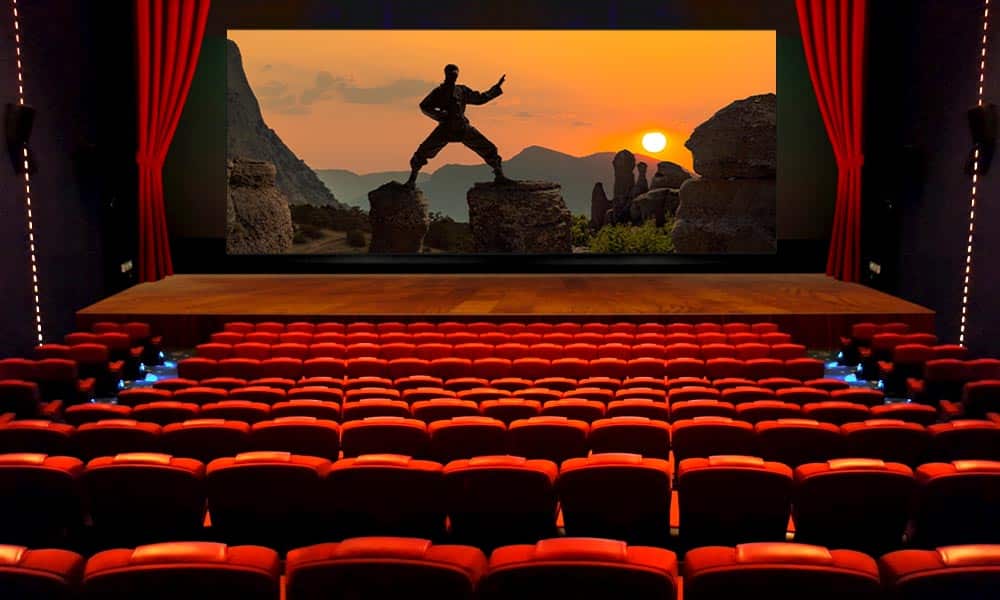 https://insaneimpact.com/wp-content/uploads/2022/07/4-cinema-aspect-ratio-1-300x180.jpg 300w, https://insaneimpact.com/wp-content/uploads/2022/07/4-cinema-aspect-ratio-1-768x461.jpg 768w" alt="Cinema aspect ratio" width="1000" height="600" class="attachment-full size-full wp-image-13101 entered lazyloaded" style="box-sizing: border-box; border: none; height: auto; max-width: 100%; vertical-align: middle; border-radius: 0px; box-shadow: none; display: inline-block; width: 600px;" decoding="async" data-lazy-srcset="https://insaneimpact.com/wp-content/uploads/2022/07/4-cinema-aspect-ratio-1.jpg 1000w, https://insaneimpact.com/wp-content/uploads/2022/07/4-cinema-aspect-ratio-1-300x180.jpg 300w, https://insaneimpact.com/wp-content/uploads/2022/07/4-cinema-aspect-ratio-1-768x461.jpg 768w" data-lazy-sizes="(max-width: 1000px) 100vw, 1000px" data-lazy-src="https://insaneimpact.com/wp-content/uploads/2022/07/4-cinema-aspect-ratio-1.jpg" data-ll-status="loaded" />

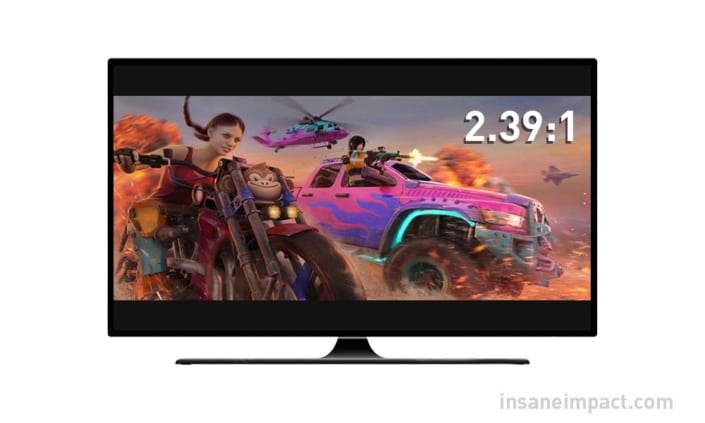 https://insaneimpact.com/wp-content/uploads/2022/07/anamorphic-wide-screen-aspect-ratio-705x423-1-300x180.jpg 300w" alt="Aspect ratio screen wide" width="705" height="423" class="attachment-full size-full wp-image-13102 entered lazyloaded" style="box-sizing: border-box; border: none; height: auto; max-width: 100%; vertical-align: middle; border-radius: 0px; box-shadow: none; display: inline-block; width: 450px;" decoding="async" data-lazy-srcset="https://insaneimpact.com/wp-content/uploads/2022/07/anamorphic-wide-screen-aspect-ratio-705x423-1.jpg 705w, https://insaneimpact.com/wp-content/uploads/2022/07/anamorphic-wide-screen-aspect-ratio-705x423-1-300x180.jpg 300w" data-lazy-sizes="(max-width: 705px) 100vw, 705px" data-lazy-src="https://insaneimpact.com/wp-content/uploads/2022/07/anamorphic-wide-screen-aspect-ratio-705x423-1.jpg" data-ll-status="loaded" />
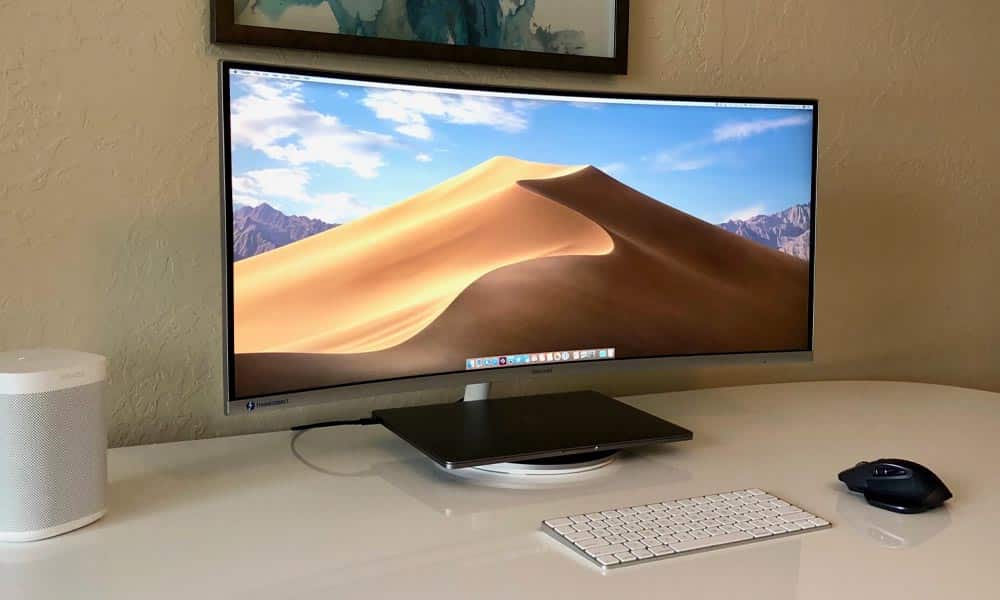 https://insaneimpact.com/wp-content/uploads/2022/07/3-21-9-aspect-ratio-example-1-300x180.jpg 300w, https://insaneimpact.com/wp-content/uploads/2022/07/3-21-9-aspect-ratio-example-1-768x461.jpg 768w" alt="16:9 computer screen curved aspect ratio" width="1000" height="600" class="attachment-large size-large wp-image-13103 entered lazyloaded" style="box-sizing: border-box; border: none; height: auto; max-width: 100%; vertical-align: middle; border-radius: 0px; box-shadow: none; display: inline-block; width: 600px;" decoding="async" data-lazy-srcset="https://insaneimpact.com/wp-content/uploads/2022/07/3-21-9-aspect-ratio-example-1.jpg 1000w, https://insaneimpact.com/wp-content/uploads/2022/07/3-21-9-aspect-ratio-example-1-300x180.jpg 300w, https://insaneimpact.com/wp-content/uploads/2022/07/3-21-9-aspect-ratio-example-1-768x461.jpg 768w" data-lazy-sizes="(max-width: 1000px) 100vw, 1000px" data-lazy-src="https://insaneimpact.com/wp-content/uploads/2022/07/3-21-9-aspect-ratio-example-1.jpg" data-ll-status="loaded" />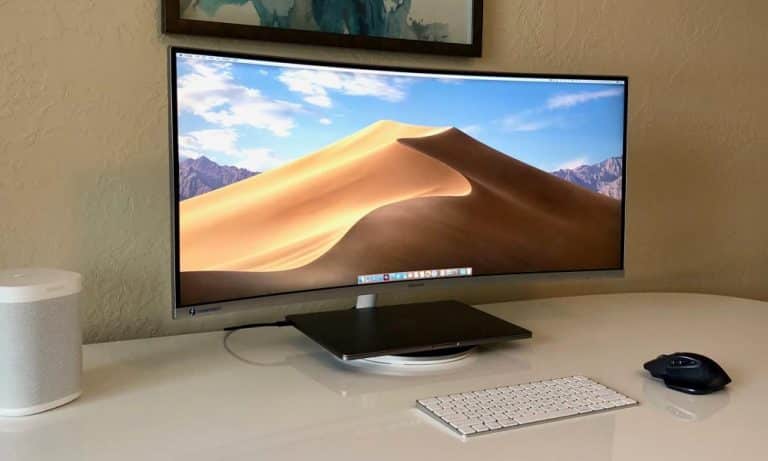

 https://insaneimpact.com/wp-content/uploads/2022/07/2-4-3-aspect-ratio-1-300x180.jpg 300w, https://insaneimpact.com/wp-content/uploads/2022/07/2-4-3-aspect-ratio-1-768x461.jpg 768w" alt="16:9 classic aspect ratio" width="1000" height="600" class="attachment-large size-large wp-image-13105 entered lazyloaded" style="box-sizing: border-box; border: none; height: auto; max-width: 100%; vertical-align: middle; border-radius: 0px; box-shadow: none; display: inline-block; width: 600px;" decoding="async" data-lazy-srcset="https://insaneimpact.com/wp-content/uploads/2022/07/2-4-3-aspect-ratio-1.jpg 1000w, https://insaneimpact.com/wp-content/uploads/2022/07/2-4-3-aspect-ratio-1-300x180.jpg 300w, https://insaneimpact.com/wp-content/uploads/2022/07/2-4-3-aspect-ratio-1-768x461.jpg 768w" data-lazy-sizes="(max-width: 1000px) 100vw, 1000px" data-lazy-src="https://insaneimpact.com/wp-content/uploads/2022/07/2-4-3-aspect-ratio-1.jpg" data-ll-status="loaded" />

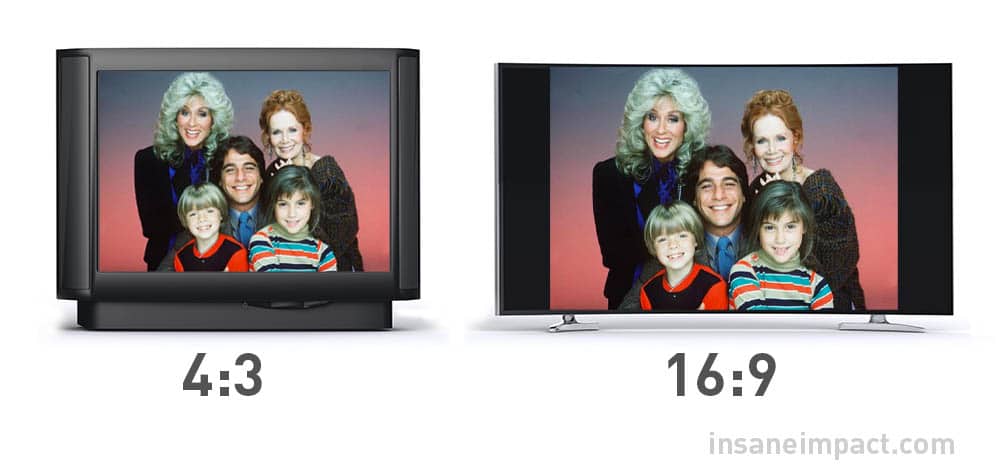 https://insaneimpact.com/wp-content/uploads/2022/07/pillarboxing-example-1-300x142.jpg 300w, https://insaneimpact.com/wp-content/uploads/2022/07/pillarboxing-example-1-768x364.jpg 768w" alt="aspect ratios on tv screens" width="1000" height="474" class="attachment-large size-large wp-image-13106 entered lazyloaded" style="box-sizing: border-box; border: none; height: auto; max-width: 100%; vertical-align: middle; border-radius: 0px; box-shadow: none; display: inline-block; width: 600px;" decoding="async" data-lazy-srcset="https://insaneimpact.com/wp-content/uploads/2022/07/pillarboxing-example-1.jpg 1000w, https://insaneimpact.com/wp-content/uploads/2022/07/pillarboxing-example-1-300x142.jpg 300w, https://insaneimpact.com/wp-content/uploads/2022/07/pillarboxing-example-1-768x364.jpg 768w" data-lazy-sizes="(max-width: 1000px) 100vw, 1000px" data-lazy-src="https://insaneimpact.com/wp-content/uploads/2022/07/pillarboxing-example-1.jpg" data-ll-status="loaded" />

 https://insaneimpact.com/wp-content/uploads/2022/07/3-2-aspect-ratio-example-1-300x180.jpg 300w, https://insaneimpact.com/wp-content/uploads/2022/07/3-2-aspect-ratio-example-1-768x461.jpg 768w" alt="aspect ratios on images printed" width="1000" height="600" class="attachment-large size-large wp-image-13107 entered lazyloaded" style="box-sizing: border-box; border: none; height: auto; max-width: 100%; vertical-align: middle; border-radius: 0px; box-shadow: none; display: inline-block; width: 600px;" decoding="async" data-lazy-srcset="https://insaneimpact.com/wp-content/uploads/2022/07/3-2-aspect-ratio-example-1.jpg 1000w, https://insaneimpact.com/wp-content/uploads/2022/07/3-2-aspect-ratio-example-1-300x180.jpg 300w, https://insaneimpact.com/wp-content/uploads/2022/07/3-2-aspect-ratio-example-1-768x461.jpg 768w" data-lazy-sizes="(max-width: 1000px) 100vw, 1000px" data-lazy-src="https://insaneimpact.com/wp-content/uploads/2022/07/3-2-aspect-ratio-example-1.jpg" data-ll-status="loaded" />

 https://insaneimpact.com/wp-content/uploads/2022/07/square-aspect-ratio-social-media-example-1-300x180.jpg 300w, https://insaneimpact.com/wp-content/uploads/2022/07/square-aspect-ratio-social-media-example-1-768x461.jpg 768w" alt="aspect ratio on mobile phones" width="1000" height="600" class="attachment-large size-large wp-image-13115 entered lazyloaded" style="box-sizing: border-box; border: none; height: auto; max-width: 100%; vertical-align: middle; border-radius: 0px; box-shadow: none; display: inline-block; width: 600px;" decoding="async" data-lazy-srcset="https://insaneimpact.com/wp-content/uploads/2022/07/square-aspect-ratio-social-media-example-1.jpg 1000w, https://insaneimpact.com/wp-content/uploads/2022/07/square-aspect-ratio-social-media-example-1-300x180.jpg 300w, https://insaneimpact.com/wp-content/uploads/2022/07/square-aspect-ratio-social-media-example-1-768x461.jpg 768w" data-lazy-sizes="(max-width: 1000px) 100vw, 1000px" data-lazy-src="https://insaneimpact.com/wp-content/uploads/2022/07/square-aspect-ratio-social-media-example-1.jpg" data-ll-status="loaded" />

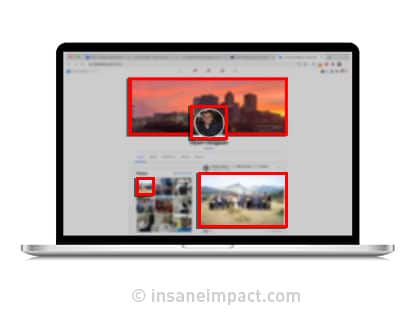 https://insaneimpact.com/wp-content/uploads/2022/07/social-media-aspect-ratios-example-1-300x227.jpg 300w" alt="aspect ratio on social media pages" width="419" height="317" class="attachment-large size-large wp-image-13119 entered lazyloaded" style="box-sizing: border-box; border: none; height: auto; max-width: 100%; vertical-align: middle; border-radius: 0px; box-shadow: none; display: inline-block;" decoding="async" data-lazy-srcset="https://insaneimpact.com/wp-content/uploads/2022/07/social-media-aspect-ratios-example-1.jpg 419w, https://insaneimpact.com/wp-content/uploads/2022/07/social-media-aspect-ratios-example-1-300x227.jpg 300w" data-lazy-sizes="(max-width: 419px) 100vw, 419px" data-lazy-src="https://insaneimpact.com/wp-content/uploads/2022/07/social-media-aspect-ratios-example-1.jpg" data-ll-status="loaded" />
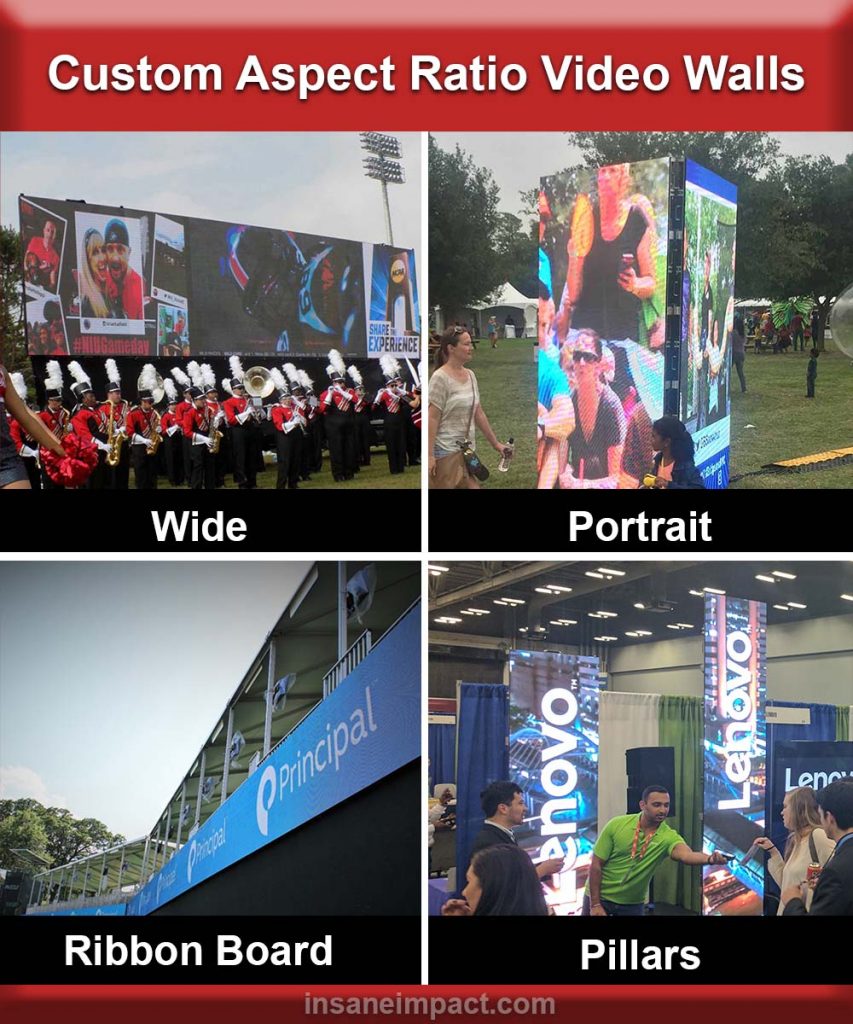 https://insaneimpact.com/wp-content/uploads/2022/07/Custom-Aspect-Ratio-Video-Walls-1-250x300.jpg 250w, https://insaneimpact.com/wp-content/uploads/2022/07/Custom-Aspect-Ratio-Video-Walls-1-768x922.jpg 768w, https://insaneimpact.com/wp-content/uploads/2022/07/Custom-Aspect-Ratio-Video-Walls-1.jpg 1000w" alt="custom aspect ratio video walls" width="853" height="1024" class="attachment-large size-large wp-image-13131 entered lazyloaded" style="box-sizing: border-box; border: none; height: auto; max-width: 100%; vertical-align: middle; border-radius: 0px; box-shadow: none; display: inline-block;" decoding="async" data-lazy-srcset="https://insaneimpact.com/wp-content/uploads/2022/07/Custom-Aspect-Ratio-Video-Walls-1-853x1024.jpg 853w, https://insaneimpact.com/wp-content/uploads/2022/07/Custom-Aspect-Ratio-Video-Walls-1-250x300.jpg 250w, https://insaneimpact.com/wp-content/uploads/2022/07/Custom-Aspect-Ratio-Video-Walls-1-768x922.jpg 768w, https://insaneimpact.com/wp-content/uploads/2022/07/Custom-Aspect-Ratio-Video-Walls-1.jpg 1000w" data-lazy-sizes="(max-width: 853px) 100vw, 853px" data-lazy-src="https://insaneimpact.com/wp-content/uploads/2022/07/Custom-Aspect-Ratio-Video-Walls-1-853x1024.jpg" data-ll-status="loaded" />


- Details
Generac is the most popular brand of whole home generators. Available from Generac is Wifi, ethernet and cellular communications to let you know the status of your generator. Unfortunately, this is a cloud service that is priced annualy. Allonis has developed a myServer local (to your home) way for you to see the system status that has no ongoing costs.
What it does:
Monitors the "23 wire" for connection to ground (this tells the transfer switch to switch over to generator power and off of utility power)
Monitors the "194 wire" for existence of 12 volts (this power from the generator powers the transfer switches switching logic - if this is unavailable - the transfer switch won't fail over to generator).
Monitors the "N1 utility sense wire" (this tells the generator to start when utility power is in failure).
Optionally monitors the Utility power (to measure your utility power usage)
Optionally monitors the Generator power (to measure how much current your generator is providing during a power outage)
Optionally monitors your propane level (to help ensure you don't run out of propane)
Control panel wiring for home standby generators
Control wires allow for proper communication and functionality between the generator, transfer switch, and utility power source. In a Generac Home Standby Generator installation, several key control wires must be properly connected and functioning for optimal performance.
Environment
This article applies to Guardian series home standby generators.
| ID | Description | ID | Description | ID | Description | ID | Description |
| A | DC Terminal Block | C2 | Wire tie for control wire | E2 | Power lug E2 | H | Neutral stud |
| B | AC Terminal Block | D | Neutral lug | F | Ground stud | J | Neutral bar |
| C1 | Wire tie for sense wires | E1 | Power lug E1 | G | Ground lug | — | — |
N1/N2 – Utility Voltage Sensing Wires (240V)
The N1 and N2 wires are responsible for sensing utility power dropout and pickup. These wires originate in the switch and must have 120VAC each (240VAC between them). The N1/N2 fuses in the Automatic Transfer Switch (ATS) protect these terminals. If the generator starts even when utility power is present, check this connection and fuses.
T1 – Battery Charge Circuit (120V)
The T1 wire powers the generator's battery charger and originates in the switch. It provides the 120VAC required to operate the internal battery charger. The T1 fuse in the ATS protects this circuit. If the generator batteries keep dying, check this connection and fuse.
00 Neutral (White)
A designated wire for neutral per NEC 2023 code. This wire is included on all new generators manufactured in and after 2023. If this connection is present on the generator, then this wire must be connected for a battery charger to work.
23/194 – Transfer Circuit
Wire 194 provides 12VDC to the ISACM board at the transfer switch. This voltage is used for powering the control board as well as the transfer relay. Wire 23 provides a ground for the transfer relay and is internally controlled by the generator's controller. If the transfer switch does not transfer, verify wire 194 has 12VDC and wire 23 has been taken to ground.
0/DC Common
The DC Common is the common ground wire and is only used with smart switches. It provides constant ground to power the Smart A/C Module (SACM). If the SACM is not operating, check this connection.
209/210 Wires – Common Alarm (Optional)
This is a customer-supplied connection that allows the generator to wire into an existing security system. These are normally open, dry contacts that close if the generator experiences a shutdown alarm. When they close, a message is sent to the home’s security system to alert it of a generator fault. These are the wires hanging loose under the control panel.
Regular maintenance, including checking these connections, is critical to ensure that the generator operates reliably when needed. If any of these connections are not functioning correctly, contact an authorized independent service dealer.
- Details
Complete Home Automation Control
The most customizable remote control on the market
Control all your Devices
Touch Screen plus
Programmable Hard buttons
Local myServer Controller
No Cloud Account Required
100% User Customizable
Edit or Create your own UI
Sample Templates Included
Works with Sonos, HEOS,
AppleTV, Roku, FireTV, Lutron,
Philips Hue, Denon, Home Assistant &
Logitech Harmony
Thousands more!
Our Commercial Systems
TV & Audio Control System
Video Walls
Digital Signage
Customer Listening
for
Sports Bars & Restaurants
Bowling Alleys & Clubs
Conference Rooms
Command Centers
Church Activity Rooms
Elevator Displays
Home Theaters
Condo Developments
Integrator Customization
Custom programming available
Try our Demos
at allonis.com
Residential Automation
Our System UIs come in both
Tablet and Smartphone versions.
Allonis
(248) 918-0123