

• Try Us Out - See our Demo Tabs Above

    Sports Bars

    Experience our Sports Bar TV, Audio and Lighting Control System with our awesome demo! We provide multiple TV control systems that will easily integrate your Audio/Video and environmental components into one easy to use package. Let multiple hand-held remotes be a thing of the past and experience hassle free one-touch control. With the versatility of myServer 6, you may be able to retrofit existing equipment into the control system which makes it economical to get the most value out of your technology investment.

    Residential

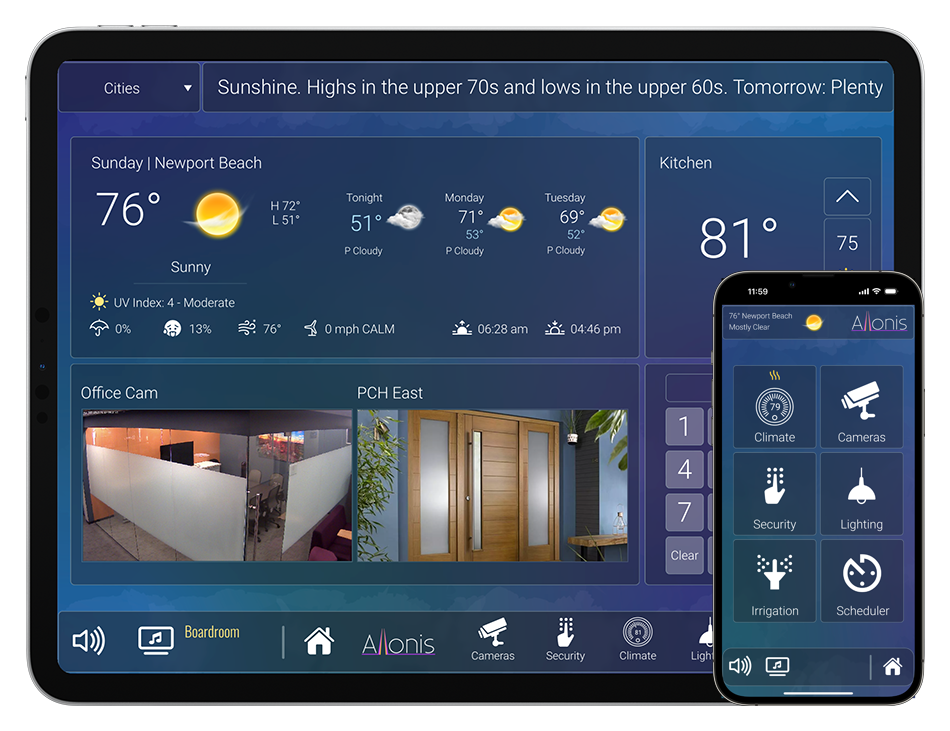
    With a whole new exciting look and feel our transparent "Moonlight" user interface allows clarity and ease in maneuvering your lighting floor plan, climate control, security cameras, and security keypad as well as entertainment options. Control all aspects of your home with simplicity and confidence.

    Digital Signage

    Allonis makes it easy to control and launch your media content. We have created software that ties in seamlessly to your bar or restaurant control system. Upload new images and videos, discard old ones, decide what to play or post and where with just a few selections.

  • Sports Bar & Restaurant Demo

    Select a source on the left and then select the TVs you would like to change on the right.

    Along the bottom are options for a DirecTV remote, TV Guide, Audio, Favorites & AppleTV. In addition you can touch the video camera on the left hand source options to get a live preview of what's playing on that source. Be sure to click around and try everything.

    Read More


    Customer Listening Experience

    Pan from left to right and up and down to see all the TVs.

    Customers can select the TV closest to them to tune in to the audio.

    Read More


    No Floorplan Option.

    If you are not interested in a navigable floor plan we can provide a generic interface instead.

    The same features are supported.

    Read More
  • Residential Demo

    Below is our residential simulation.

    Be sure to click around and try everything. Read more about the UI below.

    Read More
  • Digital Signage

    In the large window select a player on the left. Then select an option layout on the right. Select available assets from the list provided. You can add a ticker of either a message or weather by checking the boxes. When you are finished making selections click “send to player”. Your choice will appear on the corresponding player above. To pause a video click the player once.

    Read More
  • SmartRemote Demo

    Below is our SmartRemote simulation.

    Be sure to click around and try everything. Read more about the UI below.

    Read More

Our Products

See the latest myServer 6 products, available for individual purchase or part of a custom Allonis system built especially for your project.
Software
Hardware
Sports Bars
Services

Most all storage media will not survive power cycle events across time.  It is very important for a myServer 6 control system to be on a UPS for proper graceful shutdown when there is an AC line power outage.  Read More.  Plugging the system into a UPS is a great first step.  But what if the power outage extends beyond the physical storage capacity of the backup battery?  It is important to automate a myServer graceful shotdown on all systems.  myServer can also be configured to shut down other devices (TVs, AV receivers, video matrix, etc.)  This ability greatly reduces the potential for very expensive equipment failures.

Note that power cycle related failures are not covered under the myServer controller warranty.

Preventative solution can be implemented with a compatible UPS that is connected to myServer for monitoring. 

Allonis offers compatible Uniterruptible Power Supply (UPS) that can power up all of the sensitive electonics.

With that, if the power is disconnected, the UPS will continue keeping the Raspberry Pi up and running until myServer's automation rules gracefully shuts it down.

By default, the UPS is configured to auto boot when power is applied (after a 3 second delay to help ensure power line stability).

Also by default, the UPS is configured to charge it's backup batteries when power line is available.

The myServer driver will track the UPS's backup battery state of charge.  You will notice that the voltage will normally vary from 90% to 101% as it charges itself as the need exists.

You can configure the Automation Rule of when myServer will shut itself down gracefully.  You can also optionally add rules that provide indication that the power is down (or back up again).  This could be a Toast message that all clients see, or a blinking light, or an audio clip that gets played (depends on how you want to be notified, and by what means you like and by what hardware you have available that is accessible via myServer).

 Automation event example

Get the variable name from the list of variables for your UPS device ID (device ID is exposed in the UPS myServer Pi Driver)

Automation Rule Conditions:

When:

{{sensor_19_battery_charge}} <= 5

Automation Rule Actions:

Shutdown 


Use case:

Control systems like our myServer, can monitor the UPS (highly recommended in any installation). When the UPS battery goes low (power has been out for awhile), then myServer gracefully shuts down. But before it goes offline, it can be configured to send notifications that the UPS advises that the power is out. The network switch / modem etc. is also on a UPS (same one or different ones). And because myServer runs locally in the home with not critical need to see Internet, it can log the power outage, send local (to the home) messages to any connected client (like your phone) without Internet. It can also send an email / text message IF there is Internet. myServer monitors if Internet is available or not so it can be configured on what it's capable of doing.

UPS Product Description

The X728 is an advanced uninterruptible power supply expansion board for all current models of the Raspberry Pi (Raspberry Pi 4B/3B+/2B/B+) using a 40 pin header.

It can be used when myServer is implemented in a mobile vehicle that is regularily shut down and restarted and not always on charge.

It provides DC 5.1V Max 6000mA Power Backup for even the most demanding Raspberry Pi set UPS, intelligent and safe power management, safe shutdown, auto power-on, full poweroff from software, battery capacity reading, low battery automatic shutdown, battery reverse polarity protection circuit and a real- time clock, and buzzer alarm.

The X728 reserves the 40-pin header that can be stacked with other Raspberry Pi accessory boards for enhanced applications. The X728 can also be used with the X825/X828/X829 (2.5" HDD/SSD Shield) and X857/X862/X872 (MSATA/M.2 SSD shield) for safe data backup.

[For Use With]

  • all current models of the Raspberry Pi
  • Raspberry Pi 5
  • Raspberry Pi 4 Model B

[Operating System]

  • Raspbian Stretch
  • Safe shutdown function tested for Raspbian, other operating systems to be tested and advised

[How to Power]

Power via X728, do not power via Raspberry Pi!!!

  • Via Type-C socket of X728 : 5Vdc ±5%, ≥3A (Recommend to use Geekworm UL listed 5V 4A Type-C power adapter (ASIN:B09J856PND).)
  • Via DC power jack of X728 : 5Vdc ±5%, ≥4A

[Cooling Solution]

  • Add X728-A1 cooling fan board(ASIN: B08B5TQH6W) above Raspberry Pi for cooling
  • Use embedded aluminum alloy heatsink P165-A/P165-B for passive cooling

[Key Features]

  • Smart and powerful Uninterruptible Power Supply (UPS)
  • Provides continuous operations for up to 10~30hours (depending on battery type and qty used)
  • DC 5.1V Max 6000mA Power Backup for even the most demanding RPi set ups
  • Can work with X728-A2 stackable 2-cell battery holder/X708-A1 stackable 4-cell battery holder to increase battery capacity
  • Supports 3000mA fast battery charging
  • Integrated over current protection, over voltage protection, 10-A fully-integrated synchronous boost converter and Maxim's fuel-gauge systems (Reading battery voltage and percentage via i2c)
  • Intelligent automatic charging and discharging
  • On-board 4 green LEDs indicate battery charging and discharging levels of 25%, 50% , 75% and 100%
  • Intelligent and safe power management
  • Equipped with momentary button for easy power control
  • Press the button to turn on
  • Press the button and hold for 1~2seconds to reboot
  • Press the button and hold for 3~7seconds to implement safe shutdown
  • Press the button and hold for >8seconds to force shutdown
  • Supports safe shutdown and full poweroff through software
  • Support auto power on function by set the on-board pin header
  • Ultra-low standby power consumption to maximize battery life
  • Advanced system power-path management avoids batteries frequent charging and discharging and allows 3A fast charging and powering Raspberry Pi at the same time
  • Integrated Hardware DS1307 Real Time Clock (RTC) with Battery Back-Up
  • Keeps track of the time while the Raspberry Pi is switched off and allows the Raspberry Pi to retrieve the current date and time when it is switched back on
  • Uses the battery to maintain the date and time - no additional battery required
  • Powers the Raspberry Pi via the 40-pin header - no additional cabling required
  • Reserves the 40-pin header that can be stacked with other Raspberry Pi accessory boards

[Specifications]

  • UPS output : 5.1V ±5% Max 6A
  • UPS charging current: 2.3~3.2A
  • Terminal Battery Voltage : 4.24V
  • Recharge Threshold : 4.1V

Note:

  • Do not apply power to your Raspberry Pi via the Micro USB socket or Type-C socket.
  • Do not use battery with built-in protection circuit.
  • Please power off before remove or plug in any batteries.
  • Please make sure the polarity of battery is "+" to "+" and "-" to "-" and match with the "+" "-" mark on battery holder. The battery protection chip IC will be over-current, heat and then burnt if one or two of the batteries are connected reversely.

[Match Metal Case for Raspberry Pi 4]

  • Please refer to X728-C1 metal case (ASIN: B09Z6C64NN).

[Packing List]

  • 1x X728 Expansion Board
  • 8x Screws M2.5 *5mm
  • 4x Spacer M/F M2.5x20mm
  • 4x Spacer F/F M2.5x20mm
  • 1x Jumper link Pitch 2.54mm

X728 V2.5

X728 V2.5

Read Me

Please make sure the polarity of battery is "+" to "+" and "-" to "-" and match with the "+" "-" mark on battery holder. The battery protection chip IC will be over-current, heat and then burnt if one or two of the batteries are connected reversely.

X728 V2.5 Jumper Cap Function

X728 V2.0